EasyManua.ls Logo

Technics SC-S2350 - Page 58

Technics SC-S2350
60 pages
Print Icon
To Next Page IconTo Next Page
To Previous Page IconTo Previous Page
Loading...
Reference
EN
58
RQT5333
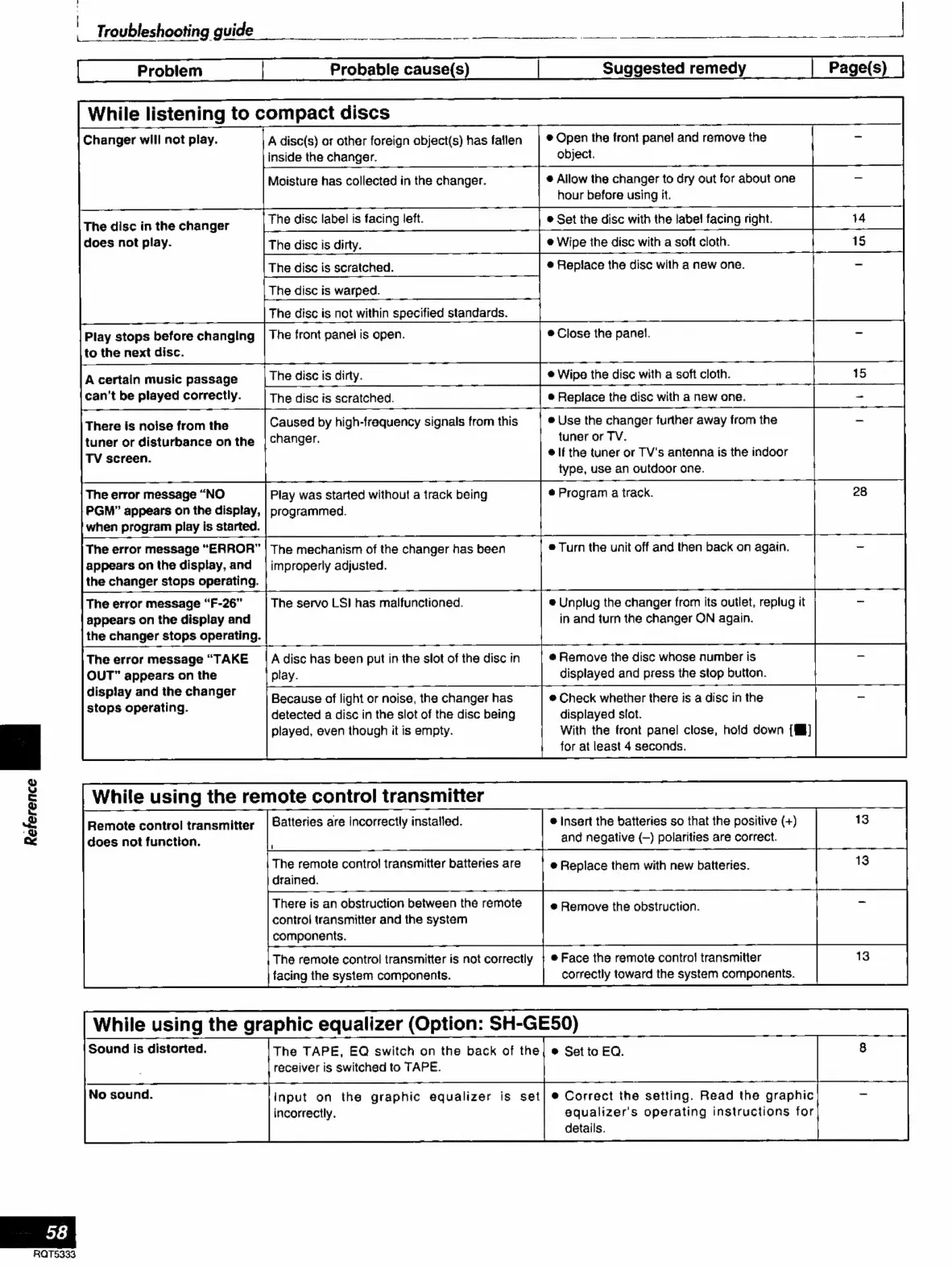
Troubleshooting
guide
EA
TS
A
rH
eae
|
Problem
Probable
cause(s)
Suggested
remedy
While
listening
to
compact
discs
Changer
will
not
play.
A
disc(s)
or
other
foreign
object(s)
has
fallen
e
Open
the
front
panel
and
remove
the
inside
the
changer
object.
Moisture
has
collected
in
the
changer.
e
Allow
the
changer
to
dry
out
for
about
one
hour
before
using
it.
does
not
play.
e
Wipe
the
disc
with
a
soft
cloth.
e
Replace
the
disc
with
a
new
one.
Play
stops
before
changing
|
The
front
panel
is
open.
e
Close
the
panel.
to
the
next
disc.
A
certain
music
passage
|
The
disc
is
dirty.
e
Wipe
the
disc
with
a
soft
cloth.
can't
be
played
correctly.
The
disc
is
scratched.
e
Replace
the
disc
with
a
new
one.
There
is
noise
from
the
Caused
by
high-frequency
signals
from
this
e
Use
the
changer
further
away
from
the
tuner
or
disturbance
on
the
|
changer.
tuner
or
TV.
TV
screen.
elf
the
tuner
or
TV's
antenna
is
the
indoor
type,
use
an
outdoor
one.
The
error
message
“NO
Play
was
started
without
a
track
being
e
Program
a
track.
PGM”
appears
on
the
display,
|
programmed.
when
program
play
is
started.
The
error
message
“ERROR”
|
The
mechanism
of
the
changer
has
been
e
Turn
the
unit
off
and
then
back
on
again.
appears
on
the
display,
and
|
improperly
adjusted.
the
changer
stops
operating.
The
error
message
“F-26”
The
servo
LSI
has
malfunctioned.
e
Unplug
the
changer
from
its
outlet,
replug
it
appears
on
the
display
and
in
and
turn
the
changer
ON
again.
the
changer
stops
operating.
The
error
message
“TAKE
|A
disc
has
been
put
in
the
slot
of
the
disc
in
e
Remove
the
disc
whose
number
is
OUT”
appears
on
the
play.
displayed
and
press
the
stop
button.
sec
aoe
eta
ed
Because
of
light
or
noise,
the
changer
has
e
Check
whether
there
is
a
disc
in
the
.
detected
a
disc
in
the
slot
of
the
disc
being
displayed
slot.
played,
even
though
it
is
empty.
With
the
front
panel
close,
hold
down
[W]
for
at
least
4
seconds.
While
using
the
remote
control
transmitter
Batteries
are
incorrectly
installed,
The
remote
control
transmitter
batteries
are
drained.
Remote
control
transmitter
does
not
function.
e
Insert
the
batteries
so
that
the
positive
(+)
and
negative
(—)
polarities
are
correct.
e
Replace
them
with
new
batteries.
There
is
an
obstruction
between
the
remote
control
transmitter
and
the
system
components.
The
remote
control
transmitter
is
not
correctly
|
e
Face
the
remote
contro!
transmitter
facing
the
system
components.
correctly
toward
the
system
components.
While
using
the
graphic
equalizer
(Option:
SH-GE50)
Sound
is
distorted.
The
TAPE,
EQ
switch
on
the
back
of
the|
e
Set
to
EQ.
receiver
is
switched
to
TAPE.
Input
on
the
graphic
equalizer
is
set|
e
Correct
the
setting.
Read
the
graphic
incorrectly.
equalizer's
operating
instructions
for
details.
e
Remove
the
obstruction.

Related product manuals