EasyManua.ls Logo

Technics SC-S2350 - Page 6

Technics SC-S2350
60 pages
Print Icon
To Next Page IconTo Next Page
To Previous Page IconTo Previous Page
Loading...
Before
use
E
RQT5333
Receiver
I
|
|
CD
changer
O
a
Center
speaker
Front
speaker
(Left)
Front
speaker
MM
(Right)
*
»
`
4
S.
.
S
?
A
30°
:
30°,
`
:
j
A :
¿
«
1
`
-
,
.
”.
+
.
Surround
“speaker
(Right)
Surround
speaker
(Left)
Front
speaker
(Left)
Front
speaker
(Right)
nny
A
|
Placement
ate
|
Placement
of
each
unit
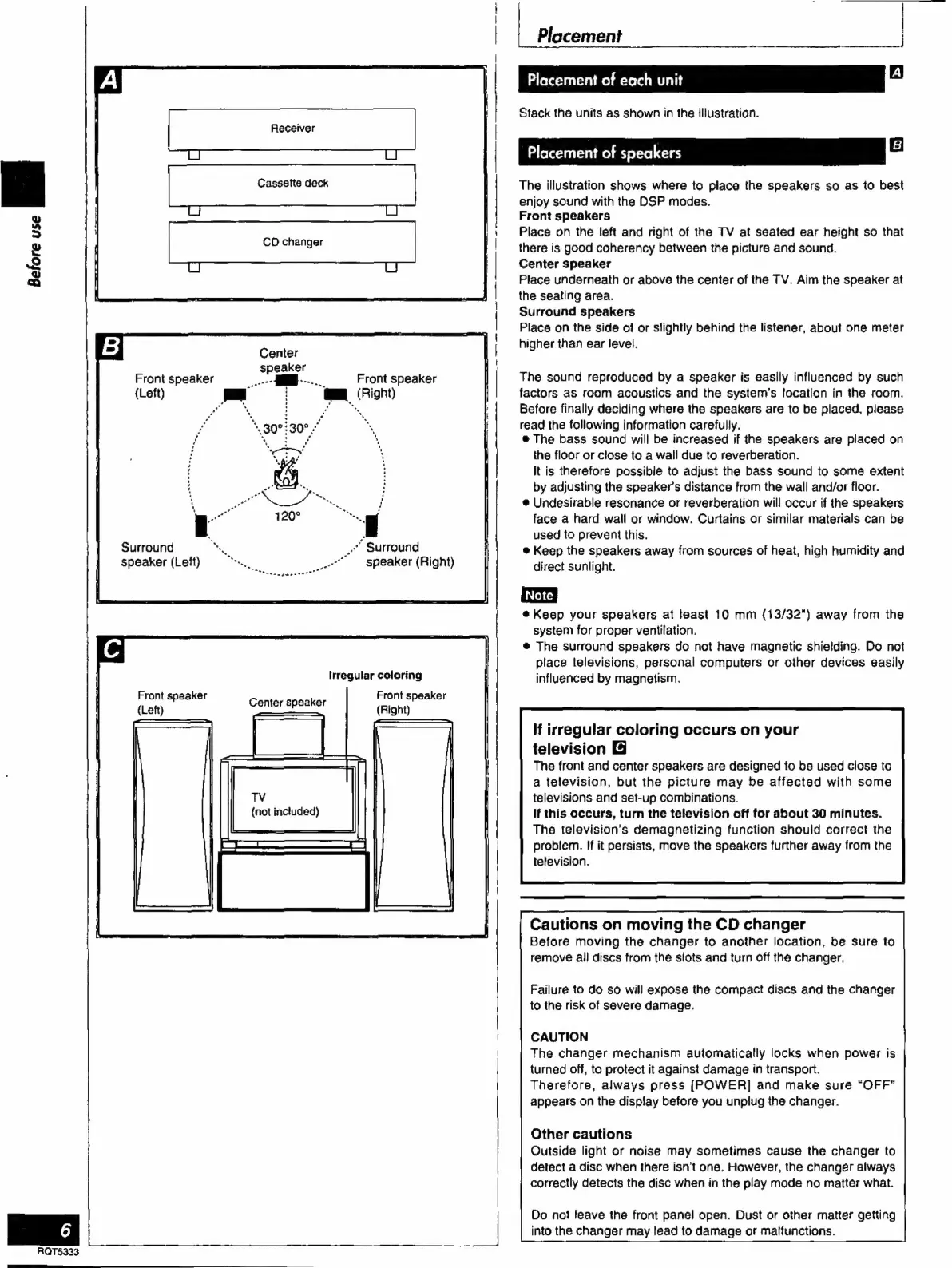
Stack
the
units
as
shown
in
the
illustration.
Placement
of
speakers
The
illustration
shows
where
to
place
the
speakers
so
as
to
best
enjoy
sound
with
the
DSP
modes.
Front
speakers
Place
on
the
left
and
right
of
the
TV
at
seated
ear
height
so
that
there
is
good
coherency
between
the
picture
and
sound.
Center
speaker
Place
underneath
or
above
the
center
of
the
TV.
Aim
the
speaker
at
the
seating
area.
Surround
speakers
Place
on
the
side
of
or
slightly
behind
the
listener,
about
one
meter
higher
than
ear
level.
The
sound
reproduced
by
a
speaker
is
easily
influenced
by
such
factors
as
room
acoustics
and
the
systems
location
in
the
room.
Before
finally
deciding
where
the
speakers
are
to
be
placed,
please
read
the
following
information
carefully.
e
The
bass
sound
will
be
increased
if
the
speakers
are
placed
on
the
floor
or
close
to
a
wall
due
to
reverberation.
It
is
therefore
possible
to
adjust
the
bass
sound
to
some
extent
by
adjusting
the
speaker's
distance
from
the
wall
and/or
floor.
e
Undesirable
resonance
or
reverberation
will
occur
if
the
speakers
face
a
hard
wall
or
window.
Curtains
or
similar
materials
can
be
used
to
prevent
this.
e
Keep
the
speakers
away
from
sources
of
heat,
high
humidity
and
direct
sunlight.
e
Keep
your
speakers
at
least
10
mm
(13/32")
away
from
the
system
for
proper
ventilation.
e
The
surround
speakers
do
not
have
magnetic
shielding.
Do
not
place
televisions,
personal
computers
or
other
devices
easily
influenced
by
magnetism.
If
irregular
coloring
occurs
on
your
television
The
front
and
center
speakers
are
designed
to
be
used
close
to
a
television,
but
the
picture
may
be
affected
with
some
televisions
and
set-up
combinations.
If
this
occurs,
turn
the
television
off
for
about
30
minutes.
The
television's
demagnetizing
function
should
correct
the
problem.
If
it
persists,
move
the
speakers
further
away
from
the
television.
Cautions
on
moving
the
CD
changer
Before
moving
the
changer
to
another
location,
be
sure
to
remove
all
discs
from
the
slots
and
turn
off
the
changer.
Failure
to
do
so
will
expose
the
compact
discs
and
the
changer
to
the
risk
of
severe
damage.
CAUTION
The
changer
mechanism
automatically
locks
when
power
is
turned
off,
to
protect
it
against
damage
in
transport.
Therefore,
always
press
[POWER]
and
make
sure
“OFF”
appears
on
the
display
before
you
unplug
the
changer.
Other
cautions
Outside
light
or
noise
may
sometimes
cause
the
changer
to
detect
a
disc
when
there
isn't
one.
However,
the
changer
always
correctly
detects
the
disc
when
in
the
play
mode
no
matter
what.
Do
not
leave
the
front
panel
open.
Dust
or
other
matter
getting
into
the
changer
may
lead
to
damage
or
malfunctions.

Related product manuals