13
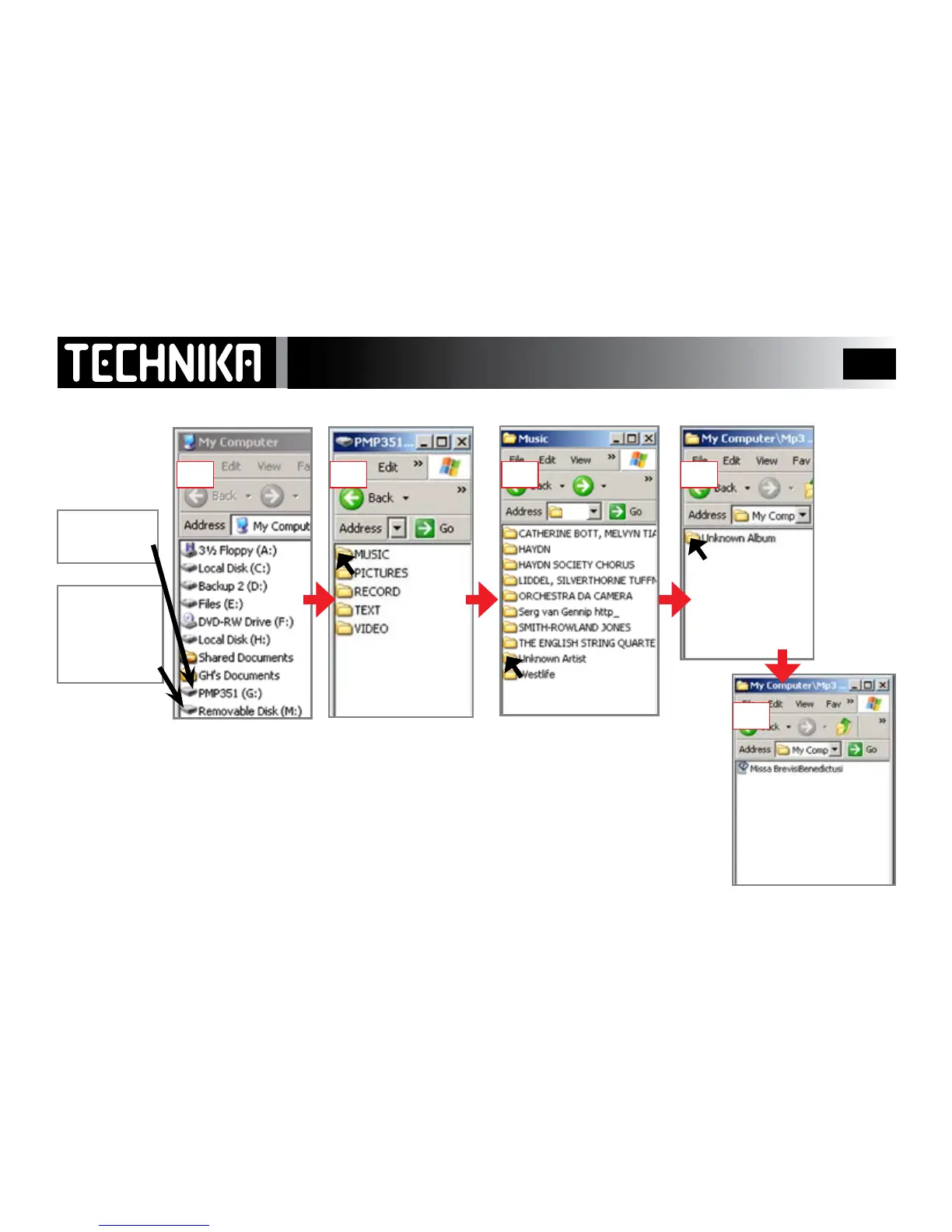
Player File Structure
Click the Player Icon
Click “Removeable Storage”
After Synchronisation Click “Music” Click a Folder Open the Album
When you connect
to the PC for the
rst time
If you like you can click
on the le and play it
on your PC using your
default Media Player.
When you rst connect the player to the PC the player establishes the ve folders shown in Fig 2.
Your music is contained in the folder called “Music” and organised by artist name. If the artist has
recorded several albums those albums will appear in the Artist Folder.
The songs are contained in the individual Album folder
The Artists and albums are identied by WMP automatically .
DO NOT alter the contents or rename these folders except to add lyrics to the songs (See Page 21).
If you wish to delete any song from the “Music” folder do it via WMP - see Page 45-46
This is the
player Icon
This icon is the
player’s mini
SD Drive
(See Page 44)
1 2 3 4
5



 To Next Page