EasyManua.ls Logo

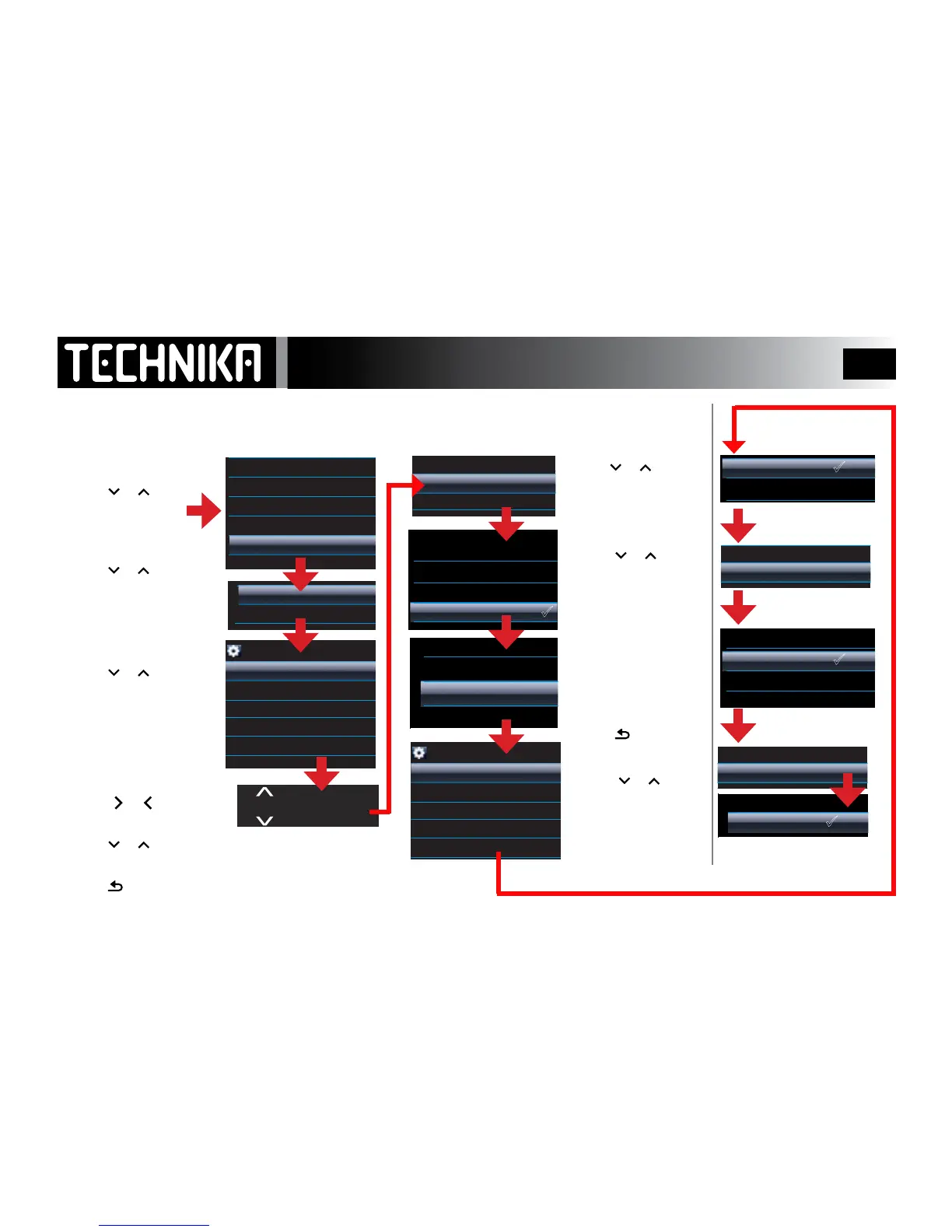
Technika MP-111 - Configuring Player Alarms; Setting Alarm Parameters

Technika MP-111
51 pages
Print Icon
To Next Page IconTo Next Page
To Previous Page IconTo Previous Page
Loading...
42
Setting the Alarm
SETTING THE ALARM: There are two Alarms. Both are set up in the same way.
12:20
Backlight
Keylock Timer
Brightness
Sleep Timer
Lyrics display
Language
Factory Settings
Information
Time Setting
Date Setting
Alarm Setting
12:20
Alarm ring select
Alarm time setting
Snooze period
Alarm switch
Alarm mode
12:20
Alarm ring select
Alarm time setting
Snooze period
Alarm switch
Alarm mode
12:20
Alarm ring select
Alarm time setting
Snooze period
Alarm switch
Alarm mode
12:20
Alarm ring select
Alarm time setting
Snooze period
Alarm switch
Alarm mode
12:20
Alarm ring select
Alarm time setting
Snooze period
Alarm switch
Alarm mode
12:20
Alarm 2
Alarm 1
• Press or to select
Alarm 1 or Alarm 2
• Press
►/ I I
• Press
or to select
Alarm time setting
• Press
►/ I I
• Press
or to select
Alarm mode
• Press
►/ I I
The clock is 24 Hr.
• Press
or to select
Alarm Setting”
• Press
►/ I I
• Press or to select
Alarm ring select
• Press
►/ I I
Select as needed
• Press
►/ I I
Select as needed
• Press
►/ I I
Select Alarm Switch
• Press
►/ I I
Select On to set the alarm•
Press
►/ I I
to conrm
.
Select Snooze Period
• Press
►/ I I
• Press or to select
an alarm ring.
There are 3 preset ring-
tones. The “User Dened
Ring” accesses the music
library so you can wake up
to your favourite song!
• Press
►/ I I
to conrm
and Exit.
• Press
to cancel and
Exit
12:20:00
• Press
or
to select
Hour : Minute: Second
• Press or to set the value
• Press
►/ I I
to conrm and Exit.
• Press
to cancel and Exit
Ring1
Ring2
Ring3
User Defined Ring
Everyday
Only Once
Off
5 minutes
10 minutes
20 minutes
<Shuffle All>
A Hard Day's Night
Love me do
Hey Jude
Help
Norwegian Wood
12:20
1/154
Off
On