EasyManua.ls Logo

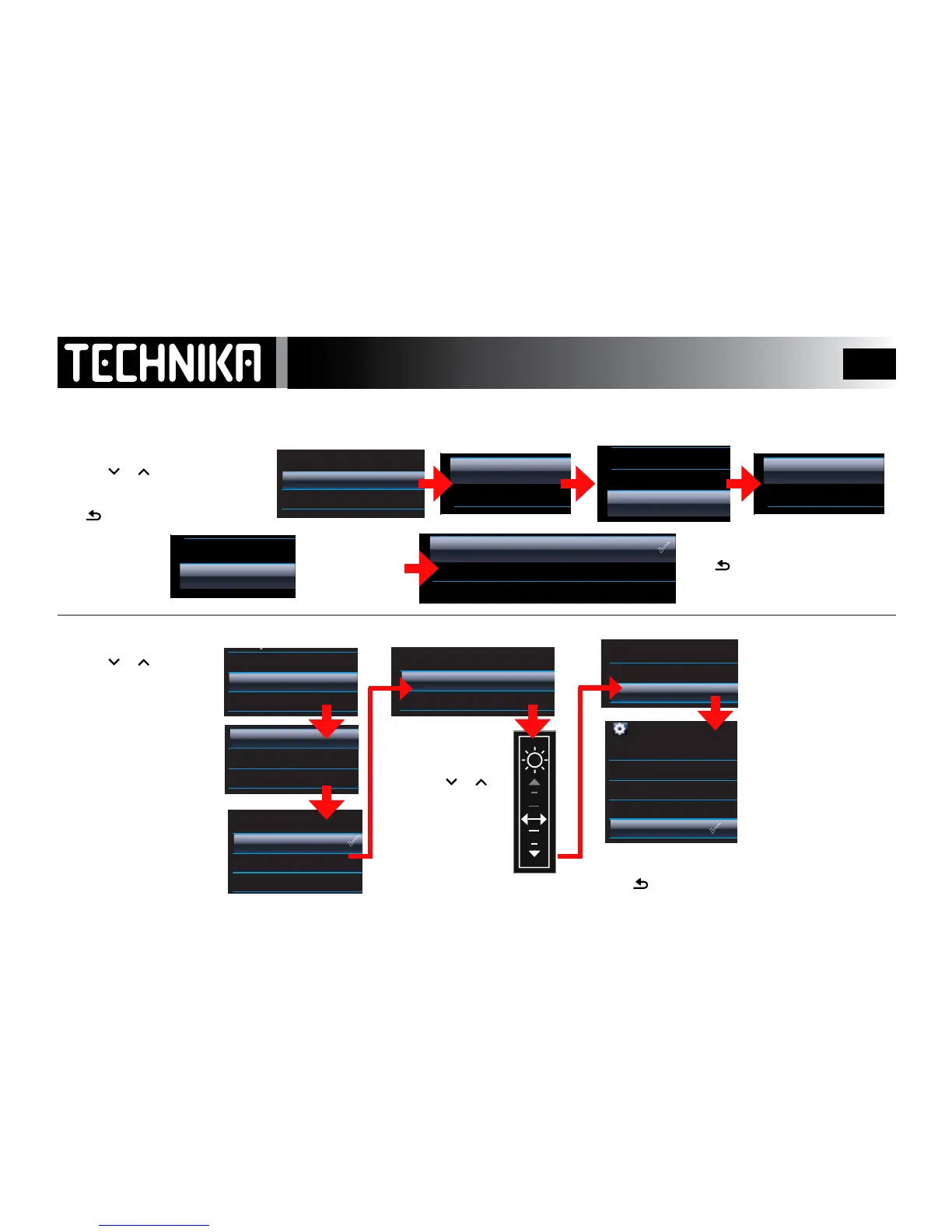
Technika MP-111 - System Settings - Part 2; Equalizer (EQ) Settings; Screen Settings Configuration

Technika MP-111
51 pages
Print Icon
To Next Page IconTo Next Page
To Previous Page IconTo Previous Page
Loading...
38
MSPlayFX
EQ
MSPlayFX
EQ
System Settings -2
12:20
Playmode
Screen Settings
EQ Settings
Sleep Timer
Lyrics display
Language
Factory Settings
Information
Time Setting
Date Setting
Alarm Setting
12:20
Playmode
Screen Settings
EQ Settings
Sleep Timer
Lyrics display
Language
Factory Settings
Information
Time Setting
Date Setting
Alarm Setting
12:20
Backlight
Keylock Timer
Brightness
Sleep Timer
Lyrics display
Language
Factory Settings
Information
Time Setting
Date Setting
Alarm Setting
12:20
Backlight
Keylock Timer
Brightness
Sleep Timer
Lyrics display
Language
Factory Settings
Information
Time Setting
Date Setting
Alarm Setting
12:20
Backlight
Keylock Timer
Brightness
Sleep Timer
Lyrics display
Language
Factory Settings
Information
Time Setting
Date Setting
Alarm Setting
12:20
Always on
30 Seconds
10 Seconds
60 Seconds
Lyrics display
Language
Factory Settings
Information
Time Setting
Date Setting
Alarm Setting
12:20
10 seconds
5 minutes
30 seconds
10 minutes
Never
Language
Factory Settings
Information
Time Setting
Date Setting
Alarm Setting
• Press or to select “EQ Settings”
• Press
►/ I I
Press to return withoutconrming
• Press or to
select “Screen Settings”
• Press
►/ I I
• Press or to
adjust the level:
• Press
►/ I I
Select “MSPlayFX”
• Press
►/ I I
Select “EQ”
• Press
►/ I I
When you have nished:
Press
repeatedly to return to
the main settings menu
When you have nished:
Press
repeatedly to return to the main settings menu
There are 8 EQ mode
Select an EQ mode. s
• Press
►/ I I
Select a mode : Press
►/ I I
Select “Backlight”:
• Press
►/ I I
Select “Keylock Timer”:
• Press
►/ I I
Select “Brightness”: Press
►/ I I
Set a time after which the
backlight goes o. (Note: longer
settings shorten battery life ).
• Press
►/ I I
Set a time after which the
keylock operates.
• Press
►/ I I
Setting “Never” disables
Keylock function.
See P15 for information
EQ SETTINGS
Refer to Page 20 for fuller details
SCREEN SETTINGS

3D
Bass
Balance
MSPlayFX
EQ
Off
MSPlay FX
Rock
Pop
Jazz
Classical
Hip Hop
Custom