EasyManua.ls Logo

Technika MP-111 - Replaying Recorded Content

Technika MP-111
51 pages
Print Icon
To Next Page IconTo Next Page
To Previous Page IconTo Previous Page
Loading...
32
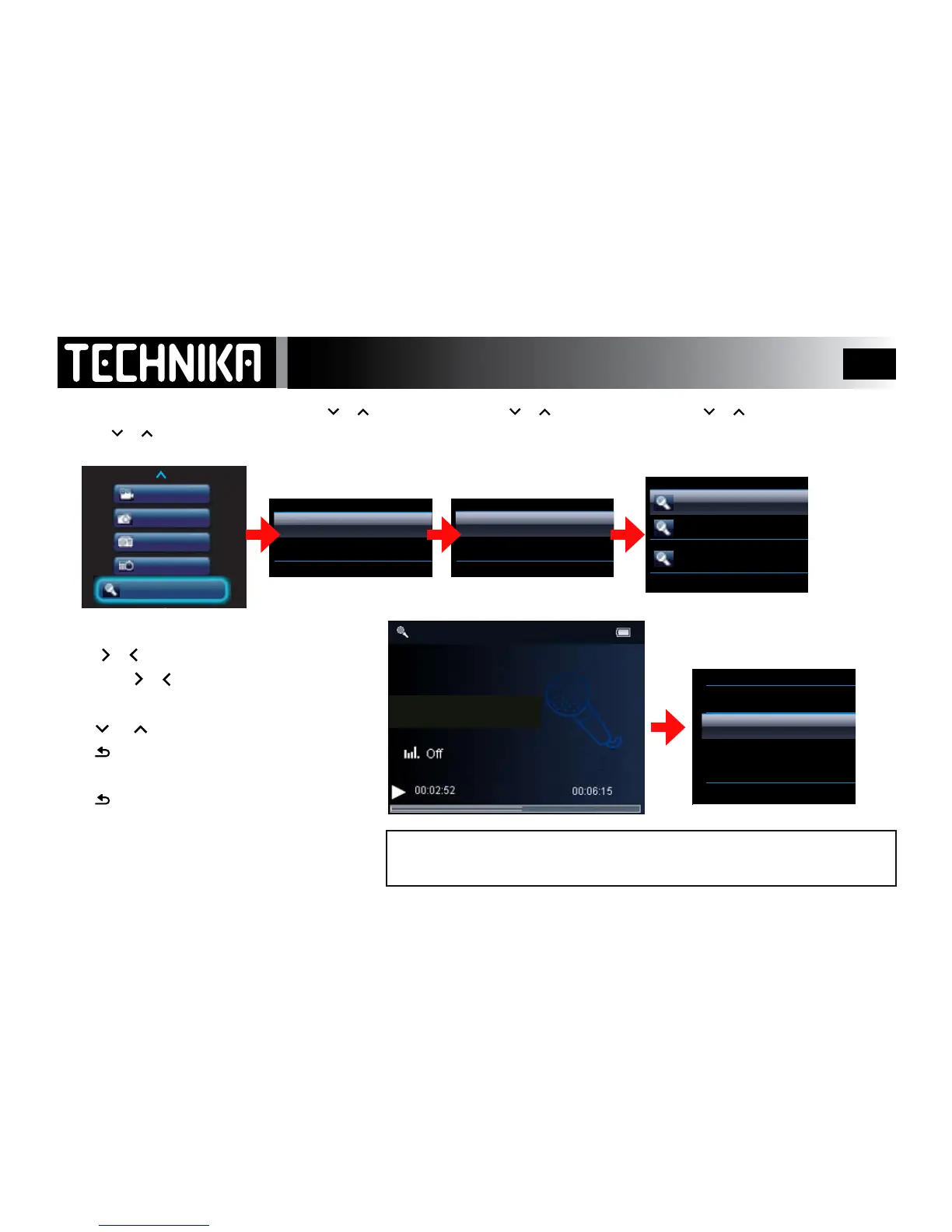
Replaying Voice and FM Recordings
Switch the player on.
• Press
or to select “Recordings”
• Press
►/ I I
• Press or to select
“Recordings Library
• Press
►/ I I
• Press or to select
“Voice/FM Recordings”
• Press
►/ I I
During Play or in Pause Mode:
• PressMENU
You can now set replay modes and add recordings to a playlist (See P.22-23)
Note: Altering these settings aects Voice, FM and Music Playback.
• Press or to select
a recording to play back
• Press
►/ I I
Video
Recordings
Pictures
Radio
Calendar
Start Voice Recording
Recordings Library
Voice Recordings
FM Recordings
VOICE0001.WAV
VOICE0002.WAV
VOICE0003.WAV
During Play you can:
Press
or
togoforward/backatrack
Holddown
or
tofastforward/reverse
Pressthe
►/ I I
keytopause/resumeplay.
Press
or toincrease/decreasevolumelevel
Press
toreturntothelistofrecordings.
When you have nished:
Press
repeatedlytoreturntothemainmenu
VOICE0001.WAV
Playmodes
Add to Playlist
EQ Settings
Lyrics Display