28
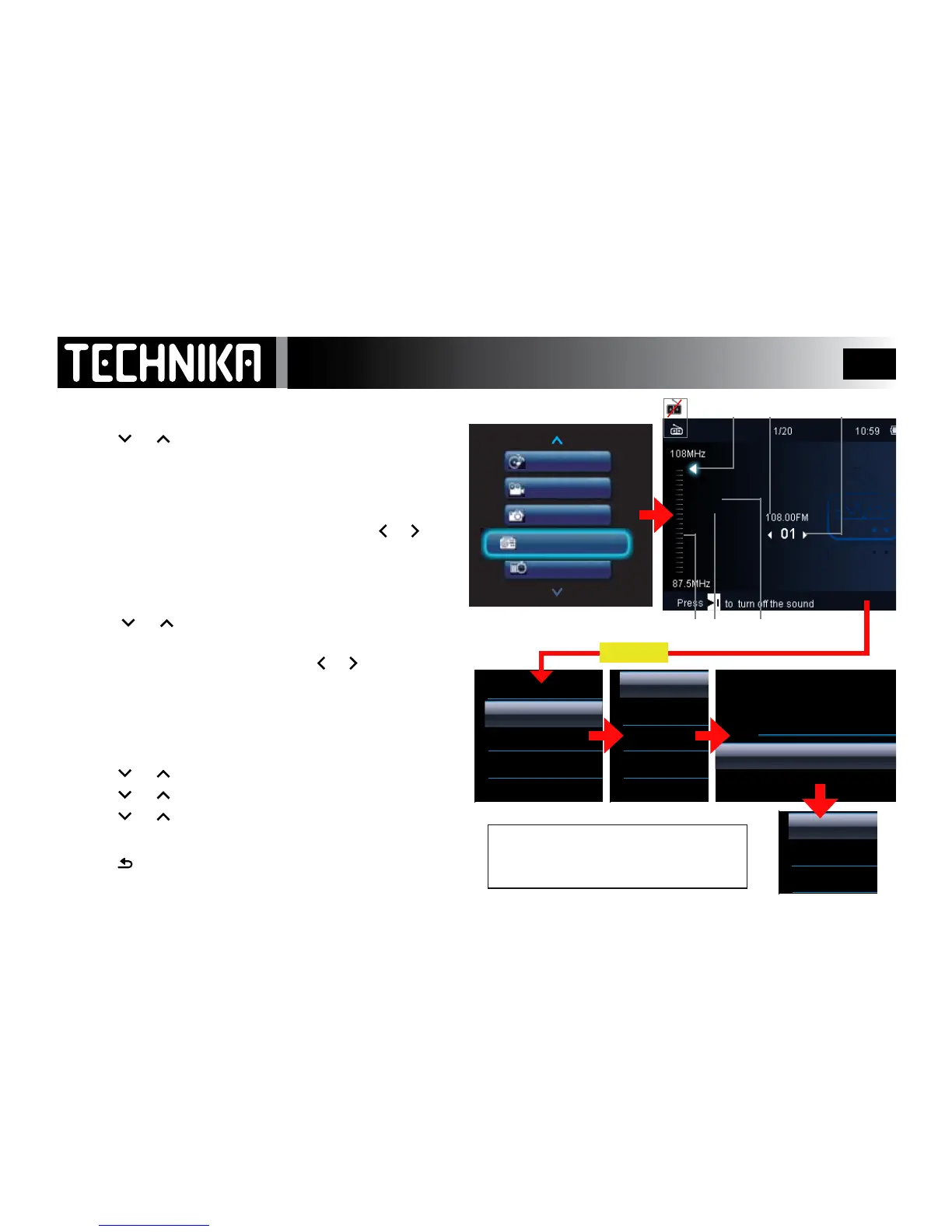
The FM Radio
Always connect the Headphones - the cable is the antenna!
• Press
or toselect“Radio”mode.Press
►/ I I
In normal use: Thelastusedstationwillbeginplaying.
WhentheplayerisswitchedonitgoestoManualMode.
MANUAL MODE:
To tune by frequency: Giveashortpressonthe
or
keys.
The frequency moves down/up in increments of 100kHz.
To mute inter-station noise:
• Pressthe
►/ I I
keytoturnthesoundo/on.
• Press or toalterthevolume.Ifthesoundis
switchedo,thevolumewillrestore.
To auto-tune: Givealongpressonthe
or
keys.
The radio scans the band. When a station is detected the scan
stops and the station plays. You can now store the station.
STORING A STATION
• Tuneinthewantedstation;pressMENU
• Press
or toselect“Savetopreset”.Press
►/ I I
• Press or toselectapresetno.Press
►/ I I
• Press or toselect“YES”.Press
►/ I I .
The station is stored in the allocated preset number.
• Press
asneededtoreturntothemainRadiomenu.
Note: Up to 30 stations can be preset,
Just repeat the procedure selecting a
new preset number for each station.
Battery Status
Frequency Preset Number
Tuning Type
Tuning Scale
Region
Sound On/O



 To Next Page