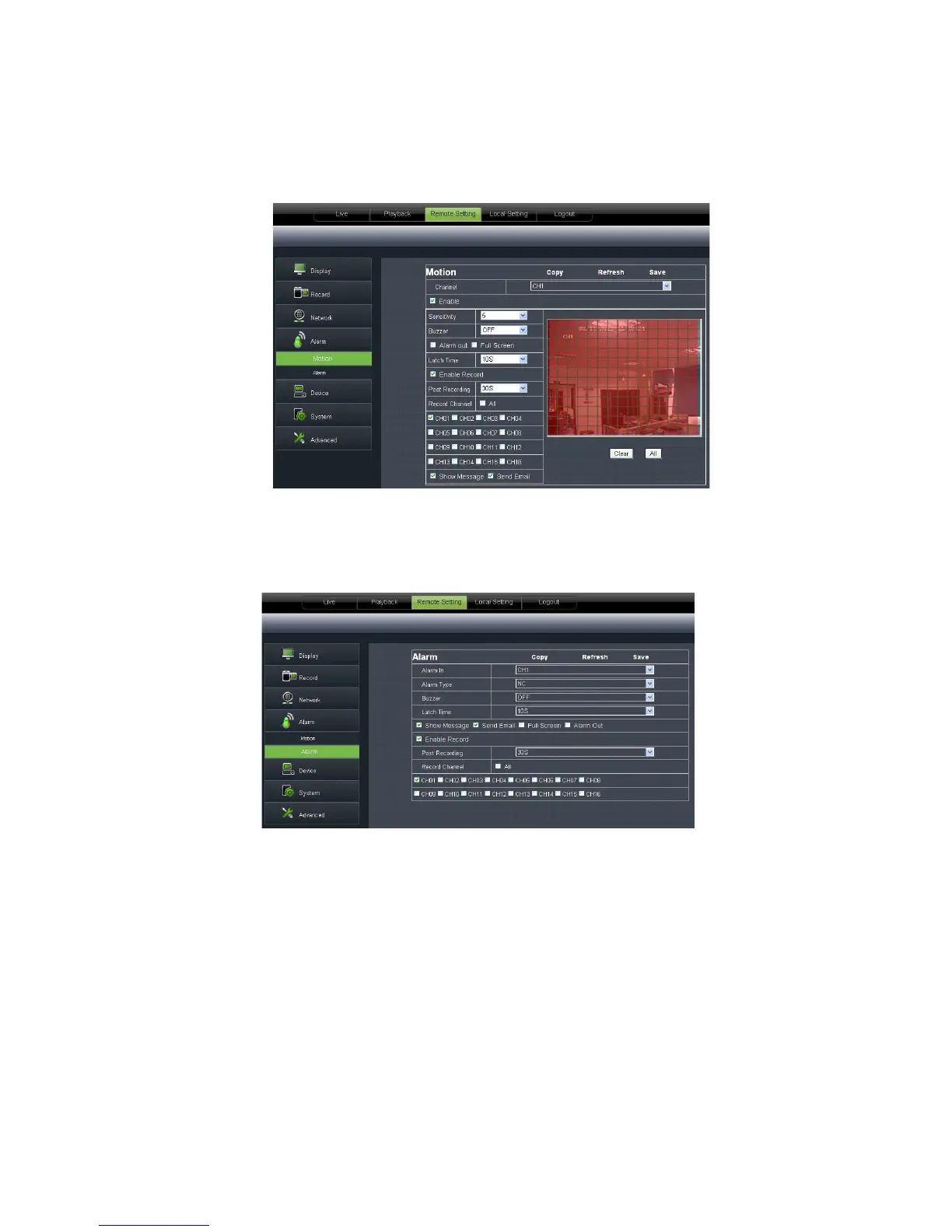
allow you configure its <Sensitivity>, <Alarm out>, <
<Alarm Capture> etc. Details setting should be
Picture 6-26).
2、 I/O Alarm: allow
you configure <I/O Status>, <Alarm output>, <I/O Alarm record> and
etc. Details setting should be consistent with DVR local setting (Shown as
Picture 6-27).
6.3.3. 5 Device
Click <Device> to unfold its sub
allow you check out HDD status and overwritten time shown as Picture 6
setting should be consistent with DVR local setting.
allow you configure its <Sensitivity>, <Alarm out>, <
<Alarm Capture> etc. Details setting should be
with DVR local setting (Shown as
you configure <I/O Status>, <Alarm output>, <I/O Alarm record> and
etc. Details setting should be consistent with DVR local setting (Shown as
Click <Device> to unfold its sub
allow you check out HDD status and overwritten time shown as Picture 6
setting should be consistent with DVR local setting.
with DVR local setting (Shown as
you configure <I/O Status>, <Alarm output>, <I/O Alarm record> and
etc. Details setting should be consistent with DVR local setting (Shown as
allow you check out HDD status and overwritten time shown as Picture 6



 To Next Page