Hardware configuration Installer Manual - TP8-96 VIDEO
7-2
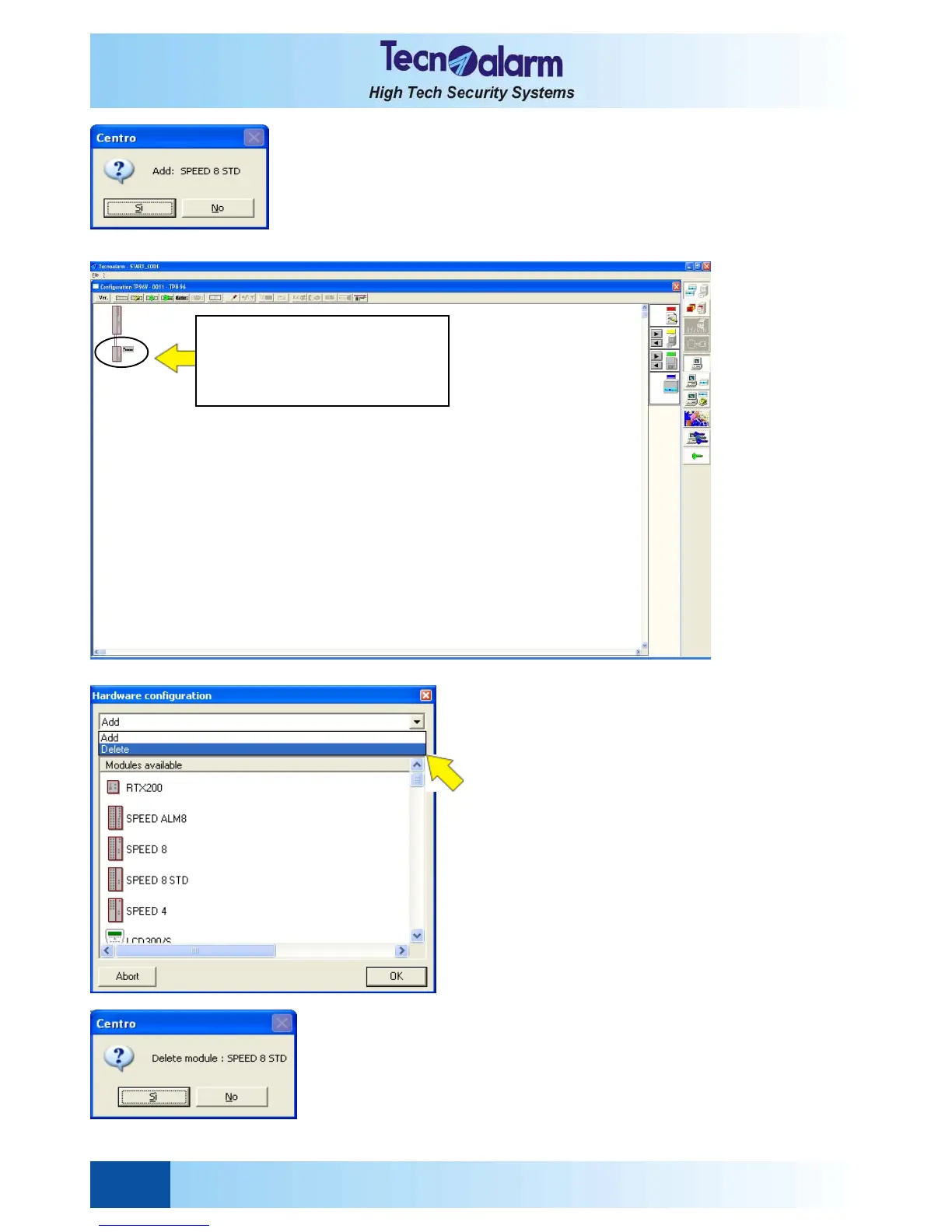
On the screen is viewed the opposite message.
Commands available
z Yes to confirm the addition of the module selected
z No to undo the addition of the module selected
Click on OK to confirm and quit hardware configuration.
Click on Abort to undo the changes to the hardware
configuration viewed.
If you confirm the addition of the module, it is added to
the system configuration viewed.
DELETION OF MODULES
Select Delete in the hardware configuration window and
select the module to be deleted, e.g. SPEED 8 STD.
On the screen is viewed the opposite message.
Commands available
z Yes to confirm the deletion of the module
selected
z No to undo the deletion of the module
selected.
On the screen is viewed the beside image.
Click on OK to confirm and quit hardware configuration.
Click on Abort to undo the changes to the hardware
configuration viewed.
If you confirm the deletion of the module, it is removed
from the system configuration viewed.
The new module is added to the
system configuration viewed.
Next to the module the
dipswitch address is shown.


 To Next Page