TTE Combo Communication Module – Installation and Programming Manual
25
• “Delete” – Deleting the system from the list and from AJAX WEB. The site will ask for
confirmation. Note: Once deleted from the list and from the AJAX WEB, the system could
not be restored again. If you delete it by mistake, you have to add the system again
following the steps described in 4.2 Adding a System to Account
.
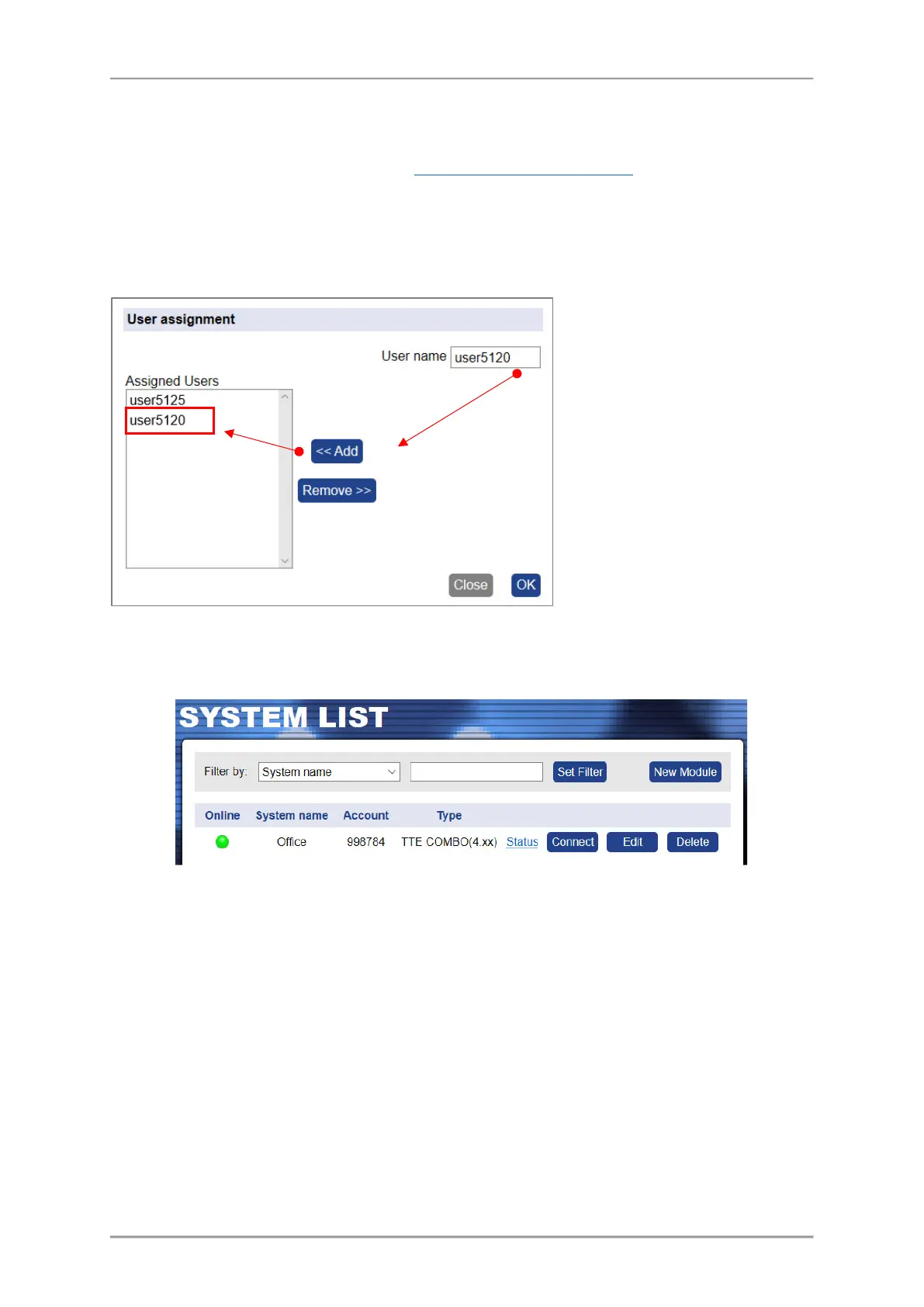
• “Share” – Sharing the access to a system between two or more different users. To share
the access, you have to know in advance the account Usernames of those Users to which
you want to assign rights for operation. Press the “Share” button to open the “User
Assignment” window.
The shared system is added automatically to the user account, but without the option for
sharing (for account “user5120” from the example above):
Note: The right to share a system for operation with other users, can only the User who
is performed the New Module Registration procedure (the initial registration of the
system) to his own account.
Step-by-Step Example for sharing access
to a system:
1. Enter in “User name” field a real
account Username registered in AJAX
WEB.
2. Press “<<Add” button.
3. The name of the User will be added to
the list of the Assigned Users.
4. Press “OK” button.
To remove a User from the List, select it
and press “Remove>>” button. Then
confirm with “OK”.



 To Next Page