Getting to know your phone 15
Getting to know your phone
If you need some help, call us on 13 2200 or go to https://go.telstra.com.au/helpandsupport/home-phone/
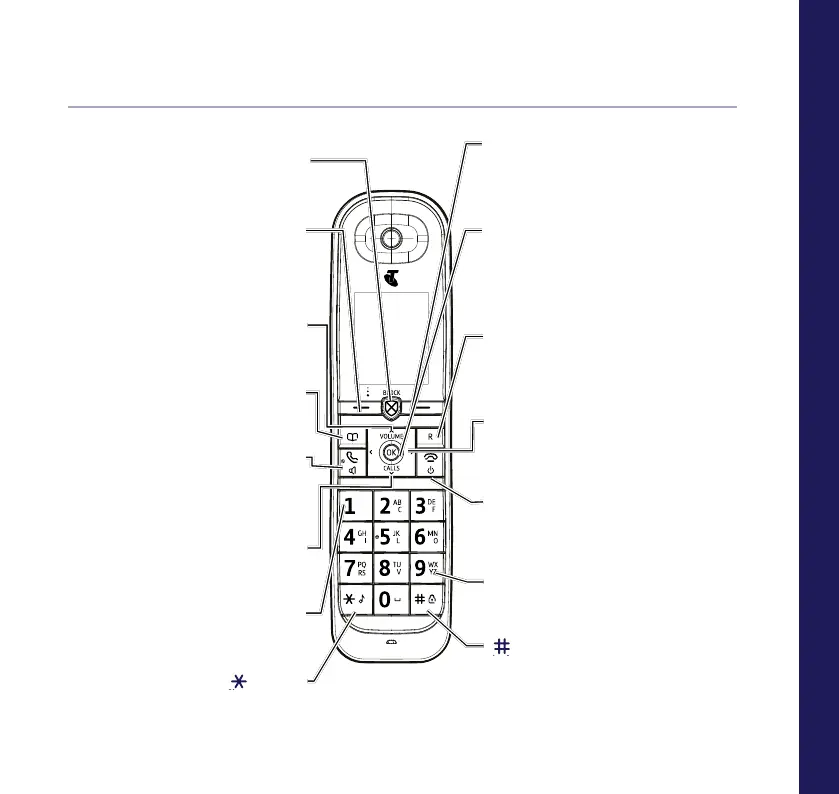
Handset buttons
Call block button
Press to access the call block
menu.
Left option button
Opens up the Menu. See page 14.
In answer machine mode, deletes
current message playing.
Up/Volume
Move up through menu options,
increase volume, page 29.
Contacts
Access stored Contacts, page 32.
Talk/Handsfree
Make/receive calls, page 28.
Switch handsfree on/off, page 29.
Calls/Down
Enter calls list, page 37, decrease
volume, page 29 and move down
through menu options.
1 (Speed dial)
Press and hold to dial Voicemail or a
stored speed dial number.
(Star)
Press and hold to turn handset
ringer on/off.
Right option button
Press to conrm the option displayed on
the screen above the button, to delete or
go back to the previous screen.
OK
From home screen, press to access a
highlighted event e.g. missed calls,
answer phone messages and text
messages on the display.
R (Recall)
R (Recall) for use with some Telstra
Call Features and when connected to a
switchboard/PBX.
< / >
Left and right navigation buttons.
In text edit/entry mode, press to move
cursor.
End call/on or off
End a call, page 28.
Press and hold to switch handset on/off.
In menu mode, press to return to home screen.
2-9 (Speed dial)
Press and hold buttons 2-9 to dial a stored
speed dial number.
(Hash)
Press and hold to lock/unlock keypad.
Toggle between upper/lower case characters
and number mode.



 To Next Page