EasyManua.ls Logo

Telstra TCG301 - Base

Telstra TCG301
76 pages
Print Icon
To Next Page IconTo Next Page
To Previous Page IconTo Previous Page
Loading...
Getting to know your phone 17
If you need some help, call us on 13 2200 or go to https://go.telstra.com.au/helpandsupport/home-phone/
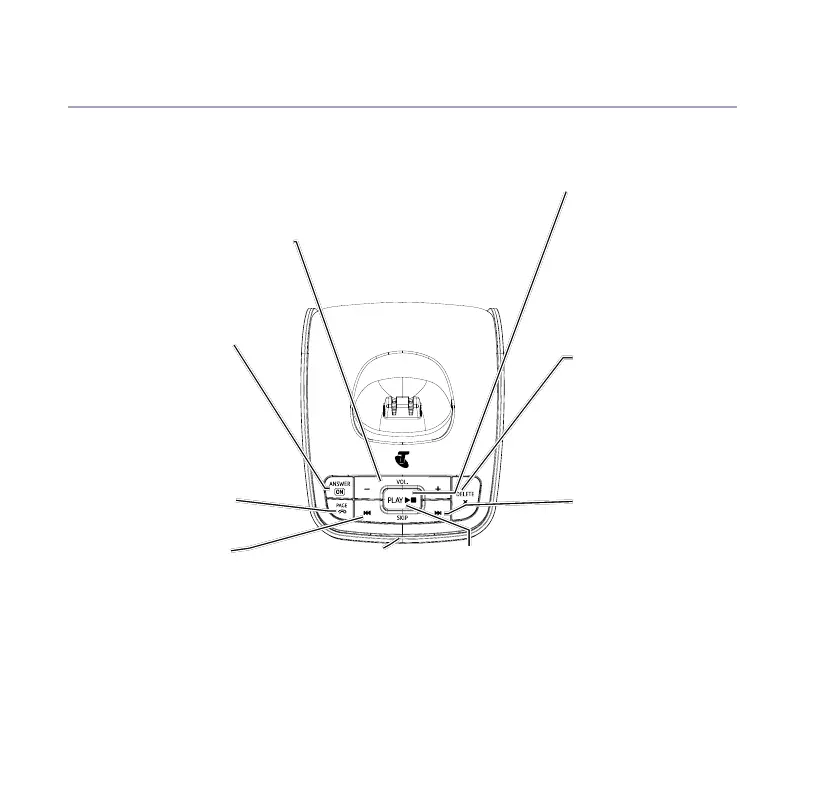
Base
Volume
Adjust speaker volume during
voice message playback.
Answer on/off
Turn answer
machine on/off.
Red light on button
is on when answer
machine is on.
Page
Press to locate
handsets.
Skip<<
Repeat current
message.
Press twice to skip to
previous message.
Delete
During playback,
press to delete
message playing.
In idle, press to delete
all old messages.
Skip>>
Skip forward to start of
next message during
playback.
Blue In use light
On when base is
connected to power
and the handset is
on the base.
Flashes when phone
rings, during a call
and registration.
Green play /
message light
.
Play / Stop
Green light on button
ashes when there
are new messages.
Press to play messages.
Stop message
during playback.

Table of Contents

Related product manuals