Getting to know your phone
If you need some help, call us on 13 2200 or go to https://go.telstra.com.au/helpandsupport/home-phone/
16
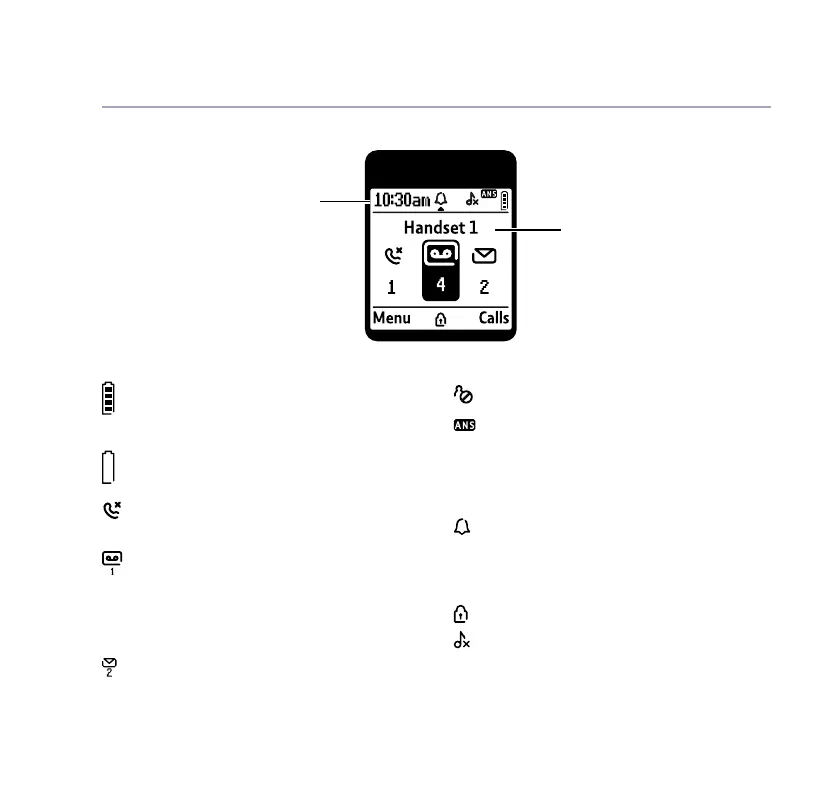
Handset display
Shows handset battery status.
Scrolls when the handset is
charging.
Empty frame ashes when battery
needs recharging.
On – missed call(s) in the Calls list*.
With number of calls displayed.
On – answer machine message(s)
received with number of messages
displayed.
FULL displayed when the answer
machine memory is full.
On – text message(s) received with
number of messages displayed.
Blocked call.
On – answer machine on.
Off – answer machine off.
UnMute/Mute Indicates when Mute is on or
off.
On – alarm is set.
Flashing – alarm time has been
reached.
Off – alarm off.
The keypad is locked.
Handset ringer is switched off.
Handset display icons
Handset name
* For full details of who has called you please make sure you have subscribed to Caller Display from
your network provider. Charges may apply.
Time



 To Next Page