HYDRAULIC PULLER TENSIONER PT2450
Manual: MI-PT2450-050-00-GB Date: 28.07.2018 Author: AT Page: 42 of 89
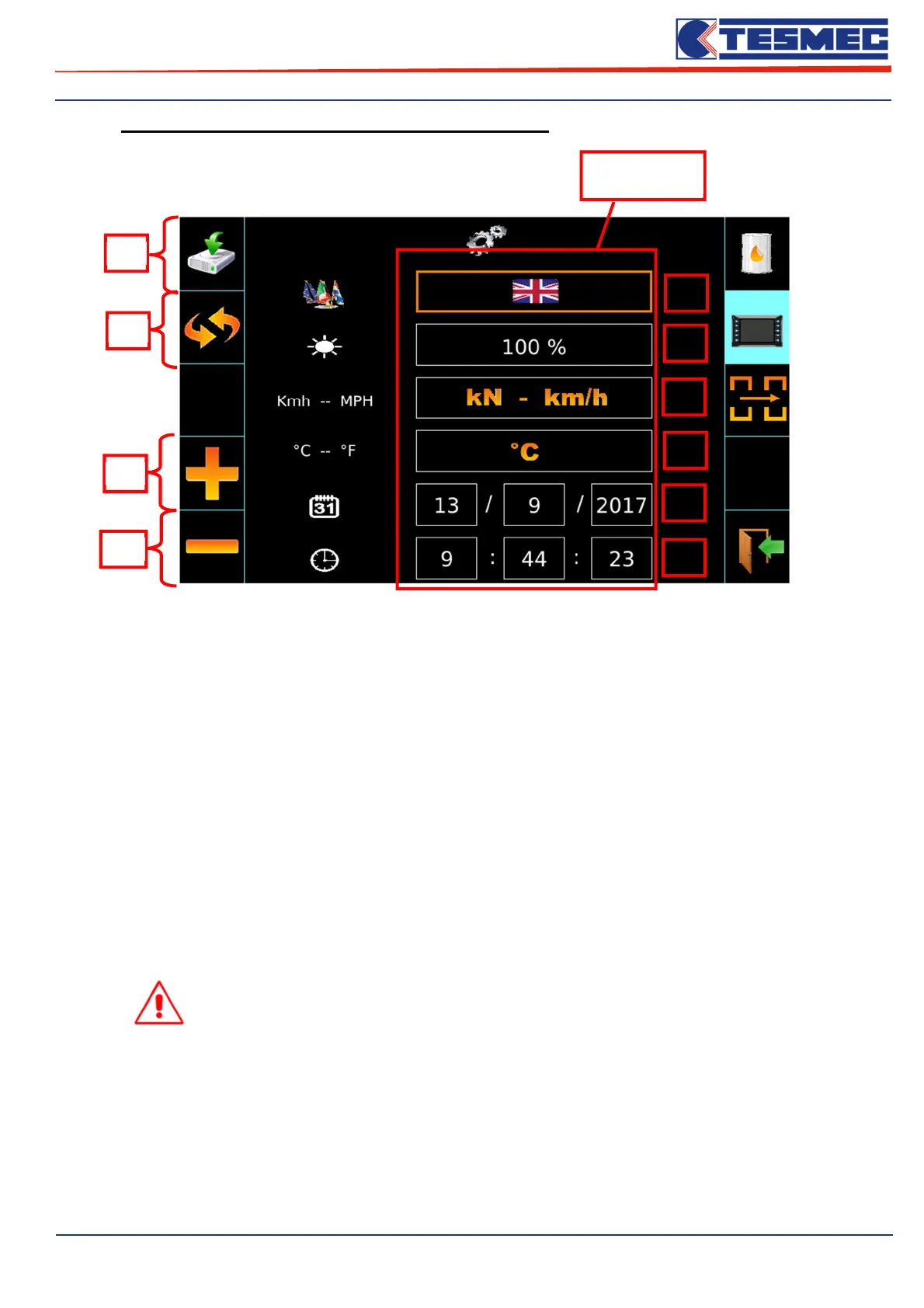
• Submenù “General settings of the machine control panel”
1- Setting Screen language;
2- Setting Display brightness;
3- Setting the speed of stringing and pull set units of measure;
4- Setting temperature units of measure;
5- Data settings;
6- Hour settings;
7- Saving time and date set;
8- Button to scroll through the different menus (the selected date it will be underline);
9- Button to increase the selected menu;
10- Button to decrease the selected menu;
ATTENTION: In order to take effect any changes to the date and / or time, you
must save the settings by pressing the dedicated button "save pos.7 settings".
7
8
9
10
1
2
3
4
5
6
Setting


 To Next Page