20
TEXI Catenaccio operation manual
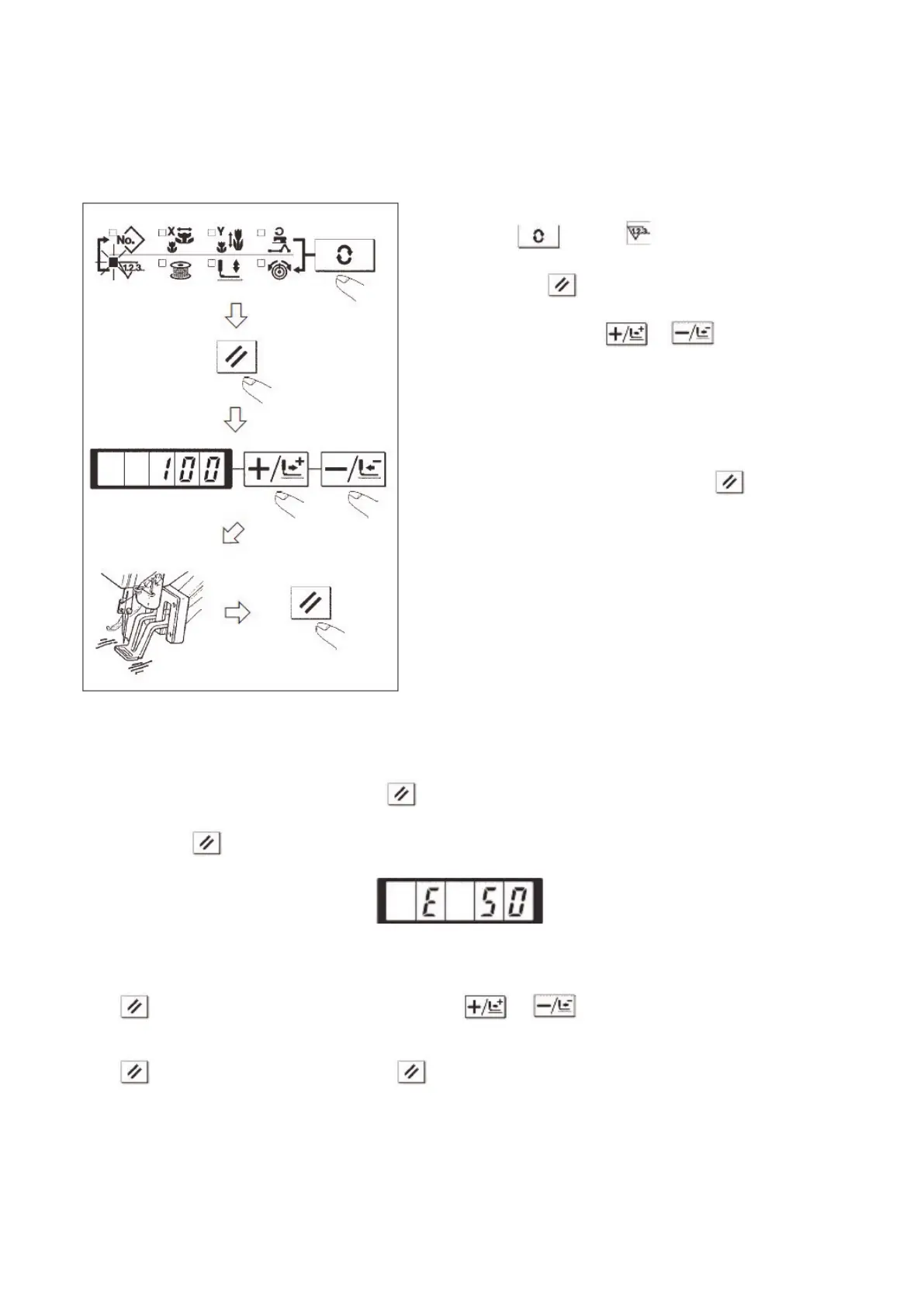
8. Bottom Thread Counter
The counters are set as Production Counter (Adding method) at the time of delivery. However, if it is used as the Bottom
Thread Counter (subtracting method), the value of parameter No.18 shall be set at 1.
9. Pause
After user set the value of No.31 parameter at 1, or the reverse gear of pedal can be used as the pause key.
1) If user presses or depresses the reverse gear of pedal, the sewing machine will stop and display the error No.50.
2) The following are the three available operations after the pause:
Press the Start Switch to start the sewing.
Press and perform the thread-trimming. After that, use & to adjust the position and then press start
switch to start sewing.
Press and trim the thread. After that, press again to return to the origin.
1. Press to select .
2. Then press .
3. After that, press & to set number
of times that can be sewn with a bobbin.
4. Finish of sewing in each time will cause the counter
to count down by one.
5. After the machine finishes the set times of sewing, the
monitor will shine for hinting the user.
6. Replace the bottom thread and press again. Then
the value of counter will restore to the set value
Repeat the steps from 4. to 6).


 To Next Page
 Loading...