300/400TS and 300/400S 12 MAINTENANCE
12 – 12
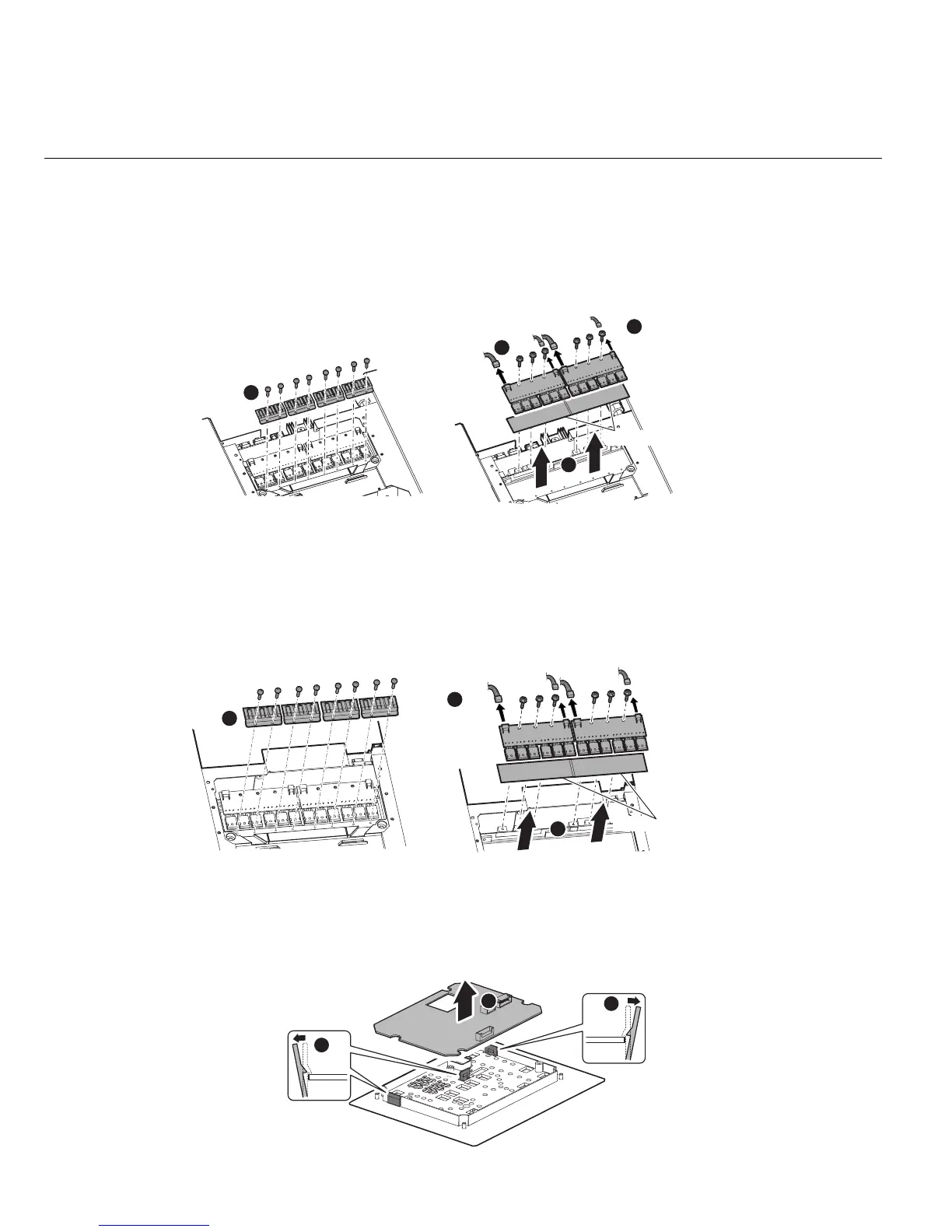
3.7 PCB8, PCB9 (WK-5479) and Q1-Q12 “Primary IGBT”
1) Remove the side cover. [Reference page : 11-1]
2) Remove the eight screws and four device clips. Remove the four connectors and six screws.
Remove the PCB8 (WK-5479) and PCB9 (WK-5479).
Remember to install Silicone Rubber Sheets where silicone compound (Shinetsu silicone G-747 or
equivalent) was spread when reinstalling the PCB8 and PCB9. Spread the silicone compound on IGBT.
3.8 PCB10, PCB11 (WK-5479) and Q13-Q24 “Primary IGBT”
1) Remove the side cover. [Reference page : 11-1]
2) Remove the eight screws and four device clips.
Remove the four connectors and six screws. Remove the PCB10 (WK-5479) and PCB11 (WK-5479).
Remember to install Silicone Rubber Sheets where silicone compound (Shinetsu silicone G-747 or equiv-
alent)
was spread when reinstalling the PCB10 and PCB11. Spread the silicone compound on IGBT.
3.9 PCB12 (WK-5527)
1) Remove the side cover. [Reference page : 11-1]
2) Remove the PCB13 (WK-5528). [Reference page :12-13]
3) Remove the three latches of Front Control Cover and then the PCB12 (WK-5527).
CN2
CN2
CN1
CN1
1
2
2
3
Silicone rubber sheets
CN2
CN2
CN1
CN1
1
2
3
Silicone rubber sheets
1
1
2



 To Next Page