300/400TS and 300/400S 11 ADVANCED TROUBLESHOOTING
11 – 3
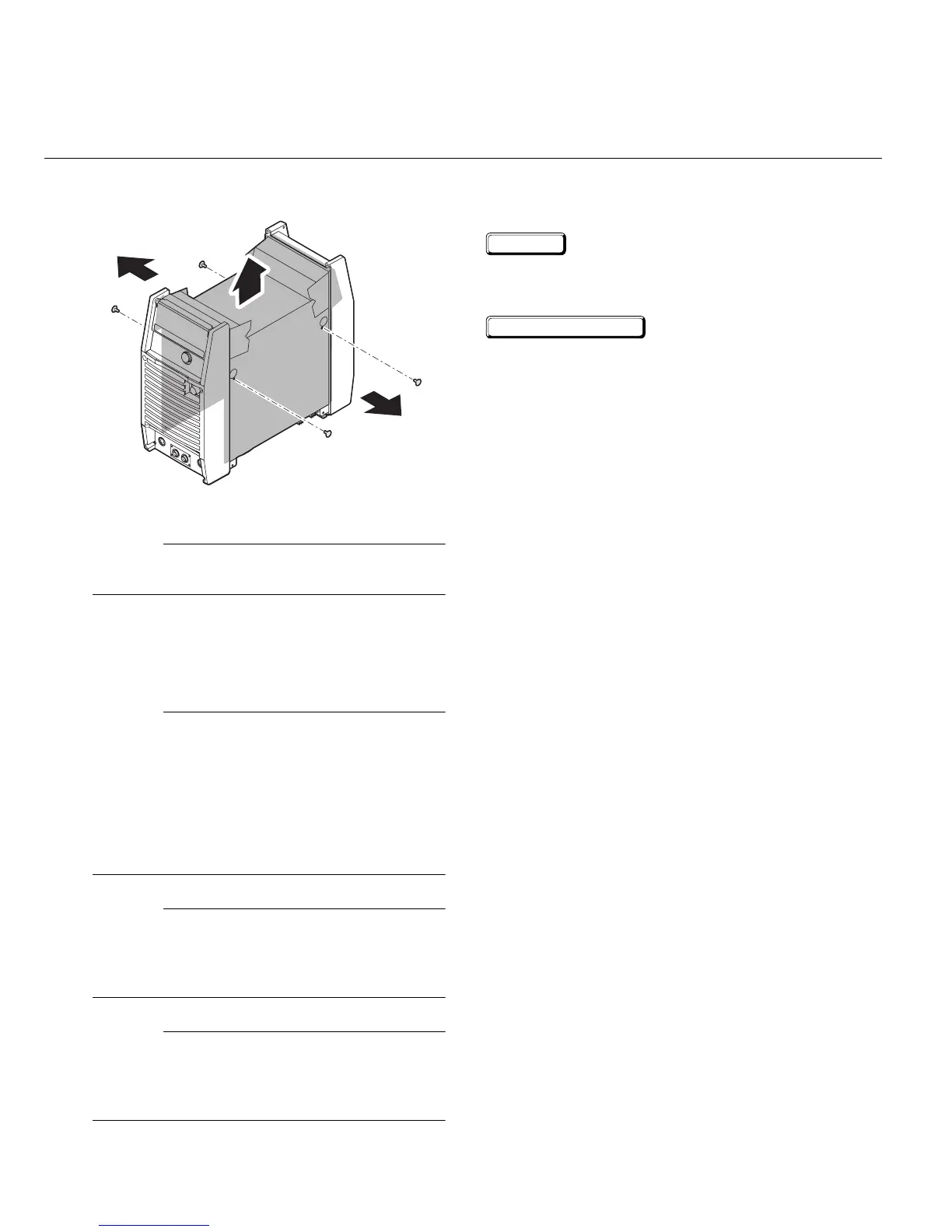
6) Remove protection cover sheet by removing
the plastic tabs.
Figure 11-6: Remove PCB cover
NOTE
When you re-assemble the parts, conduct the
above process backwards.
2
Verification and Remedy to
the Indicated Error Codes
NOTE
The capacitors inside the power supply will slowly
discharged after you turn off the switch of the
power supply or the switch at the breaker box (dis-
tribution panel). Wait at least 5 minutes for the dis-
charge to complete and then remove the cases to
continue your inspection and repair (or mainte-
nance) inside the power supply. Refer to section
11.1.1 for the removal and installation of the case.
NOTE
During the "Verification/Remedy" procedures
below, follow the alphabetical sequence (a, b, c...)
and proceed with your verification and confirma-
tion.
NOTE
After you confirm and replace all spare parts and
components, confirm that there are no damaged
harnesses or connectors, and no uninstalled
or loose screws.
2.1 E01 "Over-Temperature at
the primary side"
Cause
Occurs when an over-temperature condition of the
primary IGBT is detected.
Verification/Remedy
a) Unit may be in thermal shutdown mode.
Review the rated duty cycle of the unit per
section 3.8. Exceeding the duty cycle can
damage the unit and void the warranty. Refer
to Limited Warranty at the end of the manual.
b) Verify the ventilating condition.
Maintain a clear and unobstructed distance
of more than 12 in. in
the front and more that
20 in. in the rear of the unit for ventilation pur-
pos
es.
Verify and maintain clean, dust free, front and
rear airflow paths. Cleaning and removing
dust from the front and rear panels once
every six months in a normal working envi-
ronment is recommended. Extremely dusty
environments will require more frequent
cleanings.
c) Verify the operation of the cooling fan, FAN1,
and replace it if necessary.
Verify the condition of FAN1. Verify that there
are no broken or cracked fan blades and that
FAN1 is not producing any abnormal sounds.
If broken or cracked FAN1 blades, or abnor-
mal sounds are emanating from FAN1,
replace FAN1.
Verify the operation of the cooling fan and
replace it if the condition of FAN1 is inactive.
Refe
r to section 12.3.21 for the replacement
of FAN1.
Refer to section 11.5.3 for additional FAN1
tests.
d) Replace PCB6 (WK-5549).
Refer to section 12.3.6 for the replacement of
PCB6.



 To Next Page