300/400TS and 300/400S 12 MAINTENANCE
12 – 22
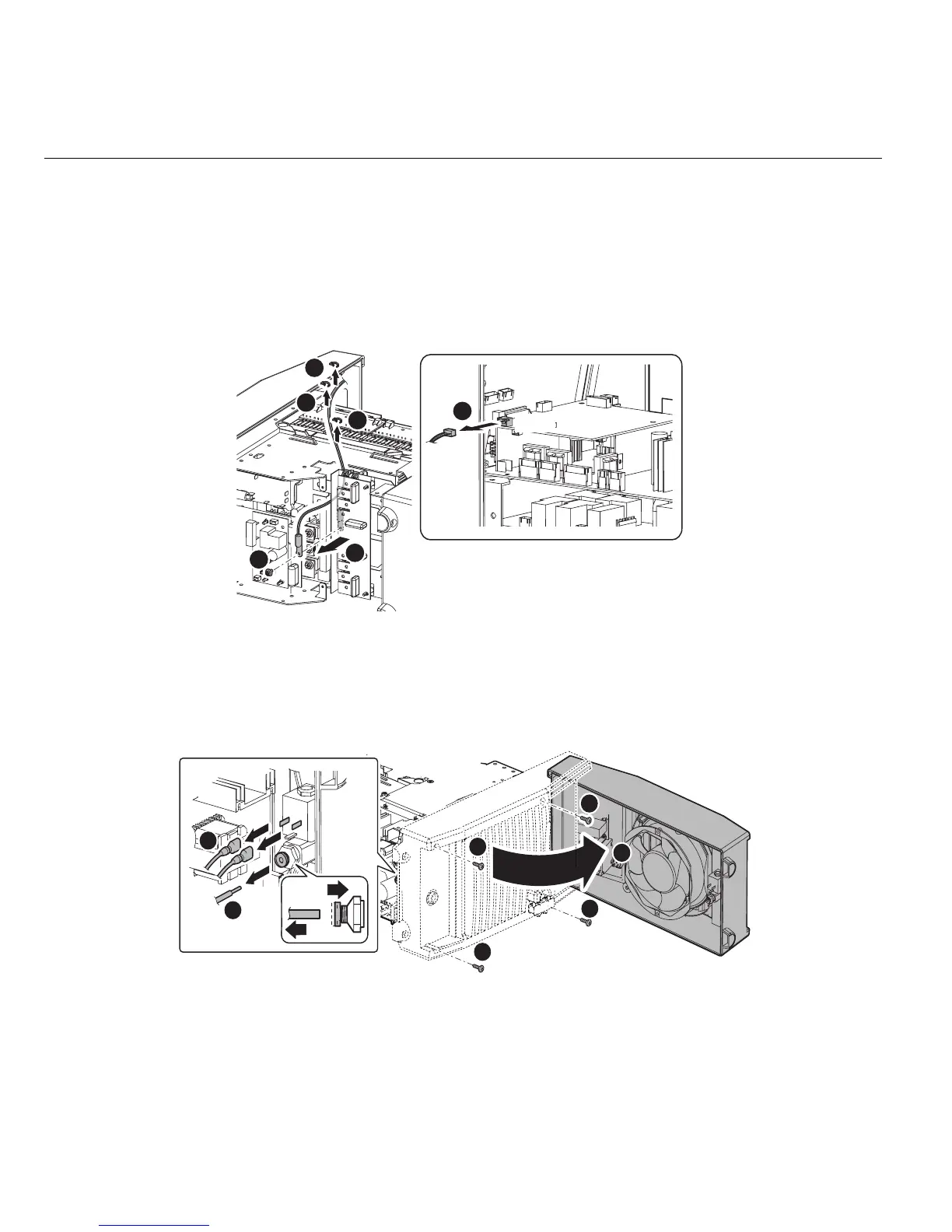
3.20 Secondary Thermistor (TH2)
1) Remove the Side Panel. [Reference page : 11-1]
2) Remove the PCB16 (WK-5569). [Reference page : 12-16]
3) Cut the three snap bands and disconnect the one connector CN9 on the PCB6. Remove the one screw
and Secondary Thermister (TH2).
Before installing a new therminstor, apply a uniform coat of silicone compound (Shinetsu Silicone G-
747 or equivalent) on the base.
3.21 Cooling Fan (FAN1)
1) Remove the Side Panel. [Reference page : 11-1]
2) Remove the Nylon Hose and two terminals. Remove the four screws and open the Rear Panel.
CN9
2
1
1
1
3
4
2
1
1
2
3
3
3
3
4



 To Next Page