300/400TS and 300/400S 12 MAINTENANCE
12 – 28
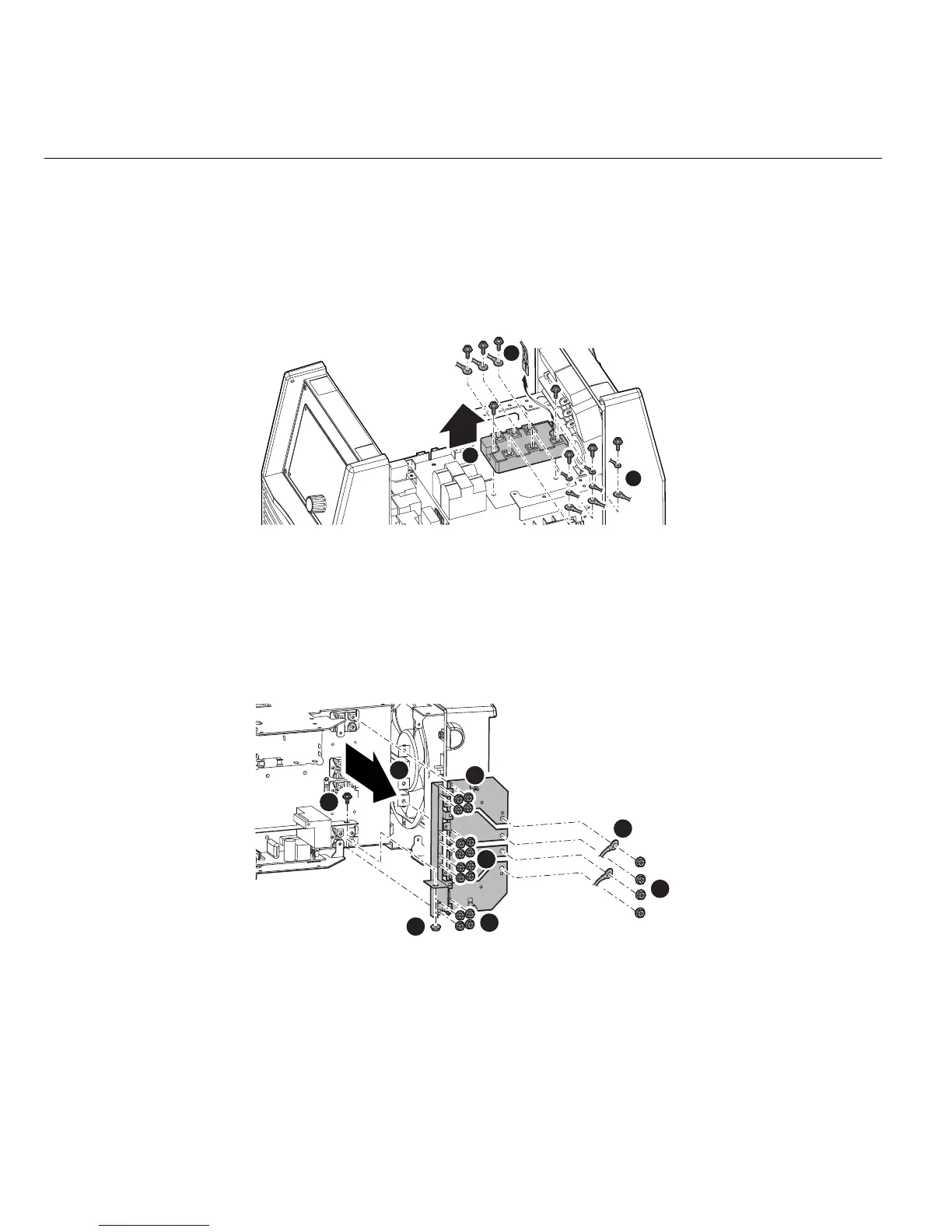
3.28 Primary Diode (D1)
1) Remove the Side Panel. [Reference page : 11-1]
2) Remove the PCB3 (WK-5548). [Reference page : 12-9]
3) Remove the six screws and 13 terminals. Remove the two screws and then detach the Primary Diode
(D1).
Before installing a new diode, apply a uniform coat of silicone compound (Shinetsu Silicone G-747 or
equivalent) on the base.
3.29 Secondary Diode (D2, D4, D5 and D7)
1) Remove the Side Panel. [Reference page : 11-1]
2) Remove the PCB15 (WK-5606). [Reference page : 12-16]
3) Remove one screw and one nut. Remove 20 screws and two terminals. Remove the D Bus Bar, D Bus
Bar1, D Bus Bar2, D Bus Bar3 and D Bus Bar4.
1
1
2
1
1
2
2
2
2
3
4



 To Next Page