300/400TS and 300/400S 12 MAINTENANCE
12 – 16
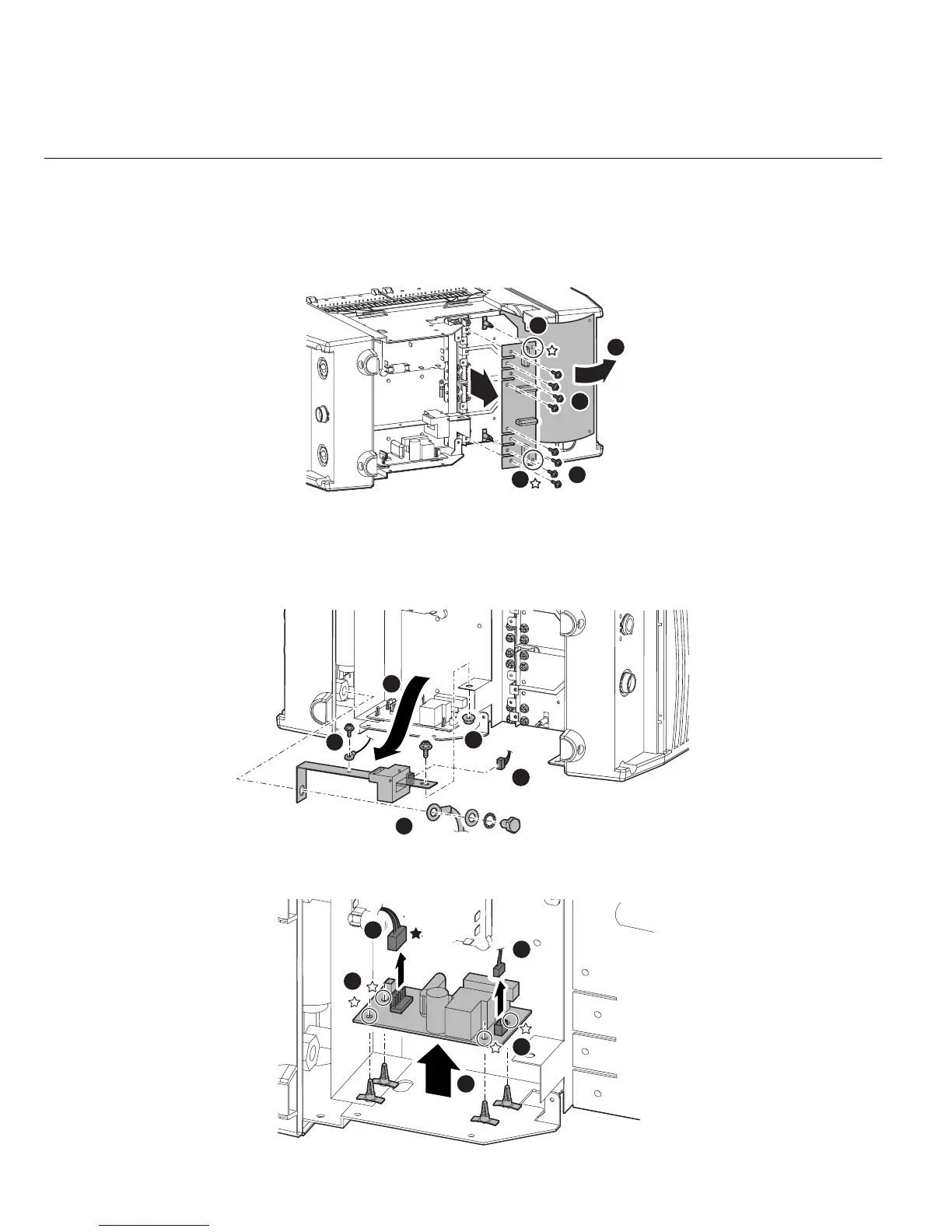
3.12 PCB15 (WK-5606)
1) Remove the Side Panel. [Reference page : 11-1]
2) Remove the Nylon Hose and two terminals of SOL1.
3) Open the Dust sheet. Remove the eight screws. Remove the two PCB supporters and remove the
PCB15 (WK-5606).
3.13 PCB20 (WK-5499)
1) Remove the Side Panel. [Reference page : 11-1]
2) Remove one screw and one terminal. Remove one bolt, toothed washer, washer and terminal. Remove
one screw, nut and the Output Bus Bar. Disconnect one connector from HCT1.
3) Disconnect the two connectors.
Remove the four PCB board supporters and then remove the PCB20 (WK-5499).
1
2
2
3
3
3
4
1
2
5
CN1
1
3
1
2
2
CN1
CN3



 To Next Page