86
TK 56430-18-IP-EN
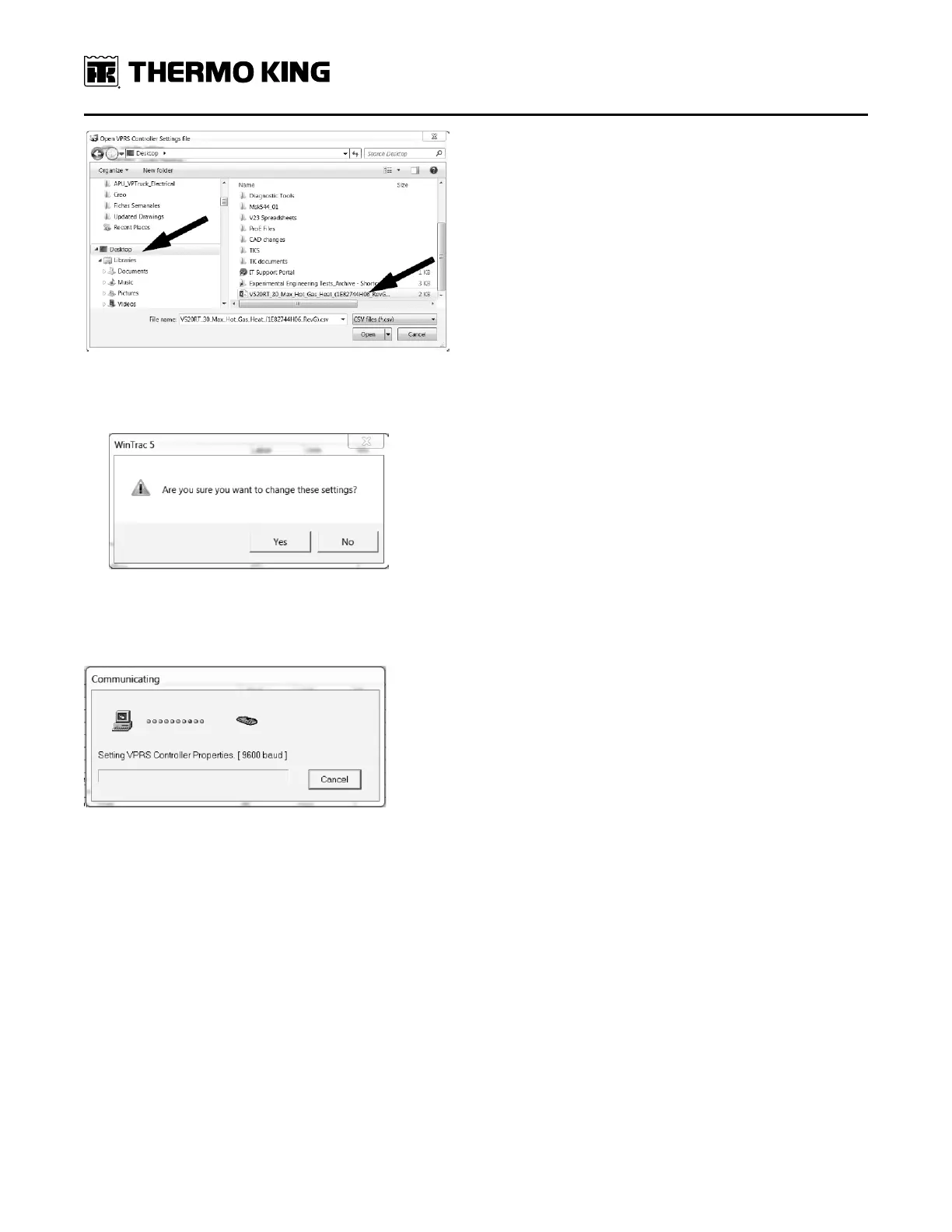
a. If the configuration file you are loading is different than the configuration file currently on the controller, a
confirmation window will appear asking if you want to change the settings.
14. Click yes and a communication window will appear. Once the new configuration file has been loaded, the
communication window will disappear and the settings window should show the name of the new configuration file
loaded.
15. Click close the settings window and close down WinTrac. Disconnect power to the unit by turning the truck ignition
off and/or unplugging the unit from shore power.
16. Verify that the correct configuration was stored by re-powering the controller and re-connecting to WinTrac.
17. Delete the .csv configuration file saved to the desktop during the loading procedure.
IImmppoorrttaanntt:: Configuration files get updated periodically and new files should be downloaded every time to verify the
most recent version is being used.
SSeeccttiioonn 99 -- CCoonnffiigguurriinngg SSooffttwwaarree aanndd CCoonnttrroolllleerr PPrroocceedduurreess




 To Next Page