UT I L I TY RE
M
O
TE
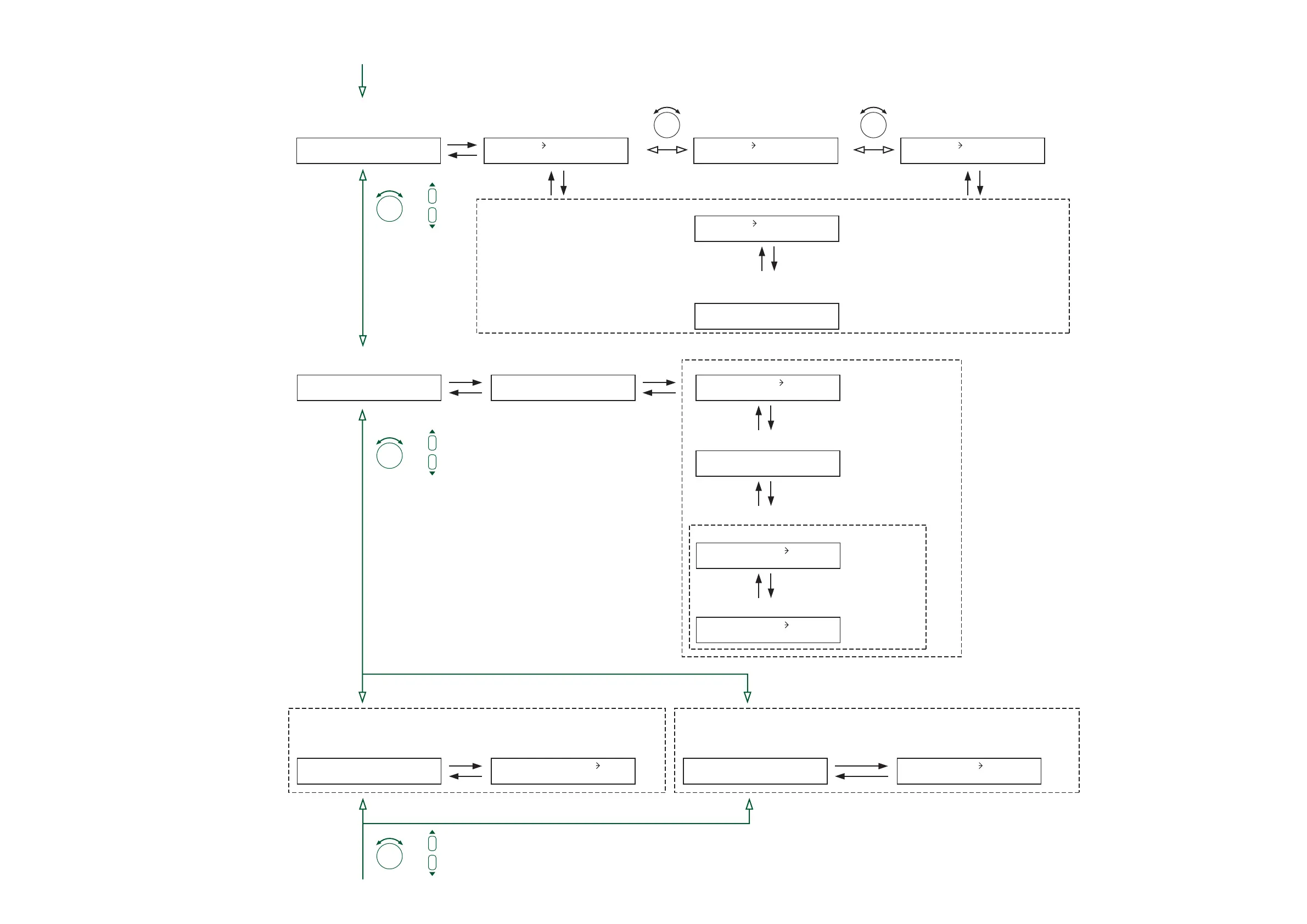
Function selection
(when the remote volume control
is selected)
Remote controller type setting
(when the remote controller type
is set to VOLUME) (p. 61-C26)
Remote-controlled channel setting* (p. 61-C27)
From the previous page
To the next page
UTILITY ANC
Function selection
(when the ANC monitor is selected)
ANC monitor switching ON/OFF
setting
(p. 62-C29)
UTILITY EVENT
Function selection
(when the Event activation at
power-on is selected) (p. 55-C1)
(In the normal matrix operation)
A
N
C
M
O
NSELECT=
O
N
Monitor switching control input terminal setting (p. 62-C30)
(When the ANC monitor switching is set to ON)
M
O
NSELECTCIN01
Setting the Event to be recalled
when power is switched on
(p. 63-C34)
RE
M
O
TE1 V
O
LU
M
E
(when the remote controller type
is set to ZM-9001) (p. 61-C26)
(when the remote controller type
is set to ZM-9002)
(p. 61-C26)
RE
M
O
TE1 Z
M
-9002RE
M
O
TE1 Z
M
-9001
RE
M
O
TE1
O
UTPUT1
(When the remote-controlled channel is the output channel)
Volume-controlled signal setting
(p. 61-C28)
VAL
I
DF
O
R ALL
P
O
W
ER
ON
–EVENT LAST UTILITY CHANN
E
L
Function selection
(when the input channel activation
at power-on is selected) (p. 55-C1)
(In the 1-channel or 2-channel output operation)
Setting the input channel to be recalled
when power is switched on
(p. 63-C35)
P
O
W
ER
ON
–CH LAST
In the 1-channel output operation,
the selectable output channel is
Output 1 only.
*
Interlock output control setting (p. 62-C31)
M
O
NSELSYNC
O
N
Interlock output terminal setting (p. 62-C33)
Monitored ANC input channel selection (p. 62-C32)
(When the interlock output control is set to ON)
(P. 55-C1)
SELECT SYNC ANC1
SELECT SYNC C
O
UT01
PARAMETER PARAMETER
or
PARAMETER
or
PARAMETER
or
PARAMETER





 To Next Page