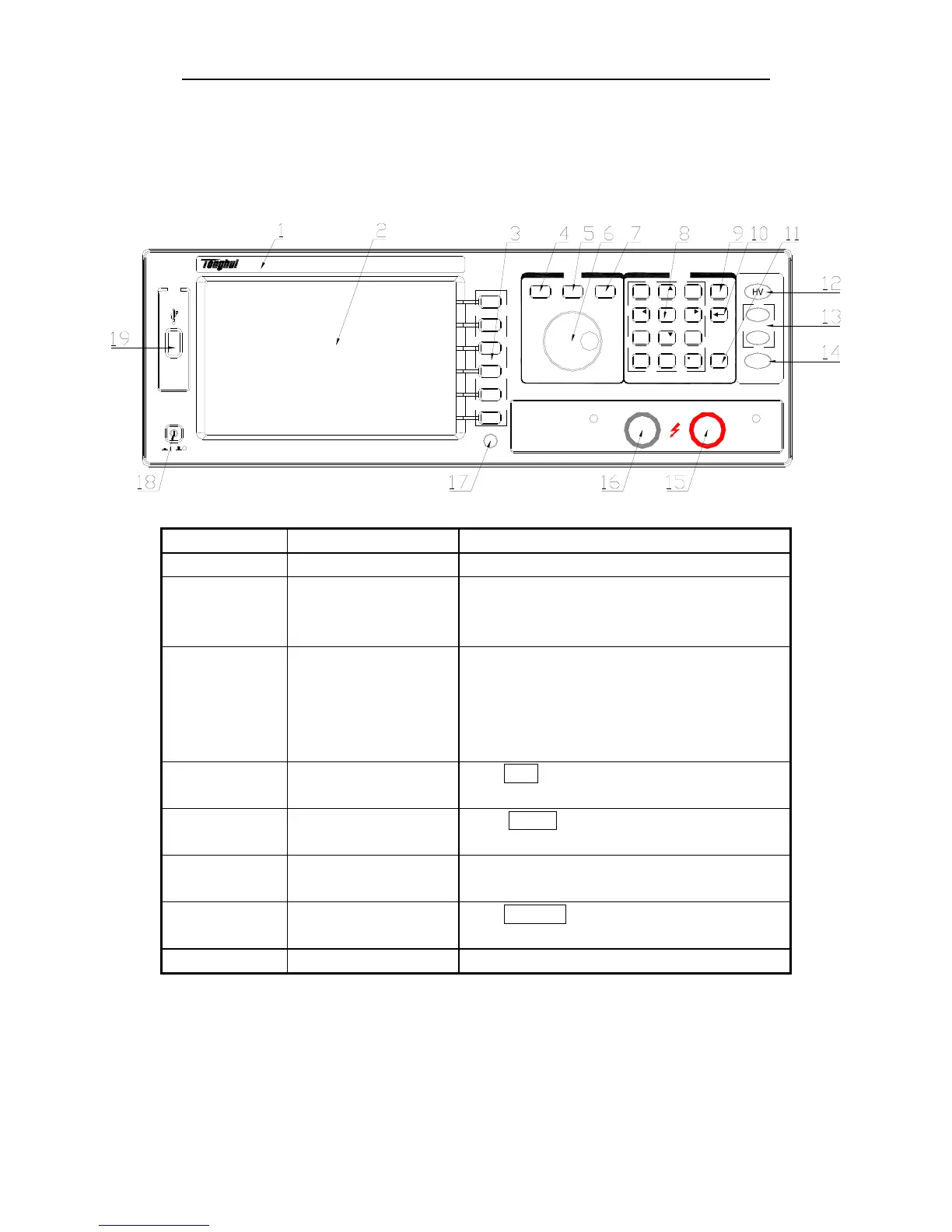
TH2883 Series Operation Manual Chapter 3 Panels and display
3-1
Chapter 3 Panels and display
3.1 Front panel
USB
TH2883-5
Impulse Winding Tester
POWER
MENU
COPY
ENTRY
ESC
ENTER
DISP
SETUP
SYSTEM
PQRS
TUV WXYZ
789
+/-
PASS
FAIL
START
GHI JKL MNO
ABC DEF
654
123
0
Serial Number Name Instruction
1 Brand and model
2 LCD 320×240 Large-Scale dot-matrix LCD displays
measurement waveform, set parameters, system
configurations, etc.
3 SOFTKEY The five keys’ functions are not fixed and have
different functions in different menus. Five soft
keys are used to select control and parameter
functions. Current function of each soft key is
displayed along its left side.
4 [DISP] Press DISP menu key to enter the <MEAS DISP>
page.
5 [SETUP] Press SETUP menu key to enter the <MEAS
SETUP> page.
6 Roller Control the movement of the cursor, confirm and
modify data
7 [SYSTEM] Press SYSTEM menu key to enter the <SYSTEM
SETUP> page.
8 NUMBER keys Input numbers or characters



 To Next Page