TH2883 Series Operation Manual Chapter 6 Introduction to [SYSTEM]
6-4
6.1.10 Date
Date can be set in this zone. The display format is like 2011/05/04. Move the cursor to this zone,
following soft keys can be used.
They are soft keys used to adjust date by 1 day.
Lighten this key to enable the numerical arrow key. Respectively press 8, 2, 4, 6, the
cursor will move up, down, left and right.
Note: The date can be directly input by numeric keys. In the process of inputting
numbers, soft keys are not available. User can press ENTER to terminate inputting (In the
state of inputting, if it is required to exit from modifying, press ESC.).
6.1.11 Time
Time can be set in this zone. The display format is like 06:22:28. Move the cursor to this zone,
following soft keys can be used.
They are soft keys used to adjust time by 1.
Lighten this key to enable the numerical arrow key. Respectively press 8, 2, 4, 6, the
cursor will move up, down, left and right.
Note: The time can be directly input by numeric keys. In the process of inputting
numbers, soft keys are not available. User can press ENTER to terminate inputting (In the
state of inputting, if it is required to exit from modifying, press ESC.).
6.2 Interface
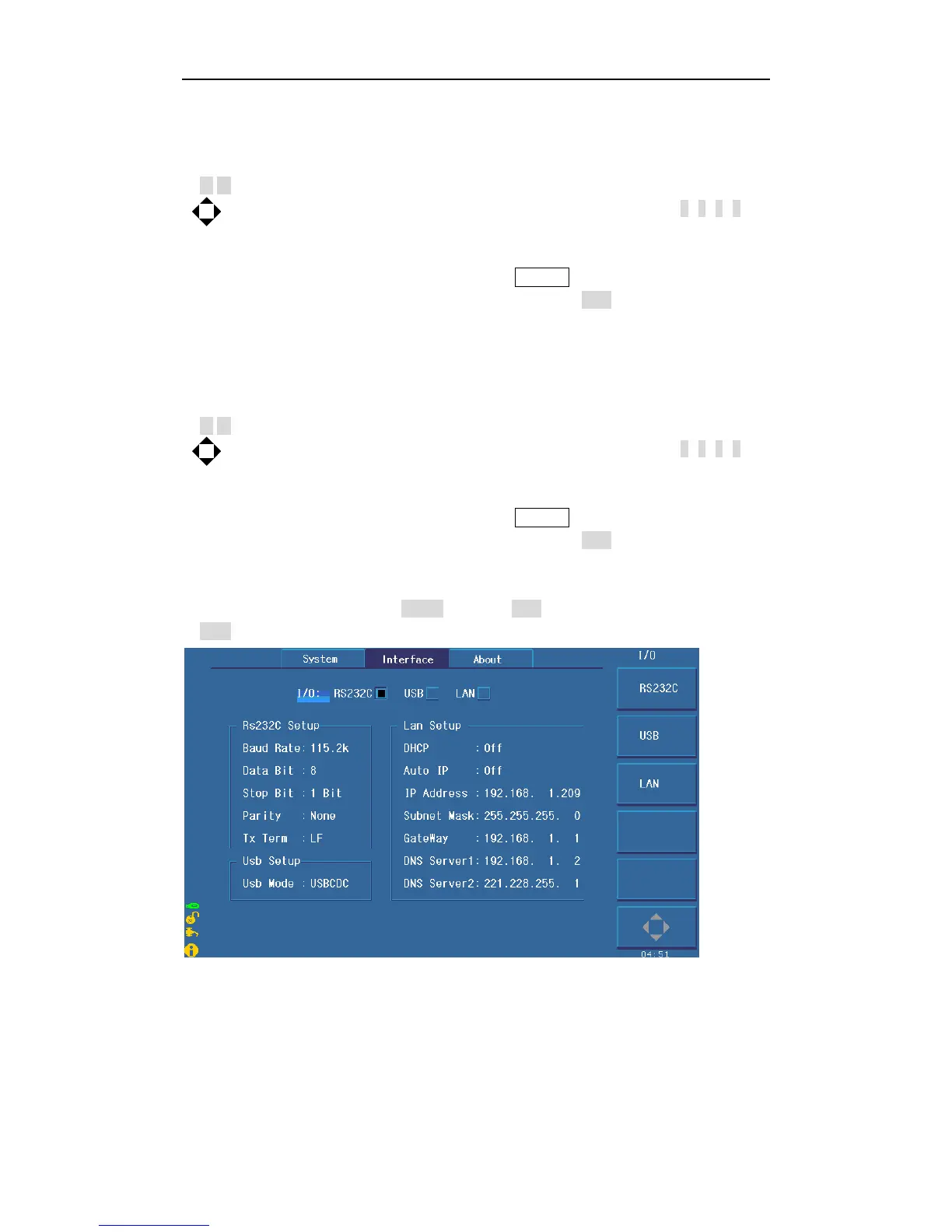
In this page, information about RS232 interface, USB interface (USBTMC or USBCDC),
LAN interface and interface setups can be set, as shown in figure 6-2.
Figure 6-2 Interface



 To Next Page