TH2883 Series Operation Manual Chapter 8 SCPI Command reference
8-23
NOTE: The value of the end point must be larger than that of the start point; otherwise an
error message will be displayed on the system message line.
NOTE: The measurement ranges of frequency and time are the same, thus the time range
will vary with the frequency range.
Query syntax: MEASure:FREQuency?
Return format: <start>,<end><NL^END>
Both <start> and <end > are NR1 format.
The :TIME command sets the time range. The :TIME? query returns the current time range.
Command syntax: MEASure:TIME <star>,<end>
Where,
<start> is the start point of time, NR1 format and ranging from 1 to 598 without unit.
<end> is the end point of time, NR1 format and ranging from 1 to 598 without unit.
For example: WrtCmd( “MAES:TIME 100,200” ); set the time to range from 100 to 200.
NOTE: The value of the end point must be larger than that of the start point; otherwise an
error message will be displayed on the system message line.
NOTE: The measurement ranges of frequency and time are the same, thus the time range
will vary with the frequency range.
Query syntax: MEASure:TIME?
Return format: <start>,<end><NL^END>
Both <start> and <end> are NR1 format.
8.3.11 ABORt subsystem command
TH2883 will abort the current measurement as soon as the ABORt command is received.
Command syntax: ABORt
For example: WrtCmd( “ABOR” );
8.3.12 Mass MEMory subsystem commands
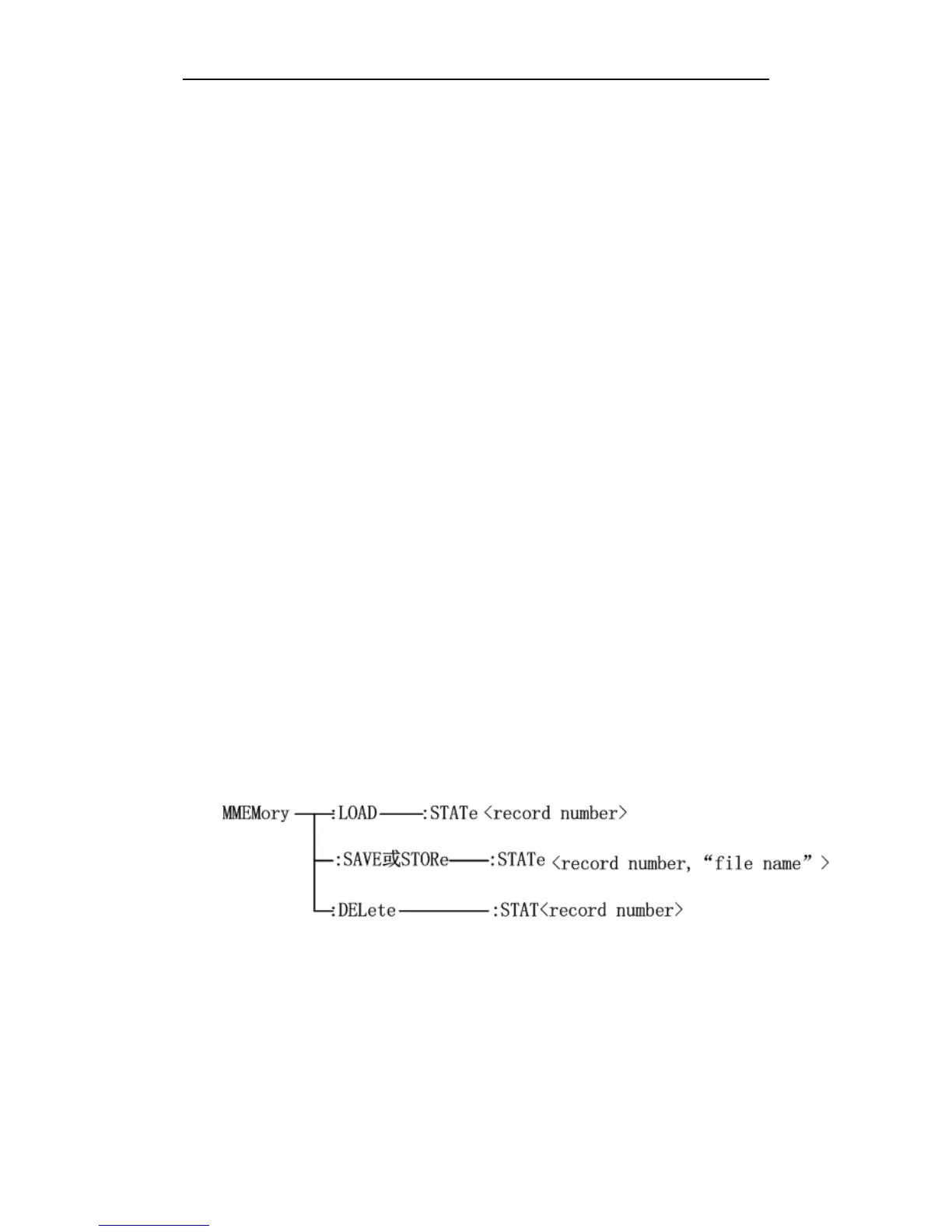
The Mass MEMory subsystem commands load and store files. Figure 8-12 shows the Mass
MEMory subsystem command tree.
Figure 8-12 Mass MEMory subsystem command tree.



 To Next Page