TH2883 Series Operation Manual Chapter 5 Introduction to [SETUP]
5-1
Chapter 5 Introduction to [SETUP]
Press SETUP to enter the <Setup> page. This is a toggle key, by pressing it, the displayed page
can be toggled among <Setup>, <Int. File>, <Ext. File>.
5.1 Introduction to icons of soft keys
Numerical arrow key. Lighten this icon to enable this key. Respectively press the
four keys, 8, 2, 4, 6, the cursor will move up, down, left and right. When the icon
becomes dark, the numerical arrow key is disabled. Likewise the cursor can be moved
by pressing START (except in the measure display page).
NOTE: When the icon is lightened, the original numerical input function for the four
numerical keys will be invalid.
Coarse adjustment key used to increase the selected value.
Coarse adjustment key used to decrease the selected value.
Fine adjustment key used to increase the selected value.
Fine adjustment key used to decrease the selected value.
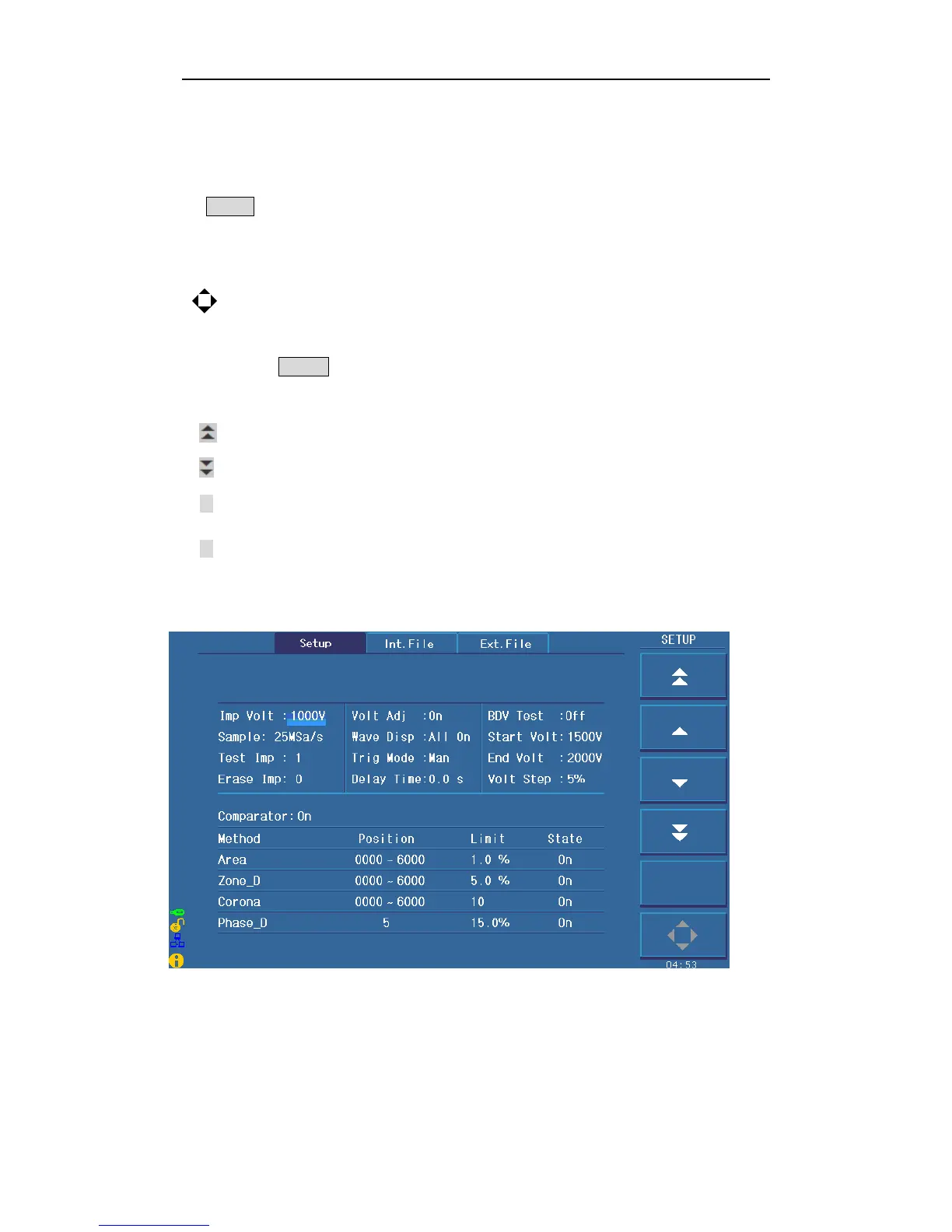
5.2 Measurement setup page
Figure 5-1 shows the measure setup page.
Figure 5-1 Measure setup page



 To Next Page