TH2883 Series Operation Manual Chapter 3 Panels and display
3-3
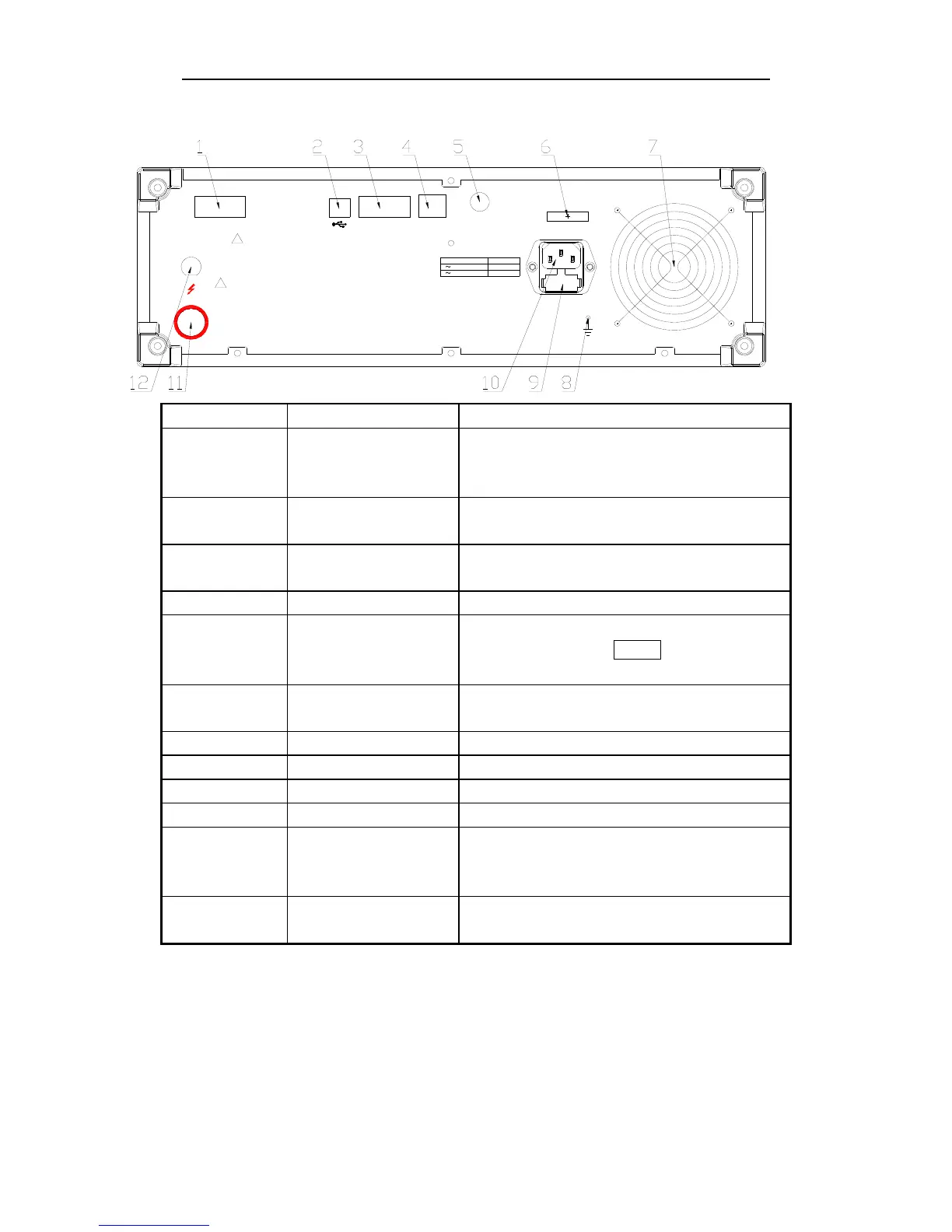
3.2 Rear panel
GND
FOOT.C
HANDLER
DEVICE
RS-232C
LAN
RATING
FUSE
T1AL
~
T2AL
110V
/ 60Hz
~
220V / 50Hz
HV
WARNING
THIS INSTRUMENT CONTAINS NO OPERATOR SERVICEABLE PARTS INSIDE;
REFER SERVICING TO SERVICE TRAINED PERSONNEL ONLY.
!
PLEASE READ MANUAL FOR SAFETY
DISCONNECT INPUT POWER BEFORE REPLACING FUSE FOR CONTINUED FIRE
PROTECTION,USE MANUAL SPECIFIED TYPE RATING FUSE ONLY.
!
Serial number Name Instruction
1 HANDLER interface Comparison results are output via the handler
interface. You can also start or stop a test through
the interface.
2 USB DEVICE interface A PC can remotely control TH2883 through the
USB DEVICE interface.
3 RS232C serial interface RS232C serial interface can be connected to an
external device for remote control and operation
4 LAN interface Be used to connect network cable.
5 FOOT CONTROL A footswitch can be used to start a measurement
instead of pressing the START key from the front
panel.
6 Name plate Show manufacture date, model, batch number,
manufacturer, etc.
7 Fan window Discharge heat.
8 Ground terminal Ground the instrument shell.
9 Fuse Fuse is used to protect the instrument .220V/1A
10 3-wire power socket Connect the power.
11 Test terminal High voltage output terminal, the function is the
same as that of the high voltage terminal on the
front panel.
12 Test terminal It is the GND terminal connected to the DUT with
11 and 16 on the front panel.
Table 3-2 Rear Panel Instruction



 To Next Page