TH2883 Series Operation Manual Chapter 5 Introduction to [SETUP]
5-8
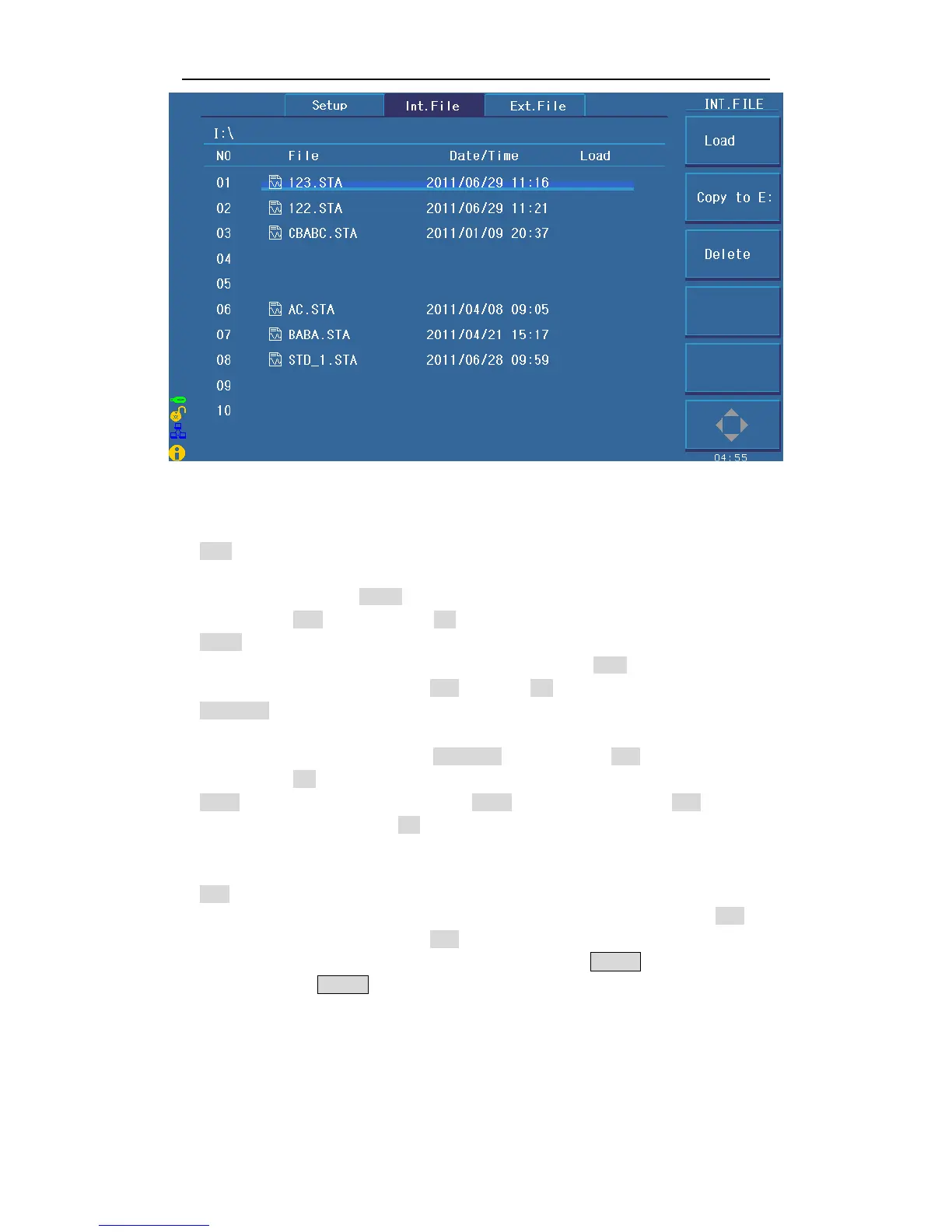
Figure 5-2 Internal File
Int. File consists of file number (NO), file name (File), Date/ Time, Load. Following soft keys
can be used in this page.
Load Press this key to load a file stored in the internal non-volatile memory. As
figure 5-2 indicates, using the arrow key or the roller can select the needed
file. Press LOAD to load the file. If the selected file is needed to load, press
YES; otherwise, press NO.
Undo Undo the loaded file. Using the arrow key or the roller can select the needed
file. If the selected file has been loaded, press Undo. If the selected file is
needed to undo, press YES; otherwise NO.
Copy to E: Copy internal files to external files (in U disk). Using the arrow key or the
roller can select the desired file. If the selected file is needed to copy to an
external U disk, press Copy to E: and then choose YES, otherwise choosing
NO to give up this operation.
Delete Delete stored files. Press the Delete soft key and then choose YES to confirm
this operation or NO to give up.
Note: If the selected file has been loaded, the starting-up load function
will be invalid.
Save Press this key to save a file. Move the arrow key to choose the catalog to
store the file. Press the SAVE soft key to store the file and then YES for
confirmation (Choose NO to give up the save operation.) The file can be
save after entering a file name and pressing the ENTER button. If user press
the ENTER button without entering the file name, the file will be saved as



 To Next Page