28
CHART FUNCTIONS UNIQUE TO THE MC-4S
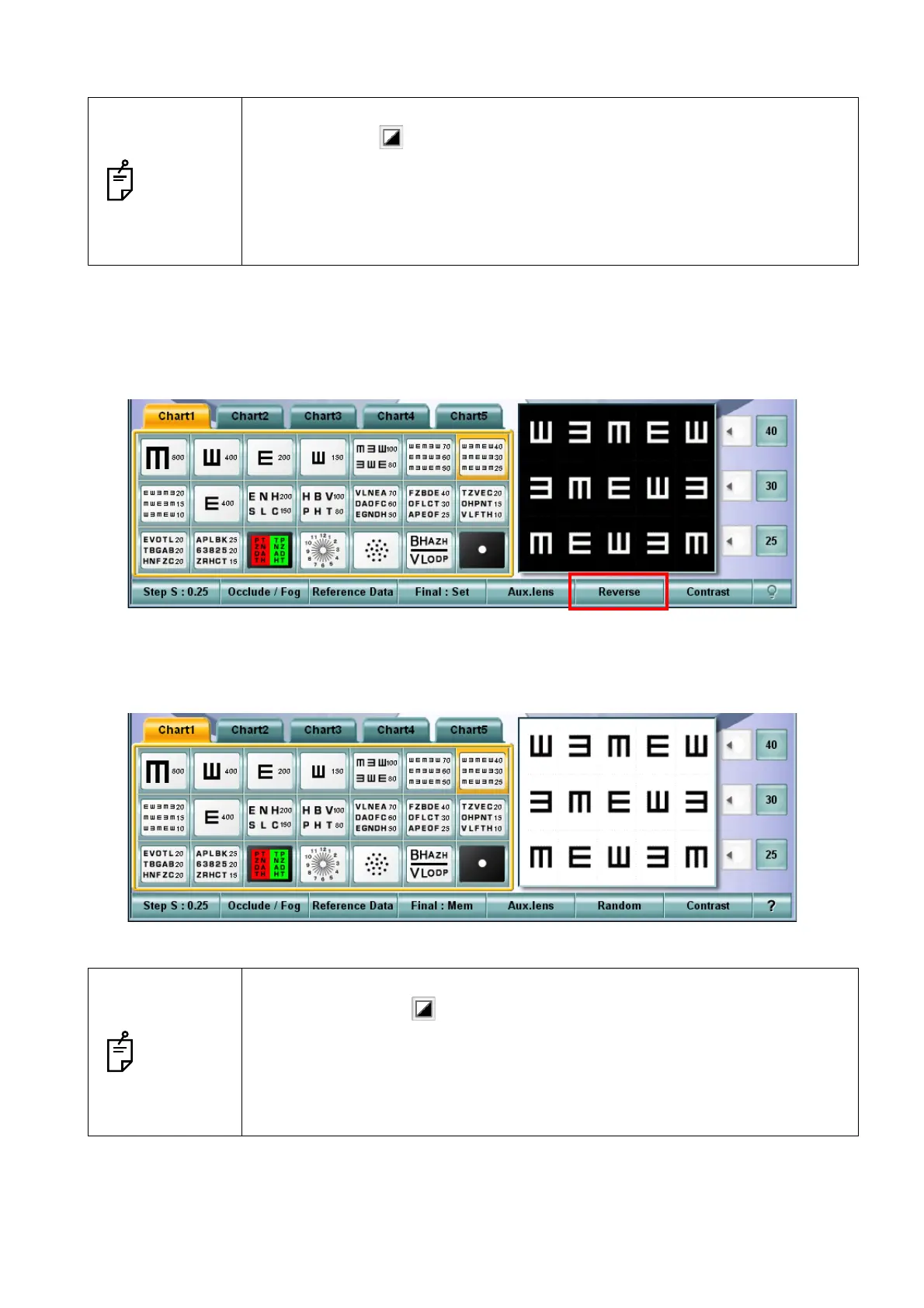
Canceling the reversed black-and-white display condition
1 Press the [Shift] key on the KB-50S and touch the [Reverse] button among the function buttons
at the bottom of the screen.
2 The reversed black-and-white condition of the chart indicated on the MC-4S is canceled.
At the same time, the reversed condition of the chart is also canceled on the chart check display
area of the KB-50S.
NOTES
• To reverse the black-and-white condition through the mouse/personal com-
puter, click the button displayed on the test screen of Step 2.
• The black-and-white reverse mode is kept while the following operations are
being executed.
• Changing to any other visual acuity chart applicable to this reverse mode
• Setting and moving the vertical mask, horizontal mask and character mask
• Executing the random mode
NOTES
• To cancel the reversed black-and-white condition through the mouse/personal
computer, click the button displayed on the test screen of Step 2.
• The black-and-white reverse mode is also canceled by the following opera-
tions.
• Changing to the chart which is not applicable to this reverse mode
• Setting the RG mask
• Setting the contrast mode



 To Next Page