32
CHART FUNCTIONS UNIQUE TO THE MC-4S
Setting "Plural rate character contrast"
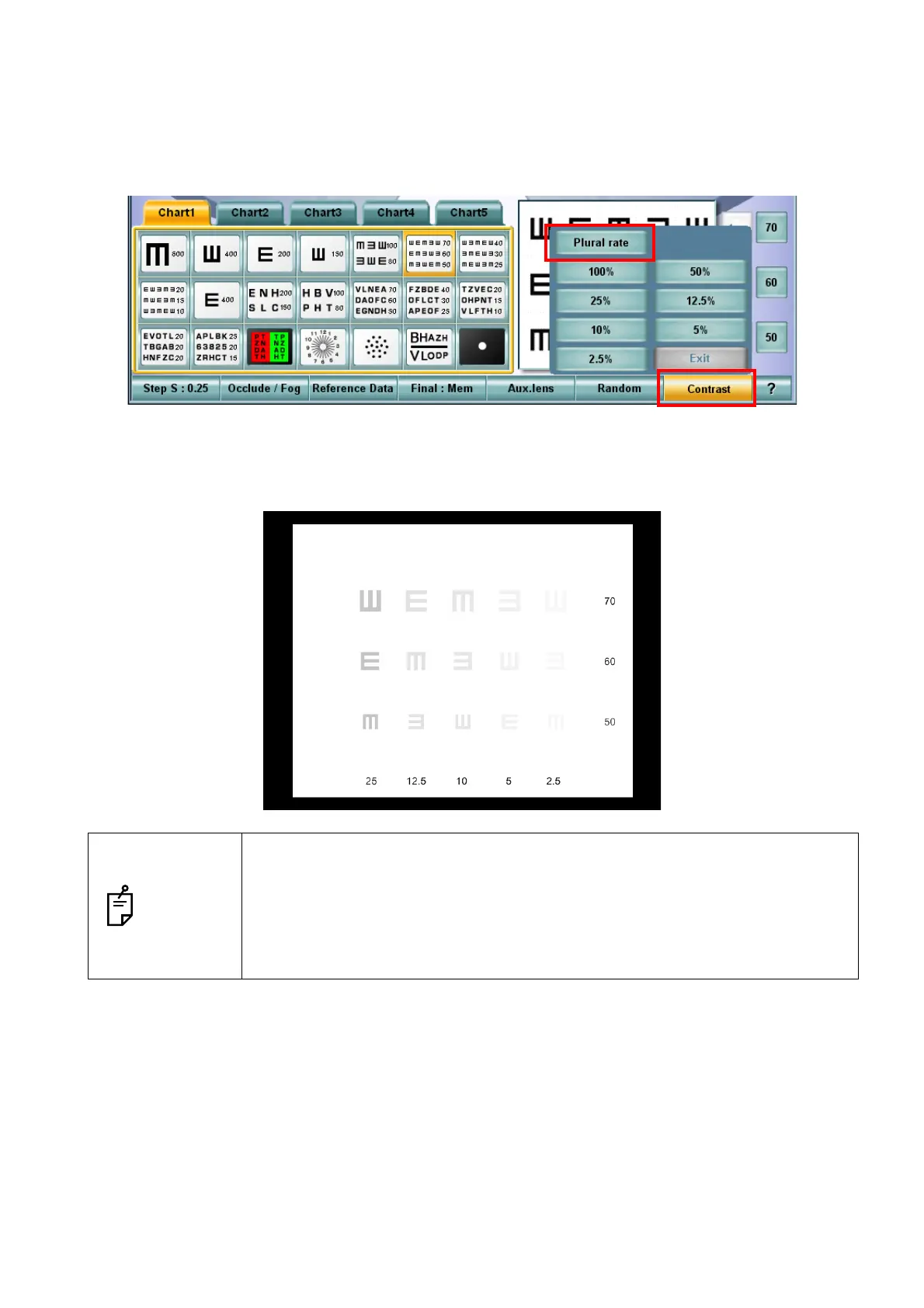
1 Select the visual acuity chart applicable to the "Plural rate character contrast" function.
2 Touch the [Contrast] button among the function buttons at the bottom of the screen on the KB-
50S to display the contrast setting menu.
3 Touch the [Plural rate] button in the contrast setting menu. As shown below, on the MC-4S, the
chart is displayed under the condition that the columns are different in contrast by stages, 25%,
12.5%, 10%, 5% and 2.5% from the leftmost.
NOTES
• When operating the CV system through a mouse/personal computer, you can
change the contrast with the same procedure.
• When changing the chart to another that is applicable to this mode, the "Plural
rate character contrast" mode is kept.
• While the "Plural rate character contrast" mode is being executed, you cannot
set the vertical, horizontal, character and RG masks.



 To Next Page