© Copyright 2013 TRENDnet. All Rights Reserved.
TRENDnet User’s Guide
TEW-810DR
47
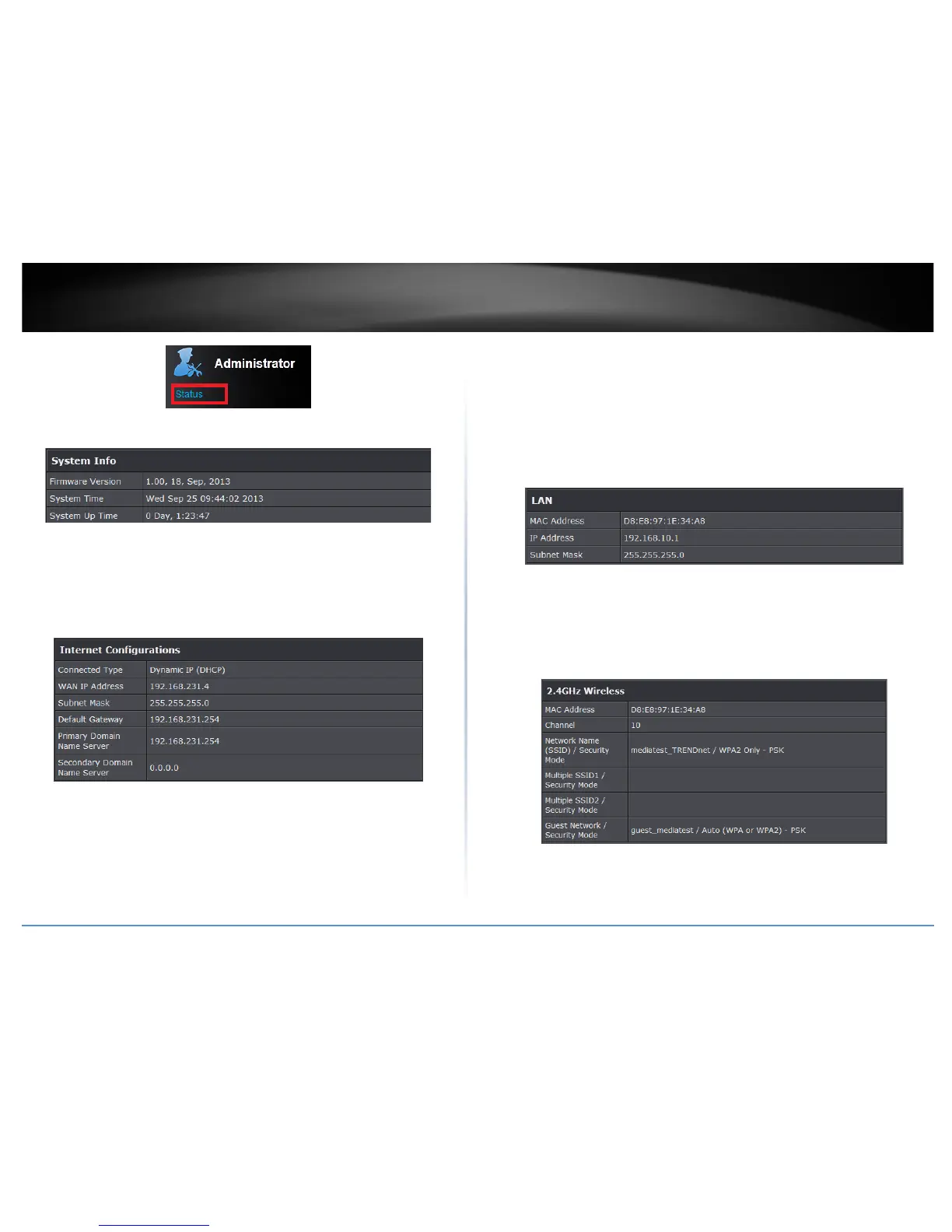
System Info
• Firmware Version – The current firmware version your router is running.
• System Time: The current time set on your router.
• Router Up Time – The duration your router has been running continuously without
a restart/power cycle (hard or soft reboot) or reset.
Internet Configurations
• Connected Type: The WAN connection type applied on your router.
• WAN IP Address: The current IP address assigned to your router WAN port or
interface configuration.
• Subnet Mask: The current subnet mask assigned to your router WAN port or
interface configuration.
• Default Gateway: The current gateway assigned to your router WAN port or
interface configuration.
• Primary/Secondary Domain Name System: The current DNS address(es) assigned
to your router port or interface configuration.
• Renew (DHCP WAN Type): Click this option to renew your WAN IP address.
• Release (DHCP WAN Type): Click this option to release the WAN IP address of your
router.
• Connect (PPPoE WAN Type): Click this option to connect to your DSL ISP
• Disconnect (PPPoE WAN Type): Click this option to disconnect from your DSL ISP.
LAN Information
• MAC Address: The current MAC address of your router’s wireless or interface
configuration.
• IP Address: Displays your router’s current IP address.
• Subnet Mask: Displays your router’s current subnet mask.
2.4GHz Wireless
• MAC Address: The MAC address of your router’s wireless LAN or interface
configuration.
• Channel: Displays the current wireless channel your router is operating.










 To Next Page