© Copyright 2013 TRENDnet. All Rights Reserved.
TRENDnet User’s Guide
TEW-810DR
48
• Network Name (SSID)/ Security Mode: Displays the current wireless network name
assigned to your router and the wireless security applied to the SSID
• Multiple SSSID/ Security: Displays the current wireless network name assigned to
your router and the wireless security applied to the SSID
• Guest Network/ Security Mode: Displays the current wireless network name
assigned to your router and the wireless security applied to the SSID
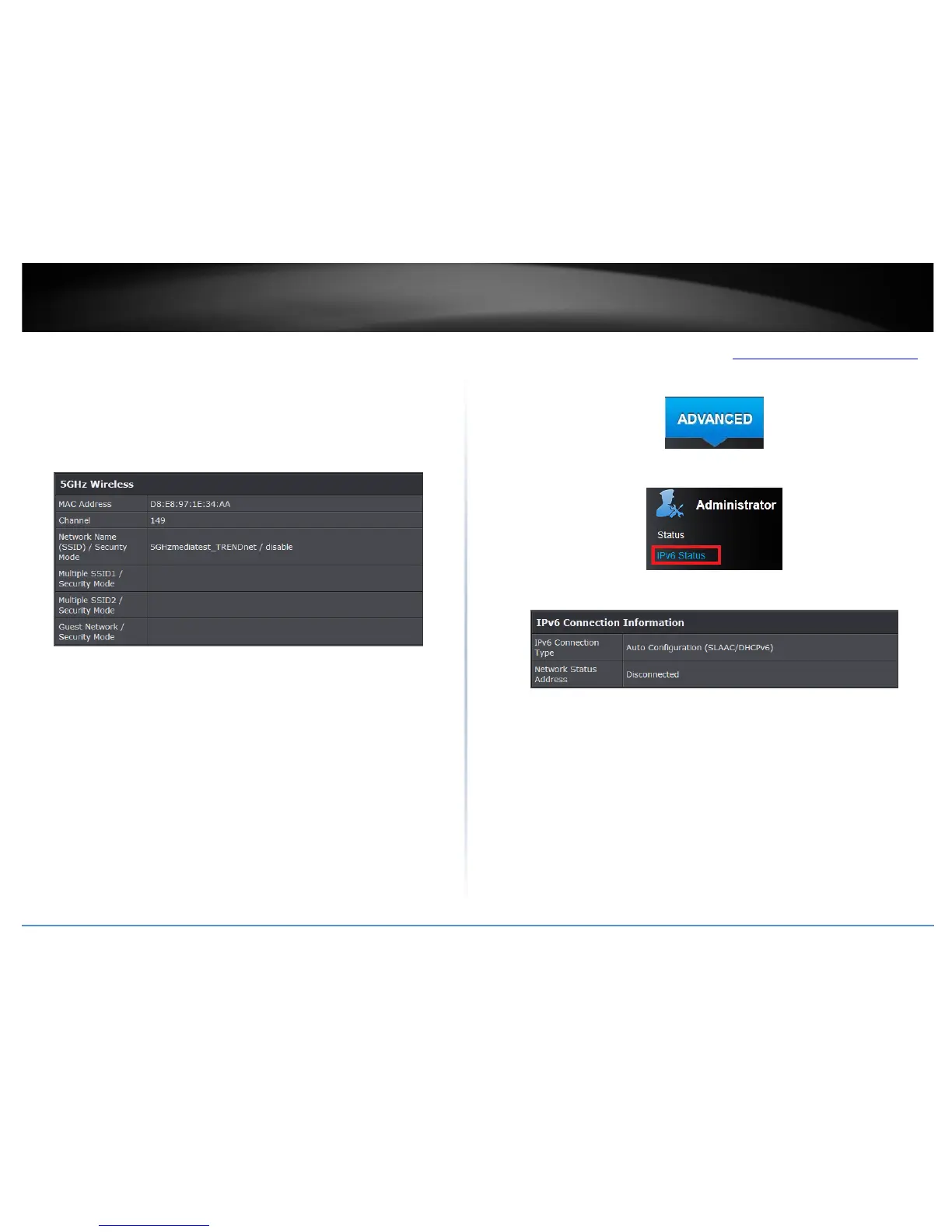
5GHz Wireless LAN
• MAC Address: The MAC address of your router’s wireless LAN or interface
configuration.
• Channel: Displays the current wireless channel your router is operating.
• Network Name (SSID)/ Security Mode: Displays the current wireless network name
assigned to your router and the wireless security applied to the SSID
• Multiple SSSID/ Security: Displays the current wireless network name assigned to
your router and the wireless security applied to the SSID
• Guest Network/ Security Mode: Displays the current wireless network name
assigned to your router and the wireless security applied to the SSID
IPv6 Status
Advanced > Administrator > IPv6 Status
You can view the current IPv6 status on your router.
1. Log into your router management page (see “Access your router management page
”
on page 15).
2. Click on the Advanced tab.
3. Click on the Administrator section and click on IPv6 Status.
IPv6 Connection Information
• IPv6 Connection Type: The type of IPv6 being used on your router.
• Network Type Status: Your IPv6 network status.
• Renew (DHCP WAN Type): Click this option to renew your WAN IP address.
• Release (DHCP WAN Type): Click this option to release the WAN IP address of your
router.







 To Next Page