© Copyright 2013 TRENDnet. All Rights Reserved.
TRENDnet User’s Guide
TEW-810DR
49
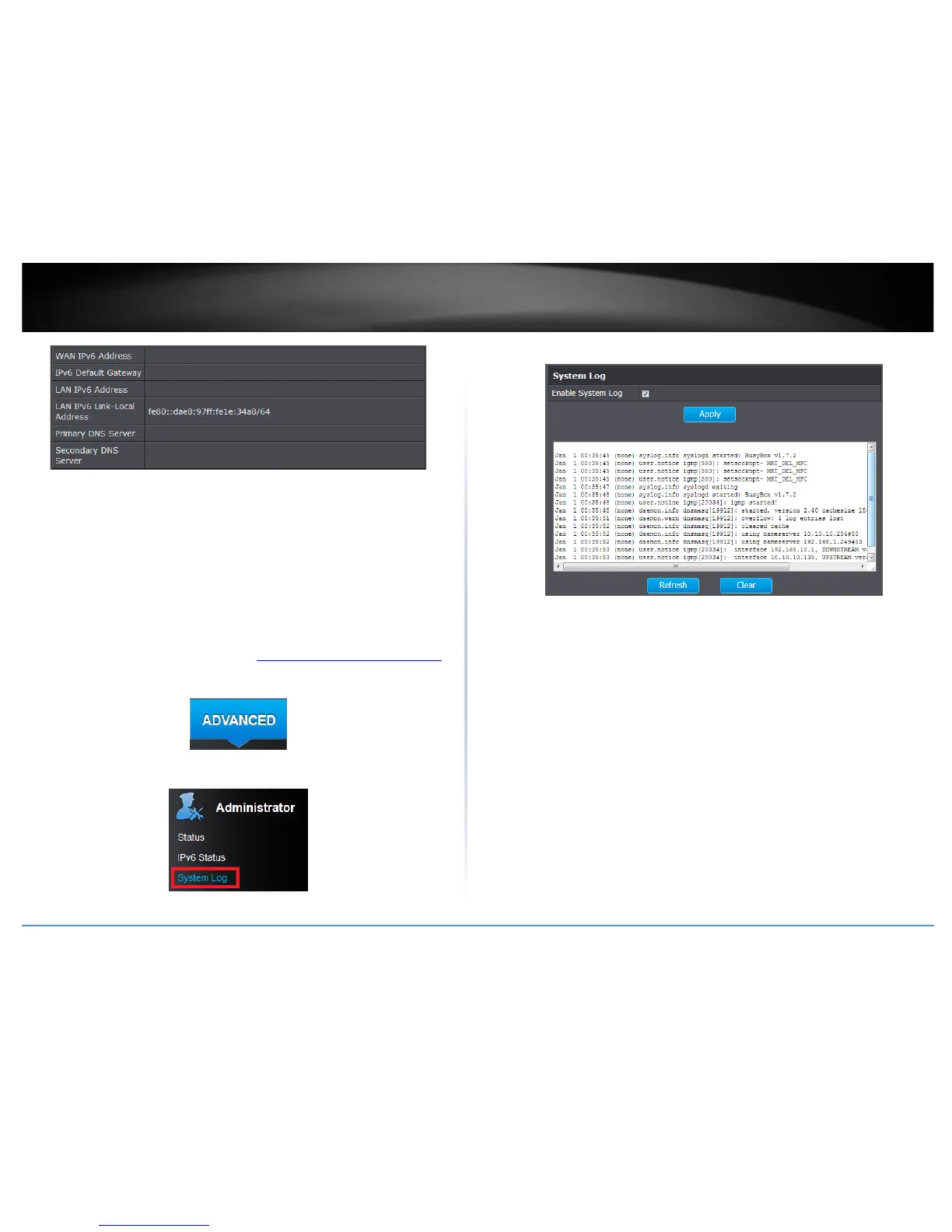
• WAN IPv6 Address: Your IPv6 WAN IP address
• IPv6 Default Gateway: IPv6 default gateway
• Network Prefix: IPv6 prefix used
• Primary/Secondary IPv6 DNS Server: IPv6 DNS server
View your router log
Administrator > System Log
Your router log can be used to obtain activity information on the functionality of your
router or for troubleshooting purposes.
1. Log into your router management page (see “Access your router management page
”
on page 15).
2. Click on the Advanced tab.
3. Click on the Administrator section and click on System Log.
4. Select Enable System Log and click Apply to save settings.
• Refresh: Click to refresh screen.
• Clear: Click to clear the screen.










 To Next Page