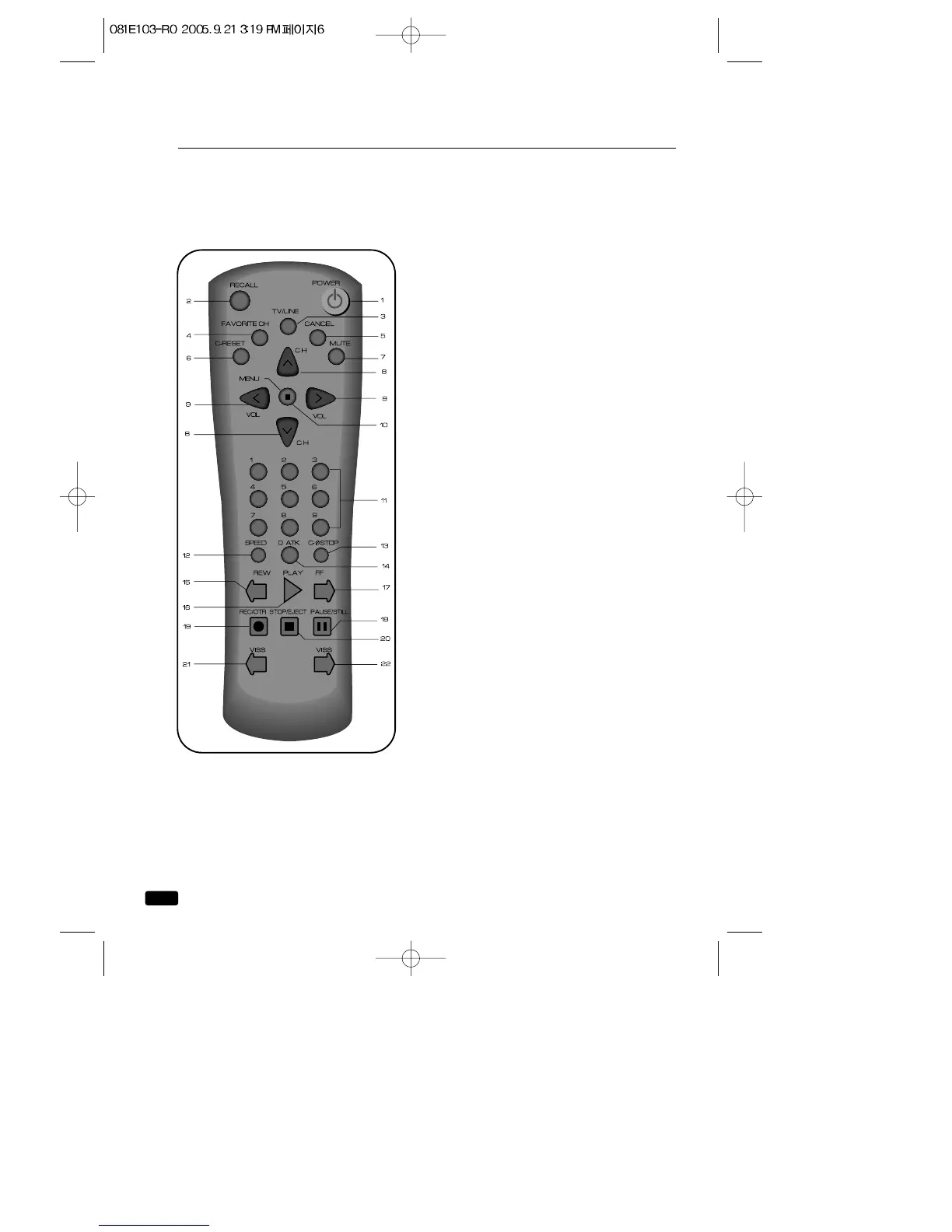
Your Remote Controller
1. POWER
Press this button to turn your
TV/VCR on or off.
2. RECALL
Press this button to display the cur-
rent time, the counter, channel num-
ber and other status items.
3. TV/LINE
Press this button to select between
viewing the signal coming from the
antenna terminal (TV) or the signal
coming from the A/V jack (LINE).
4. FAVORITE CH
Press this button to return to the
previous channel you were watching.
5. CANCEL
Press this button to erase timer pro-
gram recording settings.
6. C-RESET
Press this button to reset the
counter to 0:00:00.
7. MUTE
Press to turn the TV/VCR’s sound on
and off.
8. ▲CH▼(TRK)
Press these buttons to change chan-
nels on your TV/VCR, or select items
in the menu system, or to adjust the
tracking of a video tape during play-
back.
9. ◀VOL▶
Press these buttons to change your
TV/VCR’s volume, to activate selec-
tions in the menu system, or to
change audio and video settings.
6
Chapter 1 : Overview of Your Equipment



 To Next Page