23
Chapter 4 : Operating Your VCR
Using the Counter (Zero Stop)
The VCR counter can be used to keep track of your position on the
tape. You can also use it to quickly return to a particular point on the
tape. The counter cannot be displayed unless there is a cassette tape
in the TV/VCR.
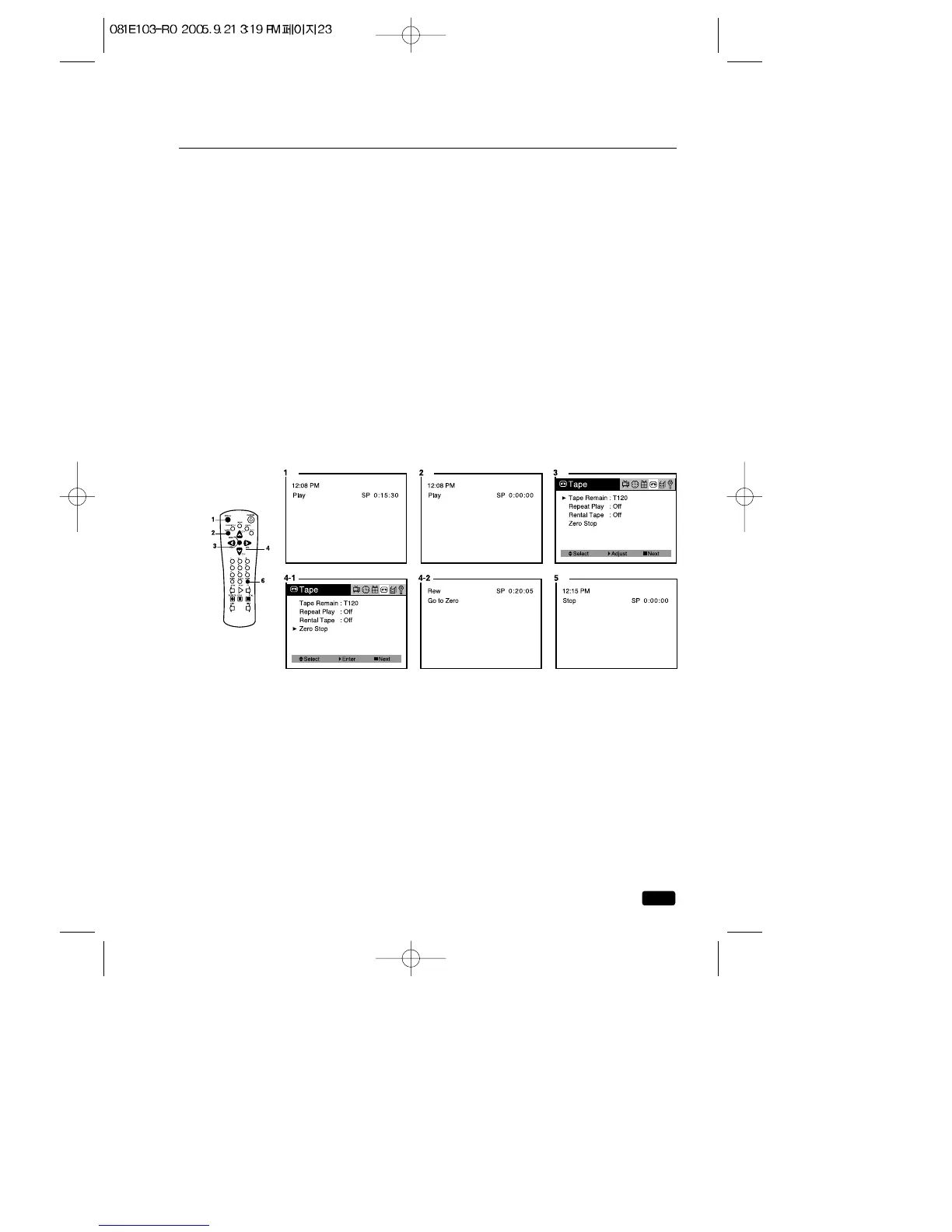
1.To display the counter, press the RECALL button until the counter is
displayed in the right hand corner.
2.To reset the counter, press the C-RESET button on the remote con-
trol (0:00:00). The counter is also reset when you put a new cassette
in your TV/VCR.
3.Press the MENU button until “Tape” menu will be displayed.
4.After play the tape, use the ▲CH▼ buttons to select the “Zero stop”.
If the press the VOL▶ button, you can quickly return to the 0:00:00.
5.The TV/VCR will rewind until it reaches the 0:00:00 mark on the
counter, then it will stop.
You can cancel the search for 0:00:00 by press the STOP button.
6.Press the C-ØSTOP button on the remote control, you can quickly
return to the 0:00:00.



 To Next Page