25
Chapter 5 : Using Timer Functions
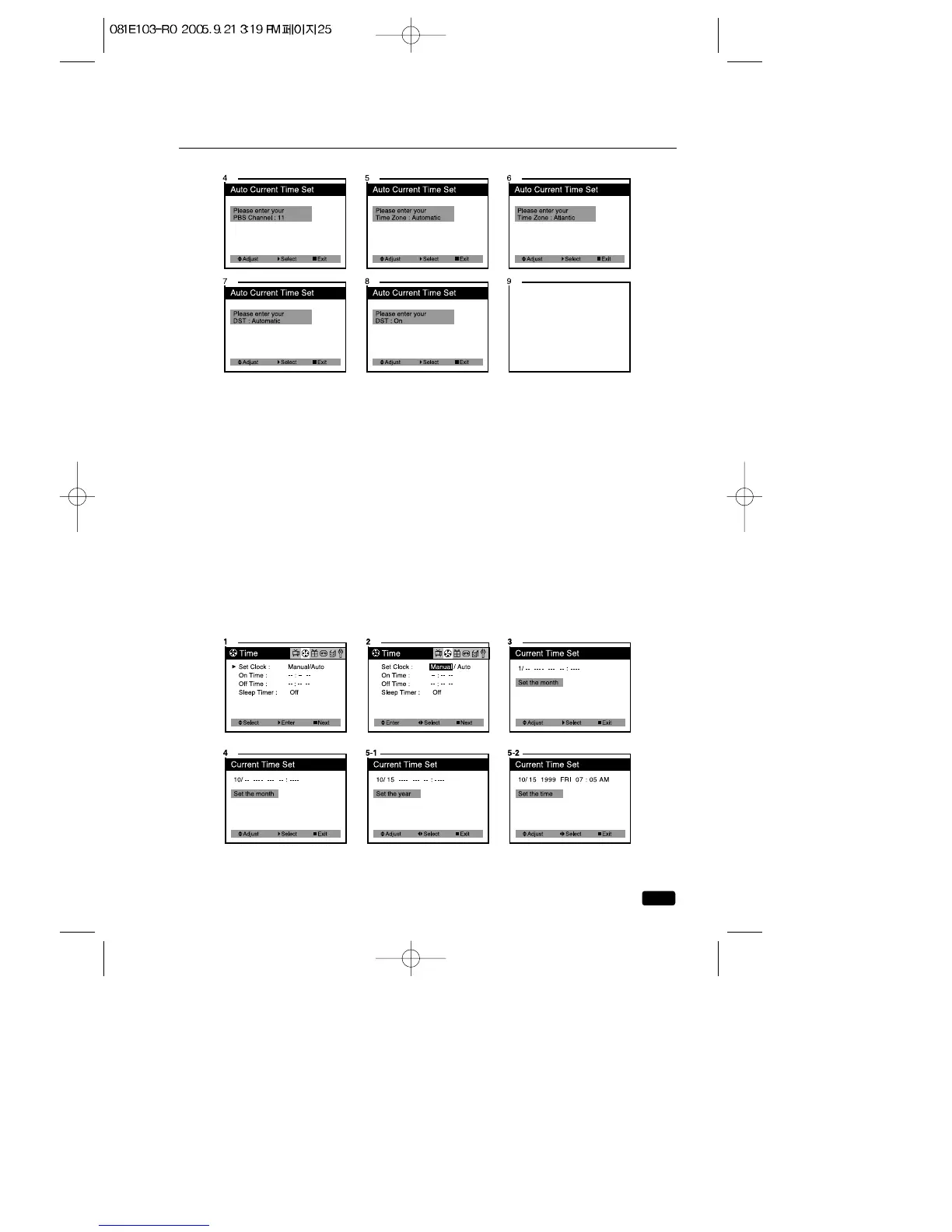
Setting the Clock Manually
If you are unable or not interested in using the Auto Clock feature, you
can set your TV/VCR’s clock manually.
1.With the TV turned on, press the MENU button until “Time” menu will
be displayed.
2.The “Set Clock” item will be selected. Press the VOL ▶button once,
then “Manual” will be displayed in RED.
3.Press the ▲CH▼ buttons to display the “Current Time Set” mode.
4.Use the ▲CH▼ buttons to set the month.
5.Press the VOL ▶ button to select the day, year and time, use the
▲CH▼buttons to setting.
If you hold down either ▲CH or CH▼button, the corresponding num-
bers will change more quickly.
6.When the clock is set correctly, press the ■ MENU button to exit.



 To Next Page