15
Chapter 3 : Operating Your TV
Changing the TV/VCR's Channel Memory
Your TV/VCR's memory determines the channels that are available
using the ▲CH▼buttons. You can add channels to this memory or
remove them from memory. If a channel is removed from memory, you
can tune to it with the number buttons, but you cannot tune to it with
the ▲CH▼buttons.
If there are just one channel memorized, then the Add/Delete Channels
function will search the whole channels. But if there are two or more
channel memorized, then the Add/Delete Channels function will search
the memorized channels only.
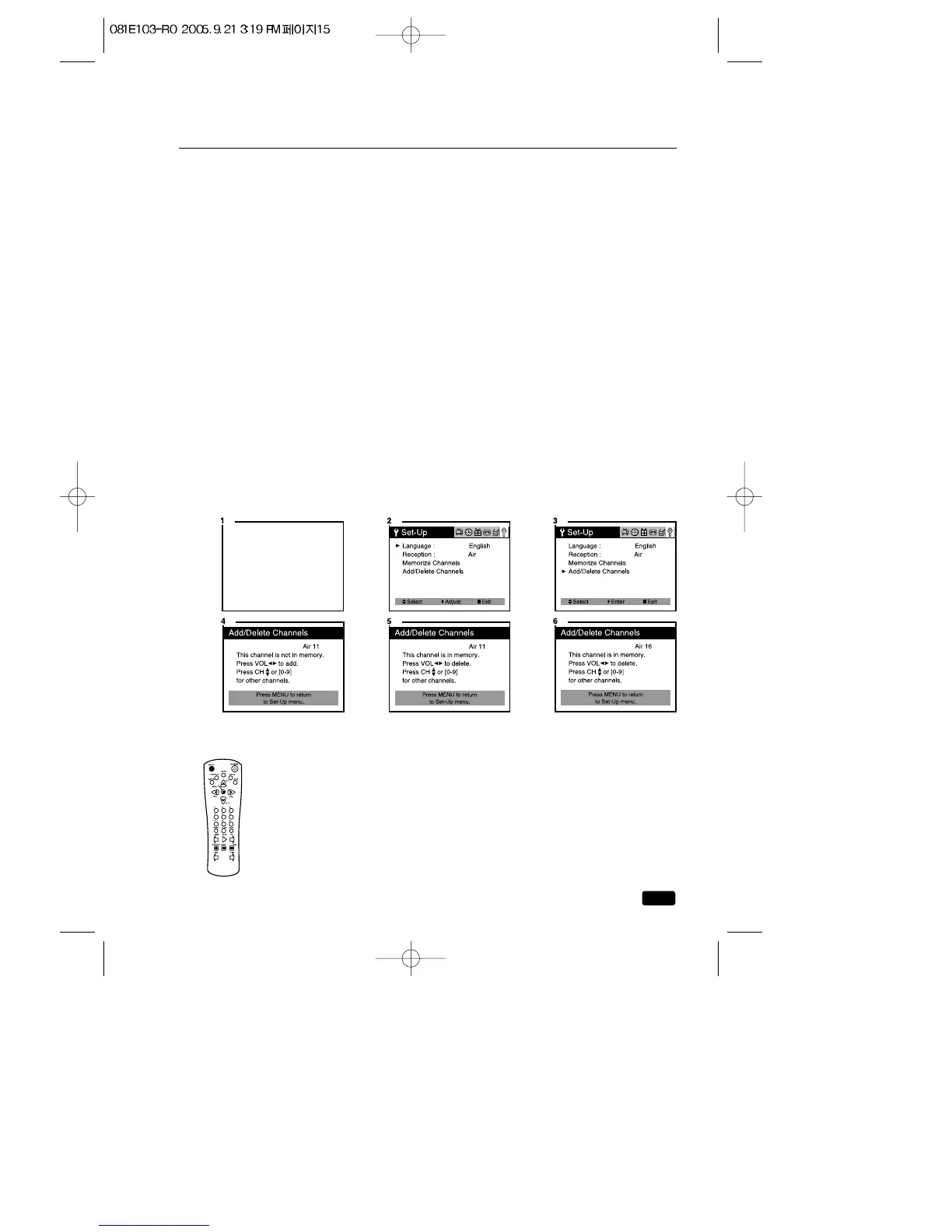
Adding/Deleting a channel to memory
1.Use the number buttons to tune to the channel.
2.Press the MENU button until “Set-Up”menu will be displayed
3.Use the ▲CH▼ buttons to select “Add/Delete Channels”, then use
the VOL▶ button to enter the “Add/Delete Channels”process.
4.If the channel is not in memory, then use the ◀VOL▶ buttons to add
the channel from memory.
5.If the channel is in memory, then use the ◀VOL▶ buttons to delete
the channel from memory.
6.If you are going to delete other channel, then press the ▲CH▼but-
tons until desired channel is selected. And press the ◀VOL▶ buttons
to delete the channel.
7.Press MENU to exit.
Displaying the TV/VCR’s Status during TV Operation
1. To quickly see the current channel number and status,
press RECALL button on the remote control.
The current channel number and status will be displayed.



 To Next Page