MAN205-0195042EN Rev. A Aug. 2011
Page 61 of 137 pages
5.2 Printer Handling
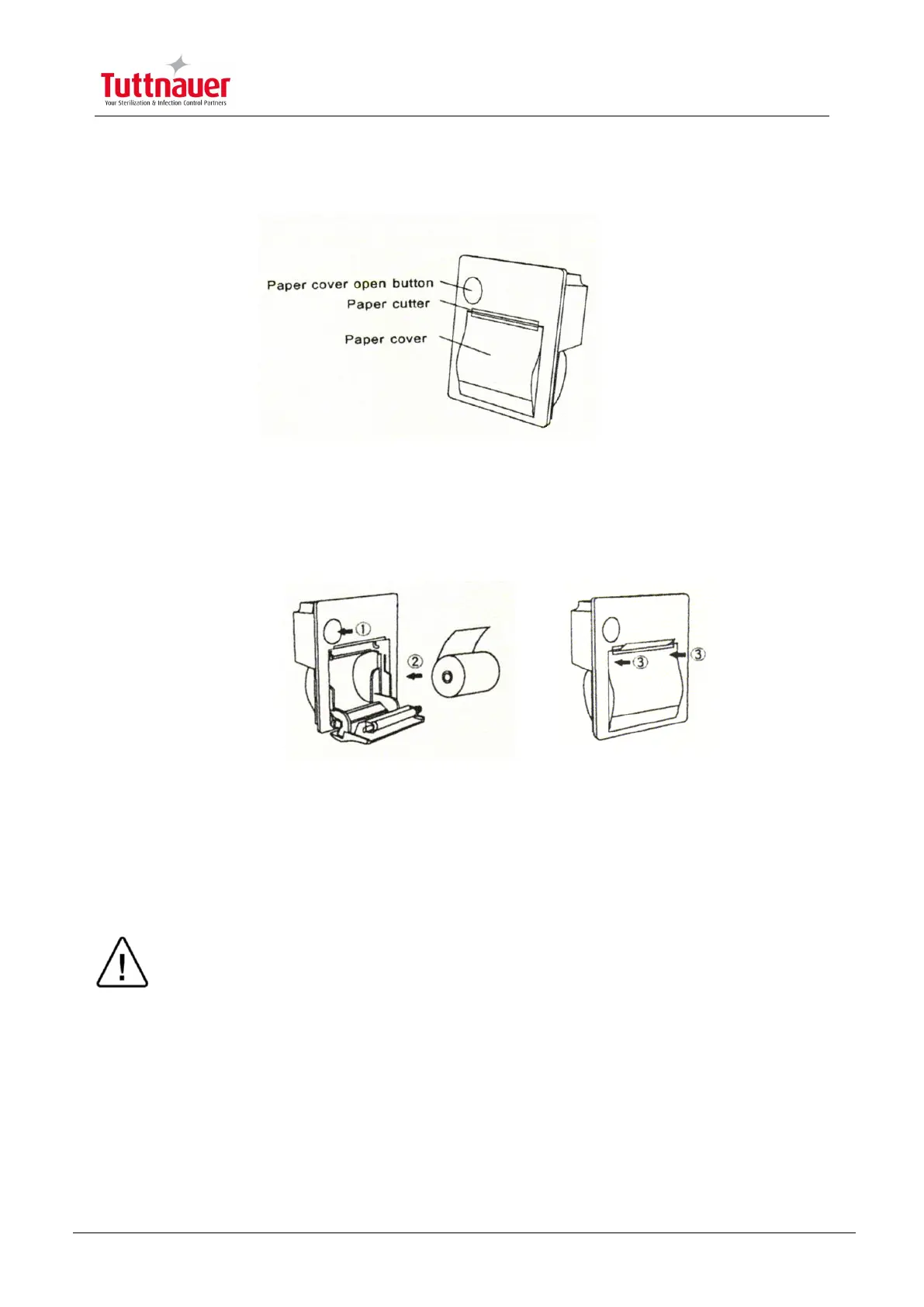
Setting Paper
1. Press the paper cover open button, and open the paper cover. Handle the
paper cutter carefully not to cut your hand.
2. Set a paper roll as shown in the figure.
3. Close the paper cover by pressing both ends of the cover with the tip end of
the paper emerging from the cutter.
Maintenance
Wipe off the soiling on the printer surface with a dry soft cloth with a weak neutral
detergent. After that, wipe the printer with a dry cloth.
Test points
In the test print mode, characters printable with the printer (ANK, KanJi) and bar code
are outputs. Turning power ON with the FEED IN signal kept low triggers the test print.
Caution!
Never disassemble the printer. Failure to follow this instruction may cause
overheating or burning of the printer or the AC adapter. Or an electric shock,
which may lead to fires or accidents.
Never use the printer in a place of extreme humidity or any place where it can
possibly be splashed by any liquids. If any liquids get into the printer, it could
lead to fire, electric shock, or other serious accidents.
Never touch the thermal head immediately after printing because it becomes very
hot. Make sure that the thermal head is cool before setting papers or cleaning the
thermal head.



 To Next Page