Chapter 11. Inverter Monitoring System via “www.inverters.pl”
11. Inverter Monitoring System via “www.inverters.pl”
11.1. Creating an user account
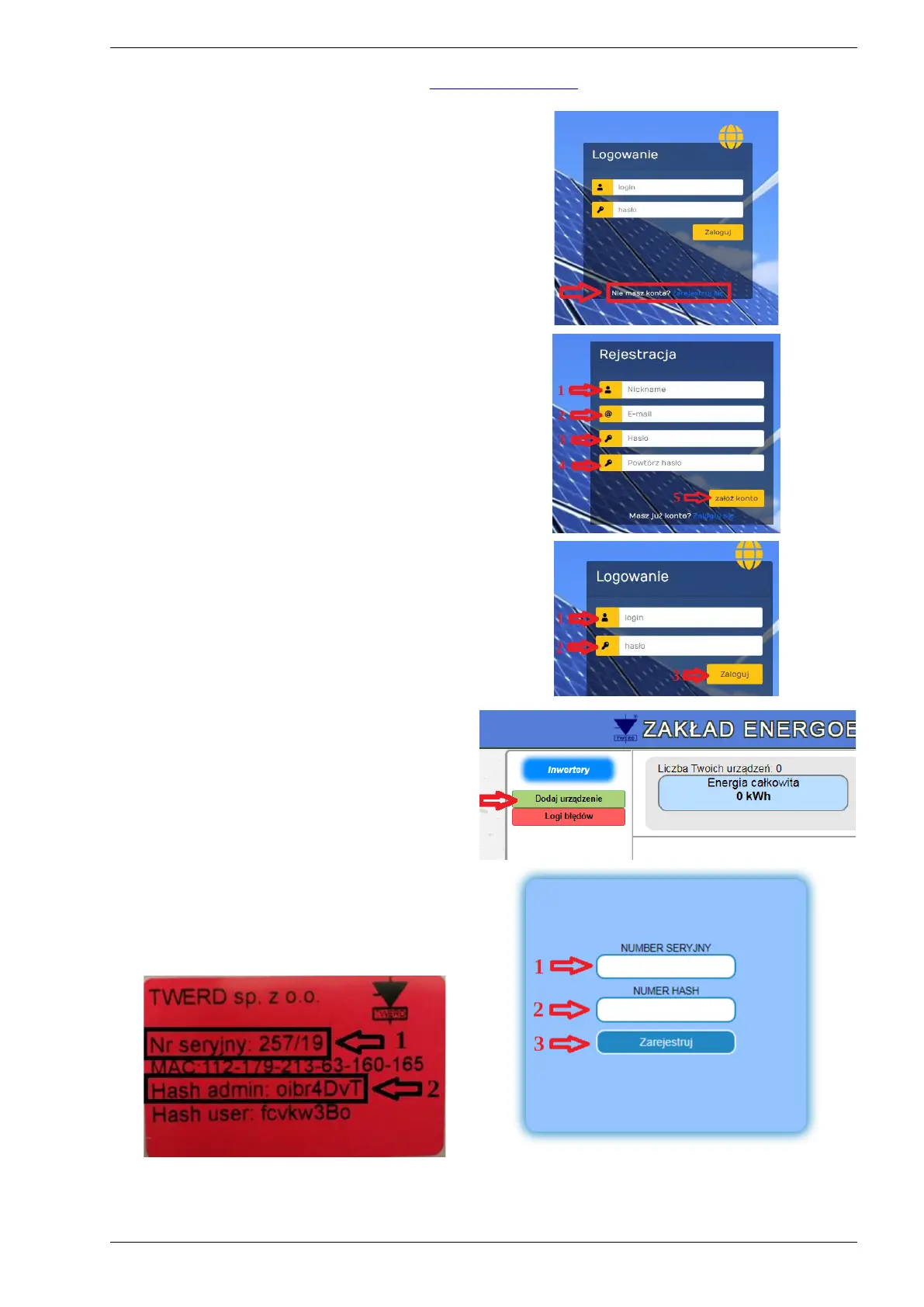
When you enter the www.inverters.pl web site,
on the main page click to “Zarejestruj sie” and:
1-Define an username.
2-Enter e-mail address.
3-Define a password.
4-Re-enter password.
5-Click to “załóż konto”
After creating an account go back to main page
for signing in.
11.2. Login
1-Enter user name.
2-Enter password.
3-For log-in click to “zaloguj”
11.3. Adding the inverter to the system to
monitor its operation
Adding inverters to the system for remote
monitoring;
Click to “dodaj urzadzenie”
1 - Enter the serial number(Nr seryjny) of the
device.
2 - Enter the hash admin numbers.
3 - For register click to “Zarejestruj”
Note: Serial number and hash admin numbers will be attached on the user manual.
After whole processes users are able to monitoring their devices via www.inverters.pl web site.
PS100 – User manual 45


 To Next Page