Chapter 11. Inverter Monitoring System via “www.inverters.pl”
1 On this label users can see registered inverters and when you click one of them you can see details of
inverter on the main screen.
2 Users can check any previous specific date parameters by entering date and clicking to
“wyswietl dane z dnia”
3 Users can check last week parameter chart by clicking to “ostatni tydzien”
4 Users can check any monthly chartered datas. To see montly chart by “+” and “-“ buttons can set month
and click to upper button “miesiac …”
5 Users can check any yearly chartered datas. To see yearly chart by “+” and “-“ buttons can set month
and click to upper button “rok …”
6 Clicking by “moc calkowita” users could see total power chart
7 Clicking by “string 1” users could see power chart of string 1
8 Clicking by “string 2” users could see power chart of string 2
9 Clicking by “string 3” users could see power chart of string 3
10 Clicking by “pred. wiatru” users could see wind speed chart
11 Clicking by “F turbiny” users could see frequency of wind turbine chart
12 From first run-up to present total energy generation
13 Present wind speed
14 Present voltage value of input 1
15 Present current value of input 1
16 Present power value of input 1
17 Present voltage value of input 2
18 Present current value of input 2
19 Present power value of input 2
20 Present frequency of wind turbine
21 Energy on a selected day
22 To register new inverter
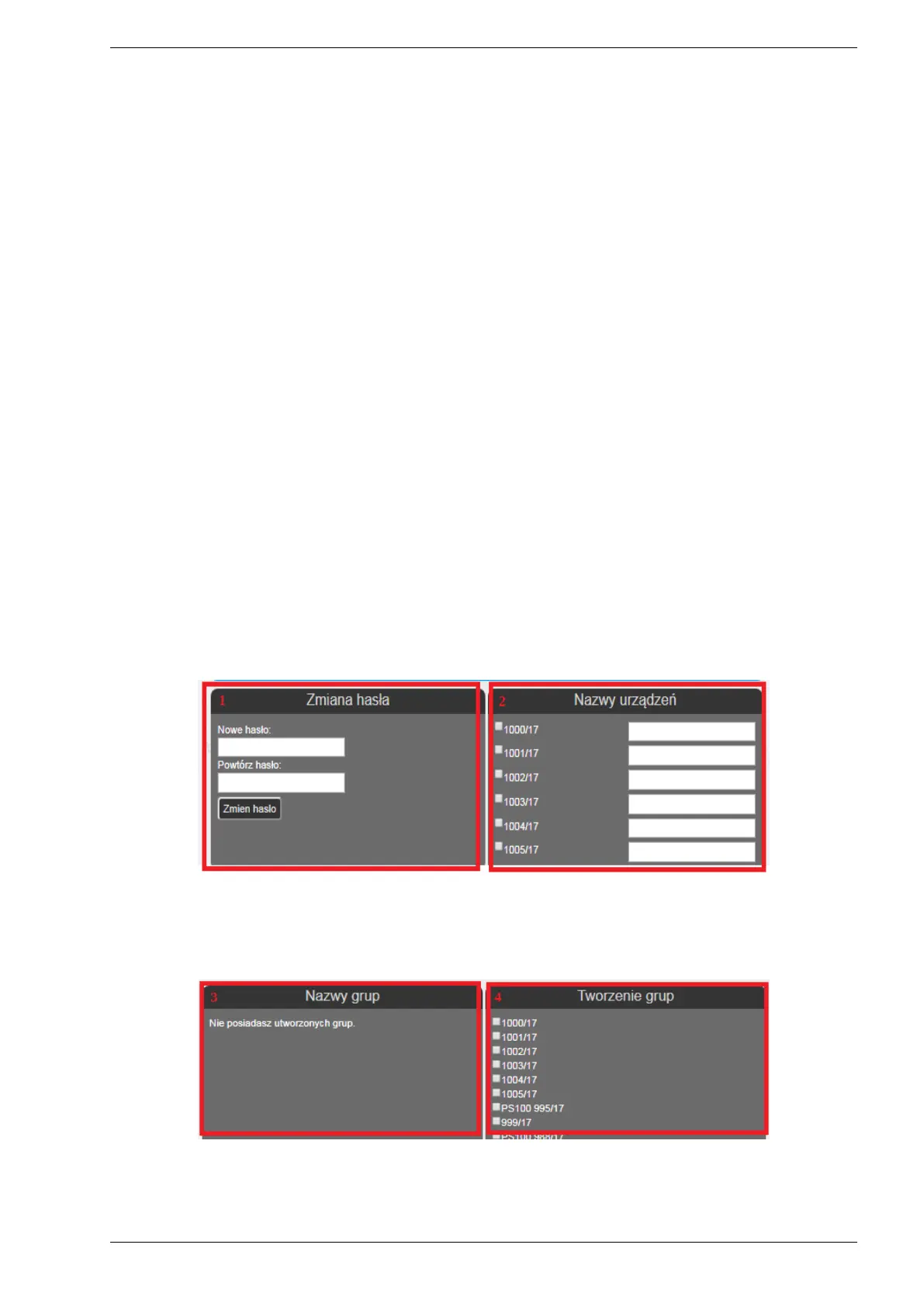
11.4. Account Settings
1 - In this menu users can change account password.
2 - In this menu users replace name of inverter. To change the name of inverter user should choose related
inverter and insert the box new name than click to save button “zmien zaznaczone”.
3 - Nazwy grup - users can see and manage created inverter groups.
PS100 – User manual 47


 To Next Page