Ubee Interactive Using the Time Option
Ubee DDW3611 Wireless Cable Modem Gateway Subscriber User Guide • November 2012 39
example.
5.6 Using the Time Option
The Time option allows you to configure the system time obtained from network servers
via Simple Network Time Protocol (SNTP).SNTP is a protocol for synchronizing the clocks
of computing devices over networks. The device must be reset for changes to take effect.
To configure system time:
1. Click Gateway from the main menu.
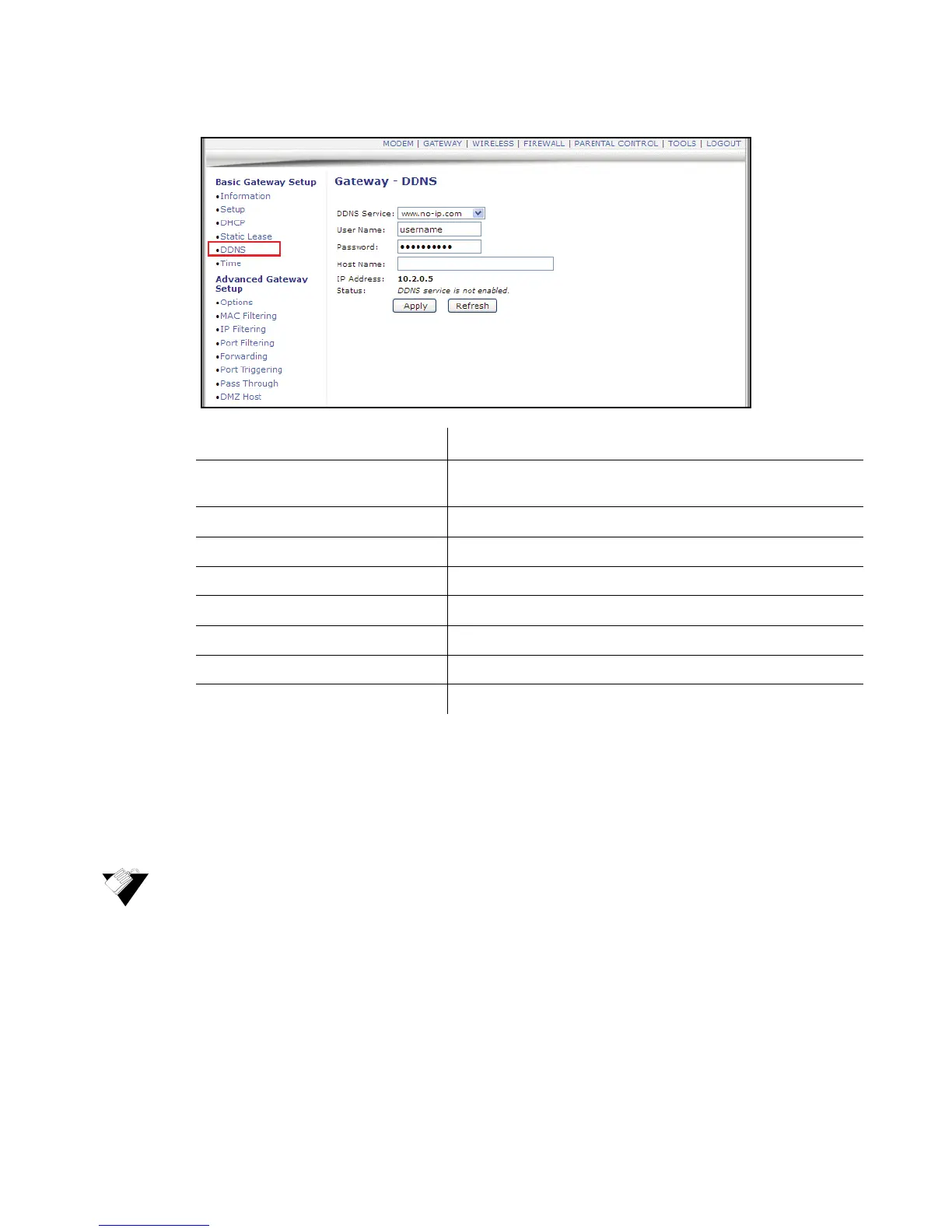
2. Click Time from the left side menu. Field descriptions are listed below the screen
example.
Label Description
DDNS Service Enables or disables the DDNS service. When enabled, this
service is available from www.dynDNS.org or www.no-ip.com.
User Name Defines the user name for the DDNS account.
Password Defines the password for the DDNS account.
Host Name Defines the host name for the DDNS account.
IP Address Displays the IP address for the DDNS account.
Status Displays if the DDNS service is enabled or disabled.
Apply Saves all screen changes when clicked.
Refresh Renews the screen with the latest information.


 To Next Page