Using the Remote Log Option Ubee Interactive
74 Ubee DDW3611 Wireless Cable Modem Gateway Subscriber User Guide • November 2012
7.3 Using the Remote Log Option
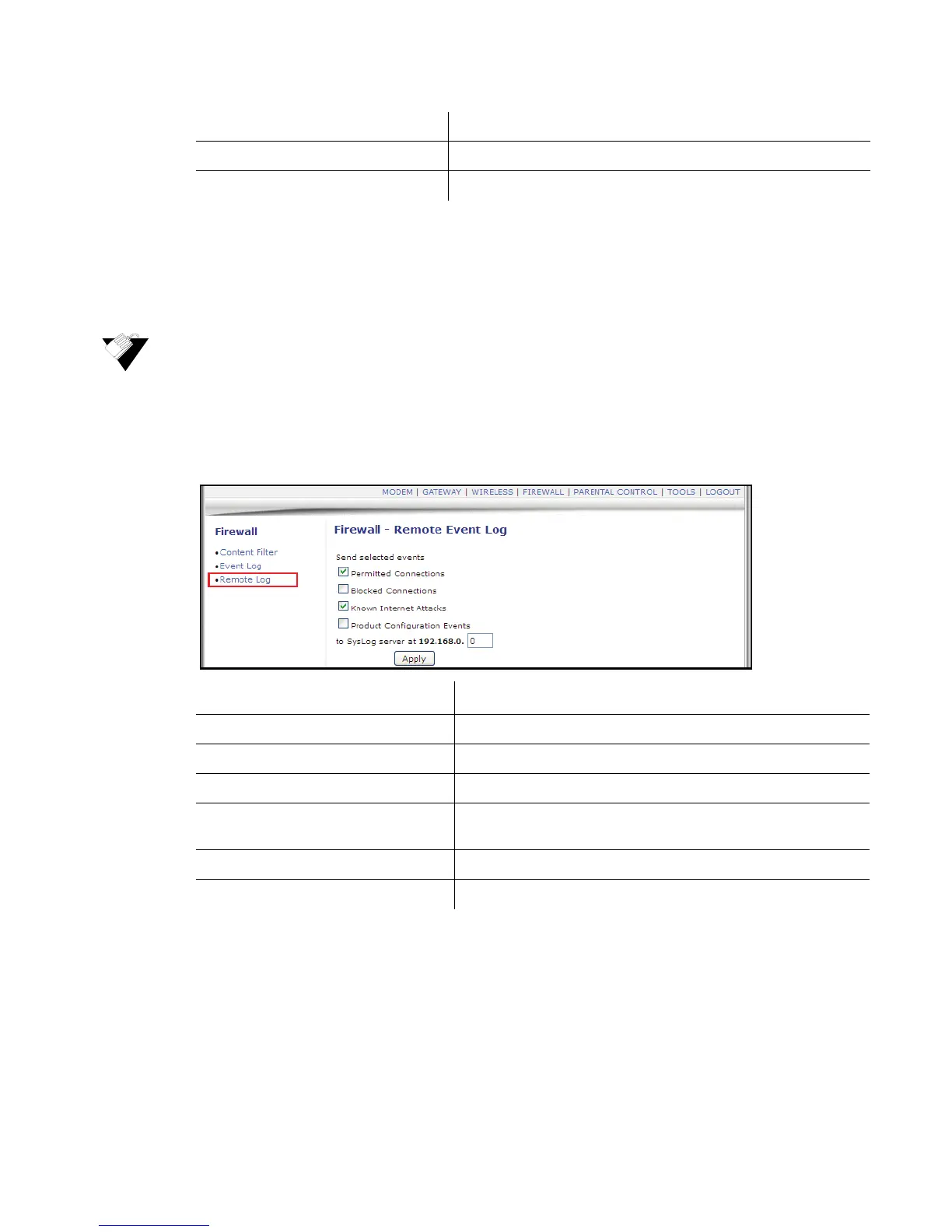
The Remote Log option allows you to configure events to be sent to a local SysLog
server.
To configure the firewall remote log:
1. Click Firewall from the main menu.
2. Click Remote Log from the left side menu. Field descriptions are listed below the
screen example.
Apply Saves the settings and completes the setup.
Email Log Sends the log to the specified email address.
Clear Log Deletes the log.
Label Description
Permitted Connections Logs all access attempts that are allowed by the firewall.
Blocked Connections Logs all access attempts that are blocked by the firewall.
Known Internet Attacks Logs all known attacks from the Internet.
Product Configuration Events Logs when the DDW3611 is configured/modified by a user or
administrator.
SysLog server Defines the IP address of the Syslog server.
Apply Saves the remote log configuration when clicked.


 To Next Page