Using the Port Triggering Option Ubee Interactive
52 Ubee DDW3611 Wireless Cable Modem Gateway Subscriber User Guide • November 2012
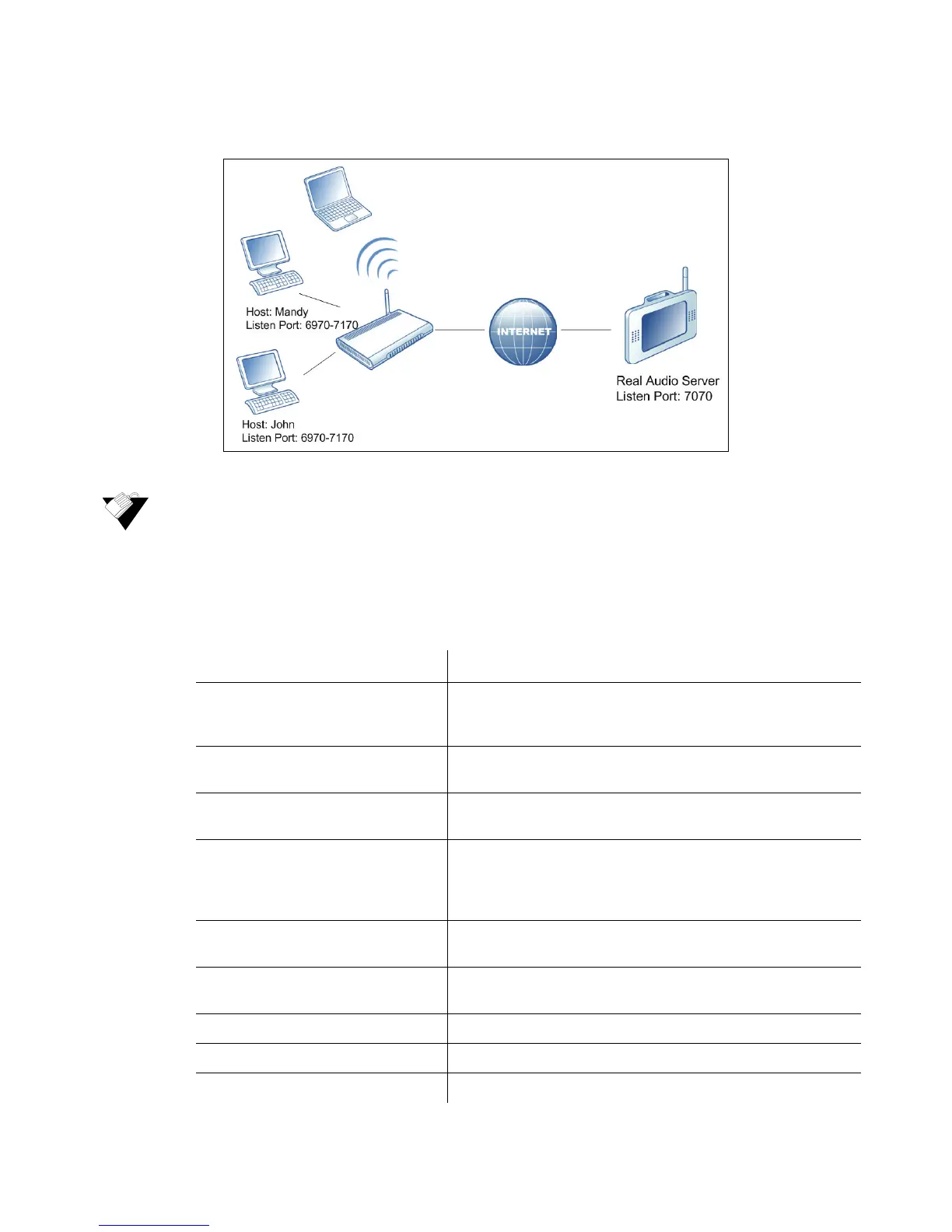
4. Only John can connect to the Real Audio server until the connection is closed or times
out.
To set up port triggering:
1. Click Gateway from the main menu.
2. Click Port Triggering from the left side menu. Fields are described following the
screen example.
Label Description
Trigger Range Defines the trigger port or a range of ports that trigger the
router to record the IP address of the LAN computer that sent
the traffic to a server on the WAN.
Start Port Defines a port number or the starting port number in a range
of port numbers.
End Port Defines a port number or the ending port number in a range of
port numbers.
Target Range Defines a target range port or a range of ports a server on the
WAN uses when it responds to service requests. The router
forwards the traffic with this port (or range of ports) to the
client computer on the LAN that requested the service.
Start Port Defines a port number or the starting port number in a range
of port numbers.
End Port Defines a port number or the ending port number in a range of
port numbers.
Protocol Defines the protocol type for this rule, UDP, TCP, or Both.
Enable Activates this rule when checked.
Apply Saves all screen changes when clicked.


 To Next Page