34
OPERATING CONTROLS AND FUNCTIONS
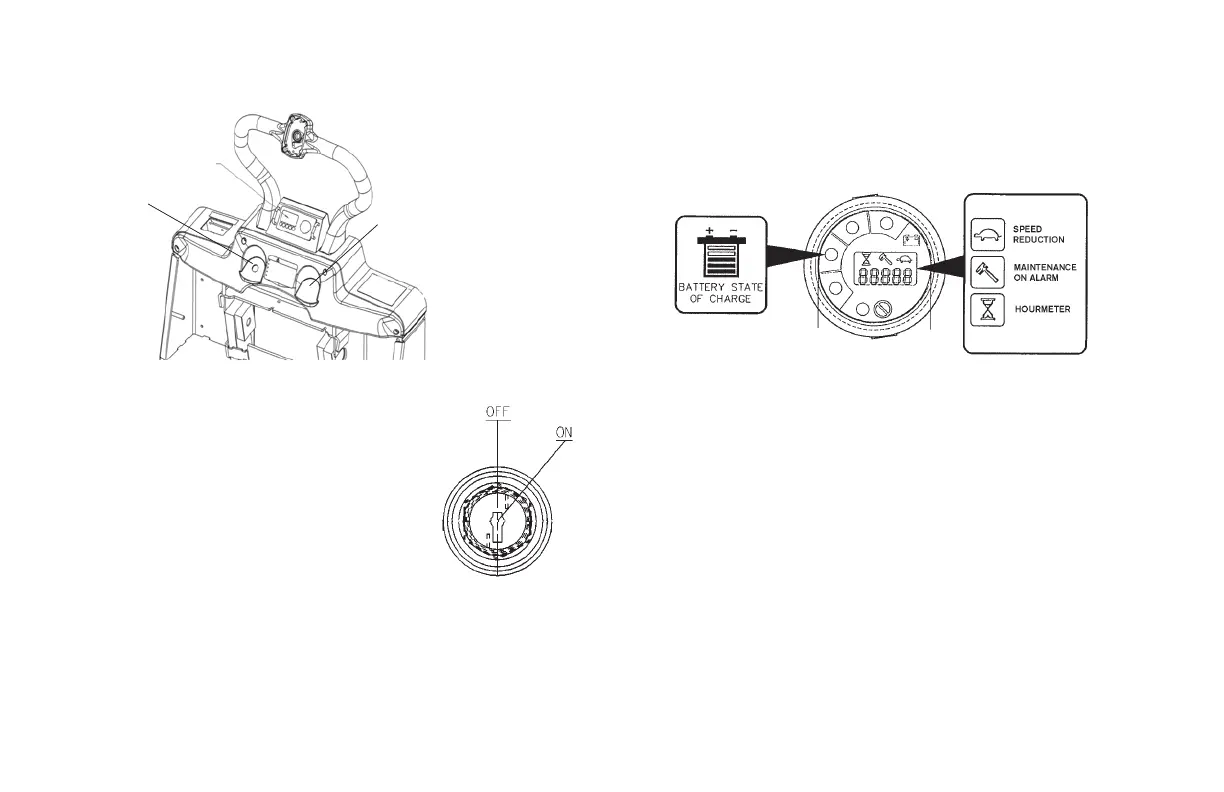
IGNITION SWITCH AND METER PANEL
IGNITION SWITCH
The ignition switch must be in the off position
to remove the key.
When the ignition switch is in the on position
the MDI will display hours in the rectangular
LED.
Optional toggle switch has the same on and
off positions.
MDI (MULTI-FUNCTION DIGITAL INDICATOR)
This MDI is standard on all units for ease in determining planned
maintenance schedules. This meter shows operating hours, low battery
and lift lockout. It will indicate low or high speed mode and display fault
codes.
The rectangular LED displays hours from when the ignition switch is rst
turned on. Then it displays the remaining percentage of charge in the
battery and nally it displays fault codes when detected. The GREEN
LED is lit when the hour meter is signaled by the line contactor closing.
The YELLOW LED (below the battery) is lit when the battery charge level
is above 20%. The RED LED (below the wrench) is lit when the unit is
going into pump lockout or when a fault is detected.
Optional Multi-Function
LCD Display
Key Switch
or
Optional Toggle Switch
Hourmeter/Battery Indicator


 To Next Page