33
OPERATING CONTROLS AND FUNCTIONS
HIGH SPEED HANDLE - 2W2 ONLY
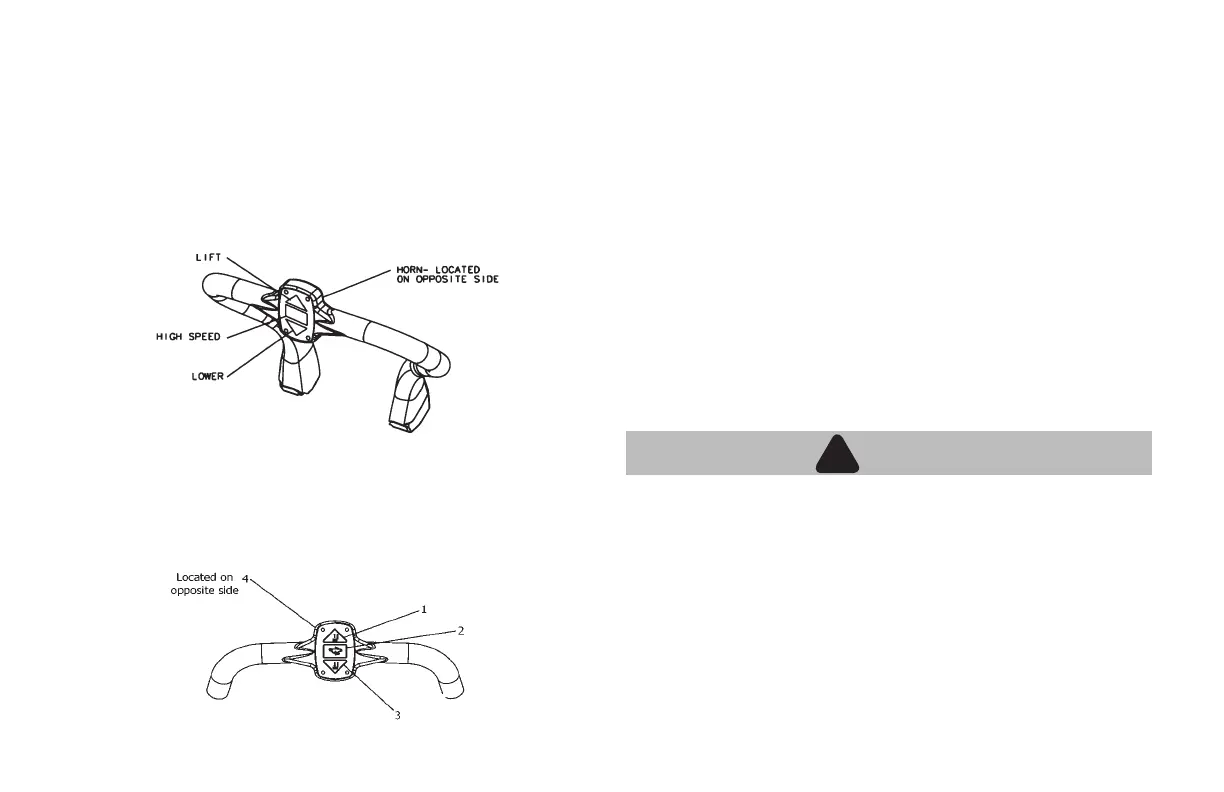
The high speed handle serves two primary purposes. The rst and
most essential is a hand hold when the operator is in the riding position
(standing on platform) or mounting the unit. The second is to provide
some of the functions contained in the steerhead. Therefore the
operator can maintain two points of hand contact with the machine
while riding and constant eye contact with their path of travel while
sounding the horn, when required.
There are four push button controls contained in the high speed handle.
1. Lift button
2. High speed button
3. Lower button
4. Horn button
LIFT BUTTON
Depressing this button raises the load carrying mechanism.
HIGH SPEED BUTTON
Depressing this button will give high speed in the rider mode. The high
speed button is equipped with anti tape down. This means if the high
speed button is held in or taped down before the ignition switch is
turned on or before the tiller handle is placed into the driving position,
the 2W2 will not go into high speed, but will remain in slow or walking
mode.
LOWER BUTTON
Depressing this button lowers the load carrying mechanism.
HORN BUTTON
Depress this button to sound the horn.
!
WARNING
!
• All 2W2 models are set to approximately 3.5 mph empty by
government and industry regulations in the walking mode. Do
not make any adjustments to this factory setting.
CRUISE CONTROL OPTION
This optional feature allows the operator from the riding position
(standing on platform) to only press the high speed button once after
the rotary thumb control has been rotated. The unit will then be able to
reach maximum speed using the rotary thumb direction controls. When
the operator returns the rotary thumb control to the neutral position, the
unit will drop out of high speed until the high speed button is pushed
again.


 To Next Page