35
OPERATING CONTROLS AND FUNCTIONS
IGNITION SWITCH AND METER PANEL (cont’d)
MDI (MULTI-FUNCTION DIGITAL INDICATOR) (cont'd)
Common Error Codes
Code Indication Correction
02 66 Low Battery Change or charge battery as soon as
possible.
02 79 Incorrect Start Pick Switch, AutoCoast or Safety Reverse
Button is pressed at key on. Make sure
none of the traction buttons are being
pressed at key on.
02 79 Incorrect Start
on Traction
Code will appear during operation if Safety
Reverse Button is pressed (activated).
02 85 Battery Gate
(with optional
battery gate
switch)
Check to see if battery gates are present
and installed properly.
05 90 Incorrect Start
on Pump
Lift or Lower Button is pressed at key on.
Make sure none of the hydraulic function
buttons are being pressed at key on.
EP2.03 No Code Controller software version
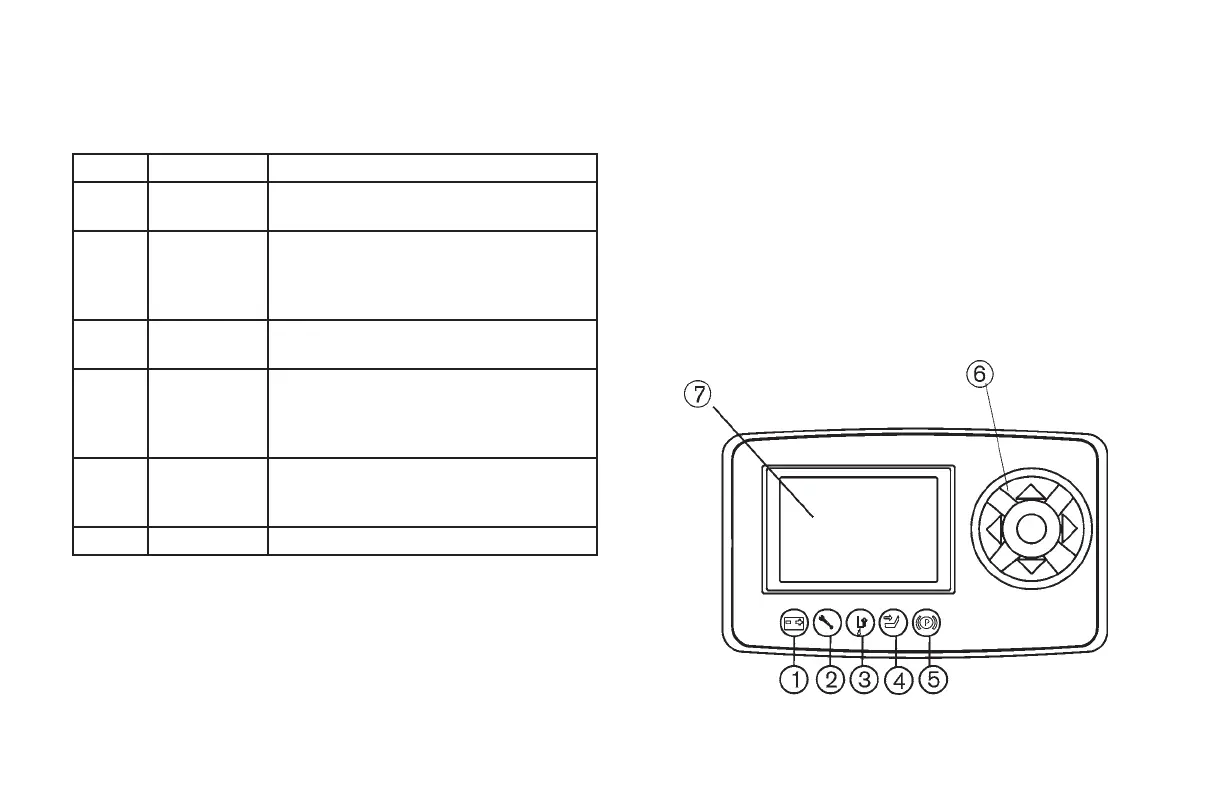
OPTIONAL MULTI-FUNCTION LCD DISPLAY
The meter panel consists of two sections: LCD (Liquid Crystal Display)
monitor and function keys. The graphic smart display has six built-in red
LED's, which provide the operator with visually easy information about
the status of some truck devices.
1. Battery
2. Wrench
3. Not used
4. Not used
5. Not used
6. Function Keys
7. LCD Display Indicators and Lamps


 To Next Page