36
IGNITION SWITCH AND METER PANEL (cont’d)
OPTIONAL MULTI-FUNCTION LCD DISPLAY (cont'd)
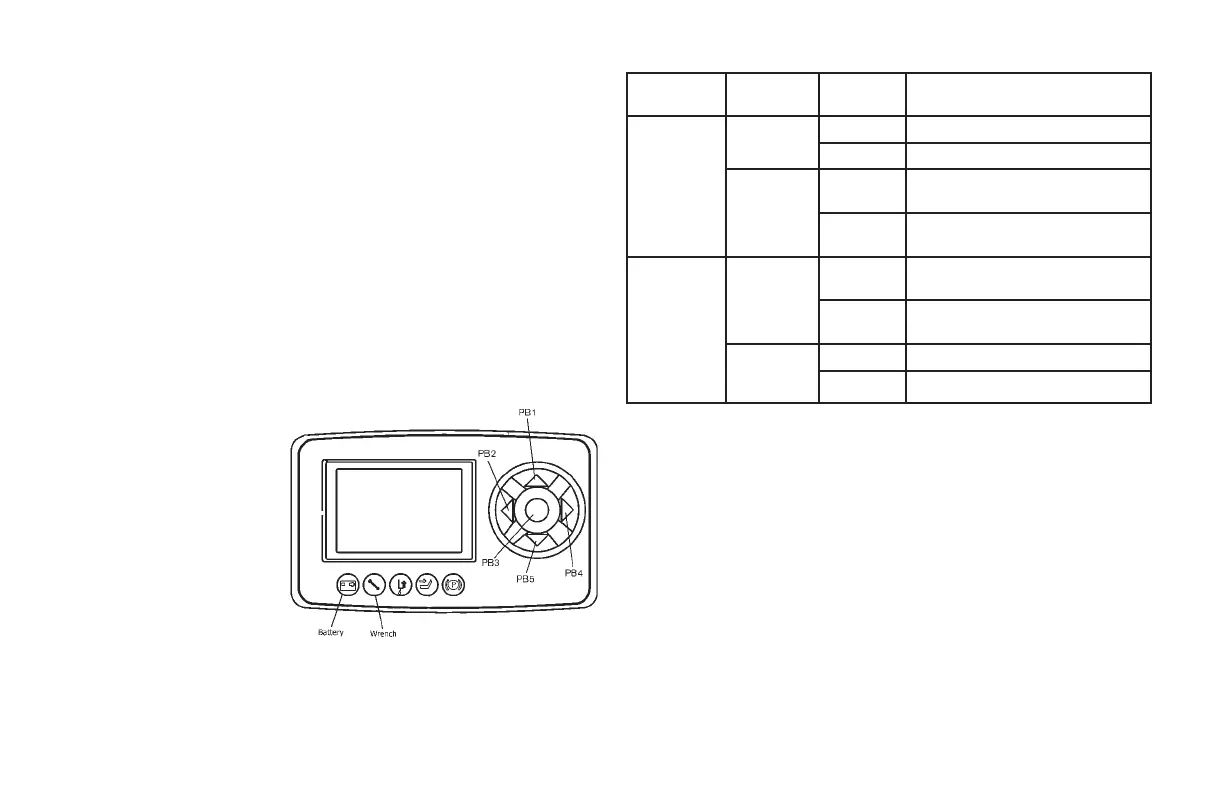
Battery
This LED lights when the measured battery voltage is equal or less than
40% nominal battery voltage.
Wrench
This LED blinks when truck is in alarm condition.
Function Keys
These keys are used to navigate screens and allow for the selection of
required mode and to change adjustment values. There are ve push
buttons PB1, PB2, PB3, PB4 and PB5.
PB1
Used to scroll up a menu
or change a value.
PB2
Used to advance into a
menu.
PB3
Used to enter or select.
PB4
Used to back out of a
menu or to exit without
making a change.
PB5
Used to scroll down a menu or change a value.
OPERATING CONTROLS AND FUNCTIONS
Adjustment
Item
Shift to
Adjust Mode
Adjustment Details
Hour Meter
Push PB2 to
Enter
Push PB2
Operating Screen Hour Counter
Push PB4
Hour Counter Operating Screen
Push PB4 to
Exit
Push PB5
t-Total Hrs tr-Traction HM
p-Pump HM
Push PB1
p-Pump HM tr-Traction HM
tr-Traction HM
Performance
Mode (If
Enabled)
Push PB2
Twice to
Enter
Push PB2
Operating Screen Hour Counter
Performance Mode
Push PB4
M-Manual H-Hour Counter
Operating Screen
Push PB4
Twice to Exit
Push PB5
M-Manual H-High E-Economy
Push PB1
E-Economy H-High M-Manual


 To Next Page