37
IGNITION SWITCH AND METER PANEL (cont’d)
OPTIONAL MULTI-FUNCTION LCD DISPLAY (cont'd)
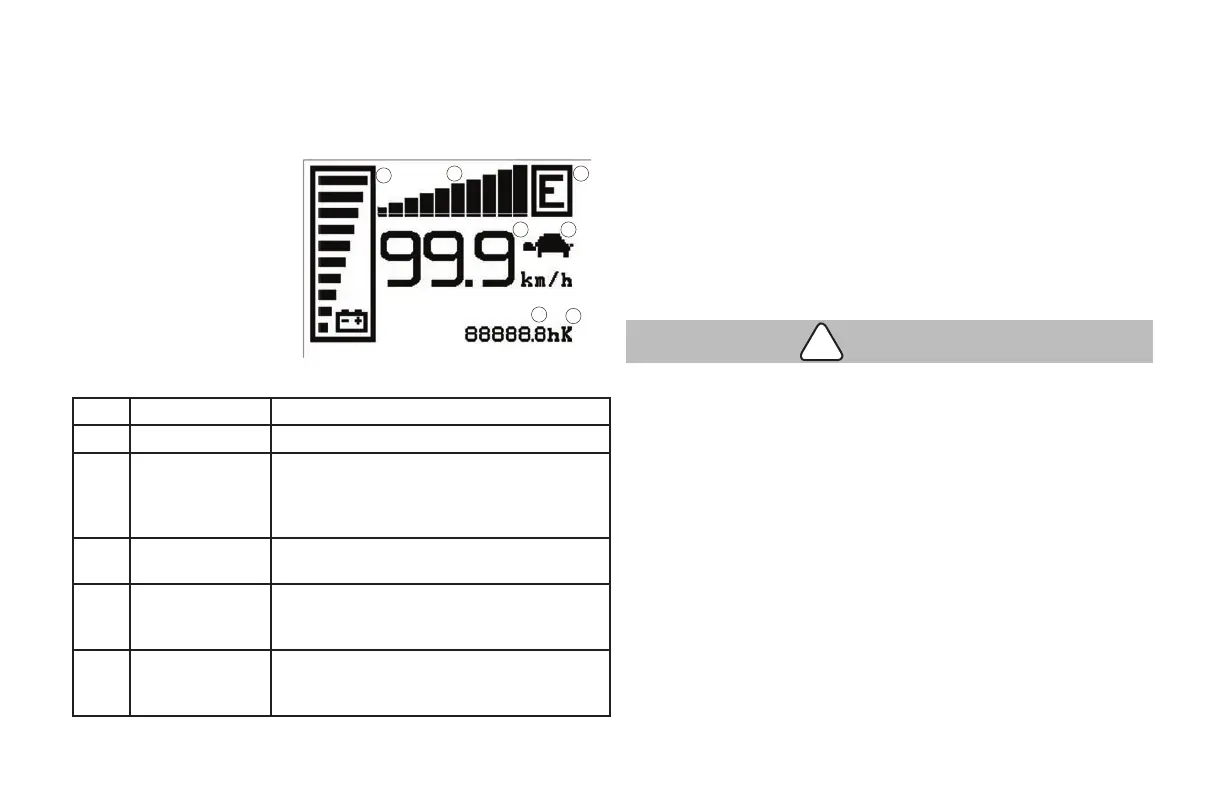
LCD Display Indicators and Lamps
1. Battery Capacity
2. Performance Mode
3. Performance Cut-Back
4. Hour Meter
5. Hour Meter Log
t - Total Hours
tr - Traction HM
p - Pump HM
6. Acceleration Bar Graph
7. Speedometer
Common Error Codes ECO Display / Meter Panel
Code Indication Correction
A66 Low Battery Change or charge battery as soon as possible.
A79 Incorrect Start Pick Switch, AutoCoast or Safety Reverse
Button is pressed at key on. Make sure none
of the traction buttons are being pressed at
key on.
A79 Incorrect Start on
Traction
Code will appear during operation if Safety
Reverse Button is pressed (activated).
A266 Battery Gate (with
optional battery
gate switch)
Check to see if battery gates are present and
installed properly.
A239 Incorrect Start on
Pump
Lift or Lower Button is pressed at key on.
Make sure none of the hydraulic function
buttons are being pressed at key on.
OPERATING CONTROLS AND FUNCTIONS
Meter Panel Explanation
When the ignition switch is in the "ON" position, backlighting makes
the display clearly visible to the operator. It displays normal operation
(battery capacity meter, hour meter, clock, steering wheel angle gauge,
speedometer, etc.), malfunction and adjustment data.
1. Battery Capacity
This meter indicates the remaining charge capacity of the battery.
As the remaining capacity decreases, the number of black steps
decreases. Before only the last black step remains, discontinue
forklift operation and charge the battery. The battery capacity
meter has a 10-step display.
• Continued operation of the forklift with discharged battery
may damage the battery and electric parts.
2. Performance Mode
Refer to pages 36 and 39.
3. Performance Cut-Back (Turtle Mode [Soft Mode])
The turtle symbol is normally off; when it appears (xed) it shows
activation of the "soft" mode of the truck, in which maximum
speed and acceleration are produced by the controller.
4. Hour Meter
The number displayed on the bottom right side of the unit shows
the hours worked.
1
6 2
7 3
4
5
CAUTION
!


 To Next Page