m90User’s Guide
© 2007 Unication Co., Ltd.
37
9. Managing the Address Book
You can store names and email or wireless addresses on your M90 for quick access when sending
messages. You can also create groups that allow you to send messages to multiple recipients.
Select ADDRESS BOOK
in the Main Menu to display the Address Book list of contacts.
Note: For shortcuts see Shortcuts for Navigating on page 14.
9.1 Adding a Contact to the Address Book
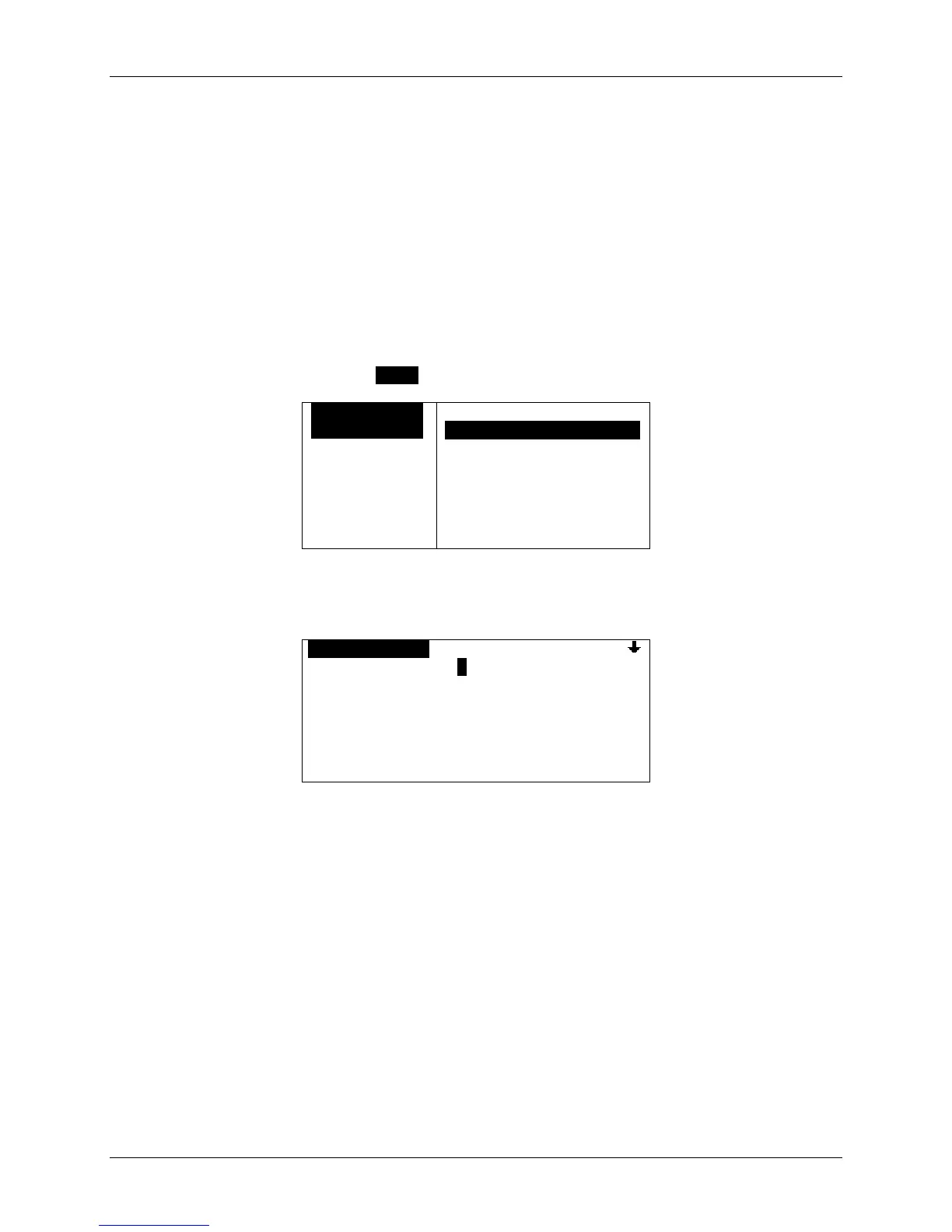
1. In the Address Book, press MENU to open the Options popup menu.
OADDRESS BOO
Brown, Tom*[
Doe, Sally*[
Anka, Alice[
Brown, Ed [W
OPTIONS
`New ContactOOOOOOOOO
`New Group
`Delete
2. Select New Contact to display the New Contact screen and type the person’s first name in the
First Name field:
ONEW CONTACTO
First Name: Mike.
Last Name:
Title:
Company:
Wireless Addr:
You can scroll down to see more fields to edit.
3. Continue to move down to each field and enter the appropriate text. Skip fields that you have
no information for.
4. Set the Usage option field to “Normal” or “Frequent”.
If Frequent is selected, the contact name will appear at the top of the Address Book list marked
with an “ * “.


 To Next Page