COURIER HIGH SPEED MODEMS
-
-
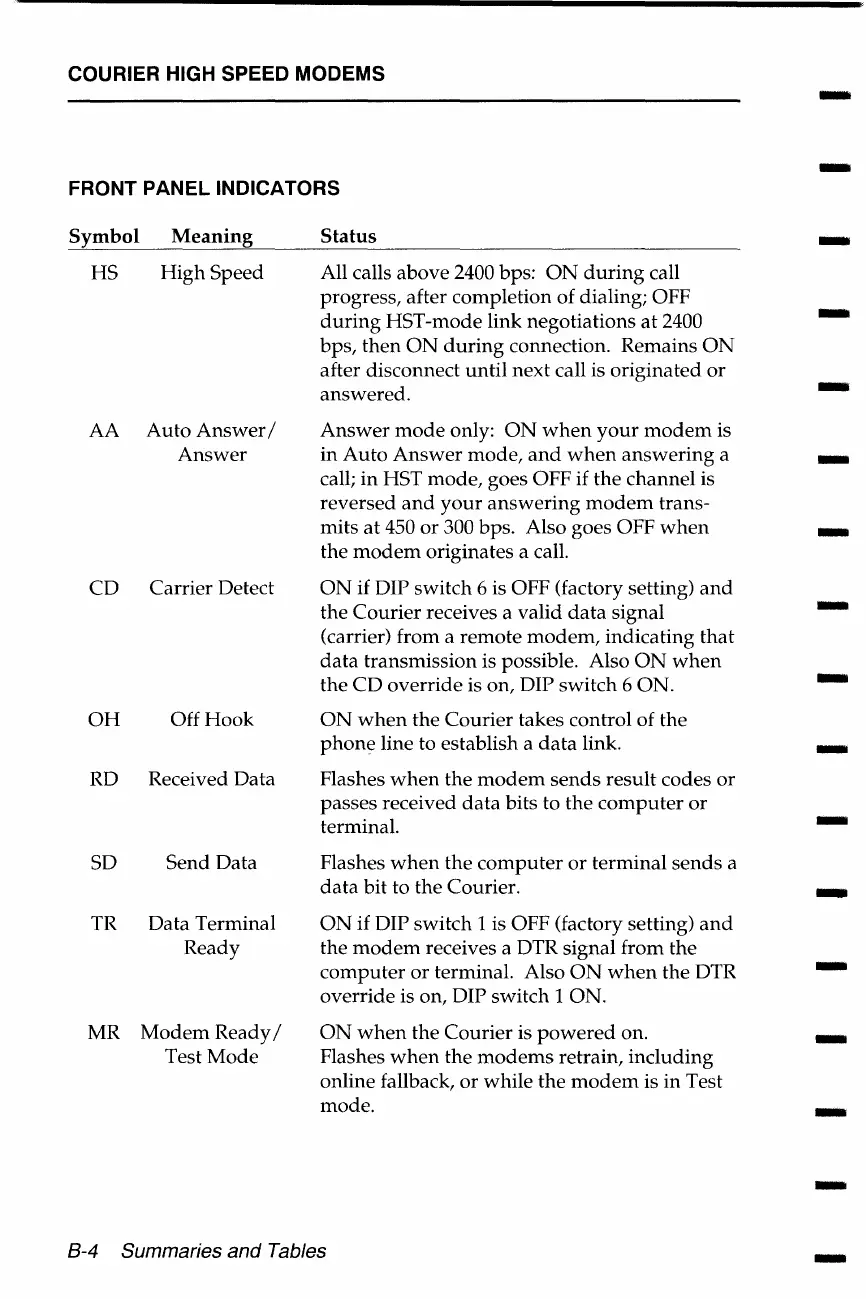
FRONT PANEL INDICATORS
Symbol
Meaning Status
-
HS
High
Speed All calls above 2400 bps:
ON
during
call
progress, after completion of dialing; OFF
-
during
HST-mode link negotiations
at
2400
bps,
then
ON
during
connection. Remains
ON
after disconnect
until
next call is originated
or
answered.
-
AA
Auto
Answer
I
Answer
mode
only:
ON
when
your
modem
is
Answer
in
Auto
Answer
mode,
and
when
answering
a
-
call;
in
HST
mode,
goes OFF if
the
channel is
reversed
and
your
answering
modem
trans-
mits
at
450
or
300 bps. Also goes OFF
when
-
the
modem
originates a call.
CD
Carrier Detect
ON
if DIP switch 6 is OFF (factory setting)
and
the
Courier
receives a valid
data
signal
-
(carrier) from a remote
modem,
indicating
that
data
transmission is possible. Also
ON
when
the
CD
override is on, DIP switch 6 ON.
-
OH
Off
Hook
ON
when
the
Courier
takes control of the
phone
line to establish a
data
link.
-
RD
Received Data
Flashes
when
the
modem
sends
result codes
or
passes received
data
bits to the
computer
or
terminal.
-
SD
Send
Data
Flashes
when
the
computer
or
terminal
sends
a
data
bit to
the
Courier.
-
TR Data Terminal
ON
if DIP switch 1 is OFF (factory setting)
and
Ready the
modem
receives a DTR signal from
the
computer
or
terminal. Also
ON
when
the
DTR
-
override is on, DIP switch 1 ON.
MR
Modem
Ready/
ON
when
the
Courier
is
powered
on.
-
Test
Mode
Flashes
when
the
modems
retrain, including
online fallback,
or
while
the
modem
is
in
Test
mode.
-
-
8-4 Summaries and Tables
-















 To Next Page